5.01 months ago
“Review”
It's a fun tool to play around with. They start you with 70 credits, enough to make a model, images, and, a video.
Sue

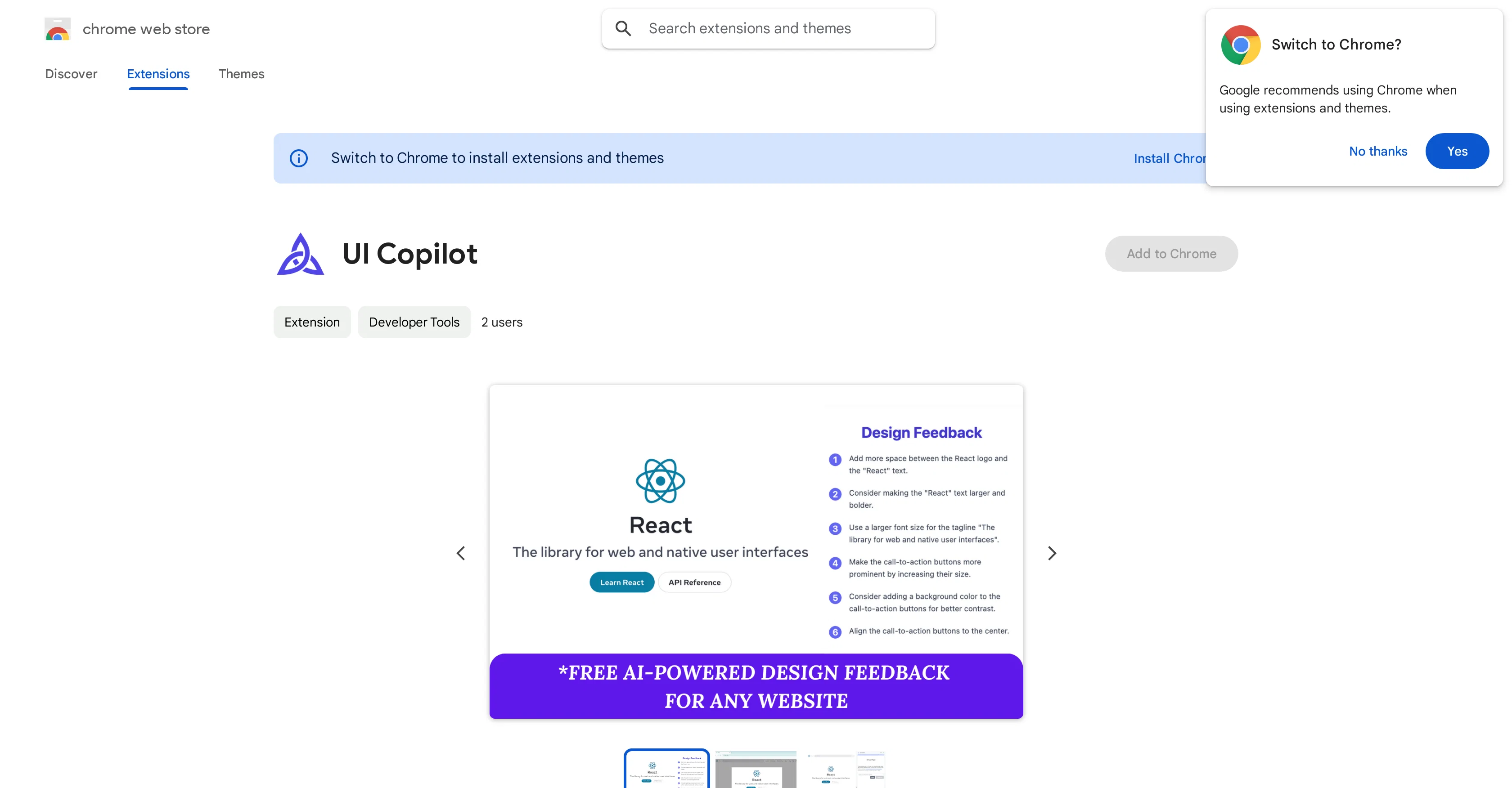
AI-powered UI feedback, instantly
UI Copilot is an AI-powered design assistant offered as a Chrome extension that provides insightful and objective feedback on the user interface (UI) of any website. Its primary functionalities include the ability to capture any part of a website and receive immediate, actionable design guidelines based on AI analysis. The tool provides tips on improving website layouts, color schemes, typography, etc. To use UI Copilot, users simply activate it from the Chrome toolbar, capture the desired portion of a website, and the tool provides a detailed list of design recommendations. This tool can be used on both public websites and localhost, as well as development servers. UI Copilot was developed with a broad range of users in mind - from professional designers seeking a second opinion, developers aiming to enhance their UI skills, or anyone interested in understanding good design practices. Furthermore, the extension is designed to be a learning tool, encouraging users to learn design principles as they browse the web. UI Copilot employs Google Gemini LLM models to deliver these features. An important note for users is that UI Copilot is free during its beta stage, providing almost unlimited feedback requests. The developers encourage users to provide feedback to help shape the future development of the tool. Help other people by letting them know if this AI was useful. Add your own prompts and outputs to help others understand how to use this AI.
When considering UI Copilot for integration into your organizational workflow, we recommend deploying a structured score card across three critical operational pillars: Security & Compliance, Integration Friction, and long-term Price Scalability. Rather than looking only at basic feature lists, modern procurement teams must assess how a software platform behaves under high load and how well it fits into the team's data security guidelines.
Depending on your operating region and field, ensure that UI Copilot supports standard security layers such as SOC 2 Type II certifications, GDPR compliance, or HIPAA-compliant database encryption. If the tool connects directly to client database tables or handles user passwords, verify that they implement multi-factor authentication (MFA), single sign-on (SSO) integrations, and end-to-end data encryption in transit and at rest.
Siloed data is the primary cause of operational friction. Evaluate if UI Copilot has native connectors for your current project trackers, messaging hubs, and customer communication channels. For custom developer requirements, check if they provide a fully documented REST API with reasonable rate limits, comprehensive Webhooks support, and robust SDK packages in your language. A flexible API layer saves hundreds of hours of manual copy-paste overhead.
SaaS pricing packages are often deceptively simple. When reviewing UI Copilot's billing structure, map out your team's projected expansion over the next 12 to 24 months. Determine how costs scale as your customer database increases or as you add team members. Factor in setup costs, mandatory support plan upgrades, API access fees, and storage overage rates to understand the true cost before committing to a contract.
By combining verified user reviews from our directory with internal workflow pilot tests, your procurement team can make an informed decision that drives productivity without creating capital waste.
Overall rating
Based on 16 reviews
It's a fun tool to play around with. They start you with 70 credits, enough to make a model, images, and, a video.
Sue
10 MB Limit does limit usability best if .pdf contains NO images.
Steve Bastiman
Keep improving!
Abubakr Jajja
I tested a one-month planner, and it was amazing. Kudos to the team!
EasyDine
I'm new in using AI tools, but i found @COACH quite helpful! It follows you step by step both analyzing your situation and finding resources... thanks!
Gabriele Orsini
I am not satisfied with @Looka.
AK Properties
Useful tool for visualizing traffic flowing through your website. Does what GA4 does but without the headache and unnecessary learning curve.
Nic Miller
Very cool app! Build was fast as, and with a few tweaks I fully launched my website in 1 hour!
Joe Smythe
It has everything that I need in one place: ChatGPT, Copywriting templates, AI Images, Audio Transcription.
Dmytro
It created some decent logos. They are great as a start point
Samuel Barlet
Really like how it finds connection in the content that I save. I don't think any other tool can do that.
amix ffx
This tool i found is super cool, I created 5 books from this tool to sell them online, which gives me great profit. I am creating more valuable books to spread knowledge, and earn some bucks as well 🤑.
Bilal Ashraf
I’ve tried many AI writing tools in the past, but this one actually delivers content that sounds human and ranks. I love how you can create a full SEO blog post with just a keyword… and it’s ready to publish in one click. That saves me so much time. Also, small win for the wallet — use code FSL25 to get 25% off on any plan. Definitely helped me out when testing it for the first time. 👍 Hope this helps someone else who’s been struggling like I was!
Jason
B12 exceeded my expectations especially after I tried a few similar tools. Signing up took under a minute and because I offer a very specific set of services as a consultant, I didn't expect the AI to be able to capture my work, but it did a great job with creating content for me. I only had to make a few edits, add my bio, and was able to publish that same day. Now I get lots of compliments on my site and I've even tried their other tools like email marketing, which is great because the emails match my site's appearance. Overall I would recommend B12 as an effective, affordable, and easy to use website solution.
Katie G
Thanks for your great feedback Gregory. A feature in @Macky that is designed for more specific industry-specific information is the "Ask @Macky" one. In this feature you can use your own promopting to get outputs that are specific to the business question being asked. Also, at the end of each output you have an opportunity to ask any detailed question you want about the output to get more specific responses. You can drill down several times to get further insights using this feature. Hope this helps!
Kinetic Consulting
not that good it cant generate your prompt it can only generate custom prompt as saved by itself
Sarthak Agarwal
Starting Price
Free plan available
Free tier available with optional paid upgrades.


