Mermaid Viewer

5.0(24 reviews)

Create and share Mermaid diagrams instantly in your browser.

Freemium

Mermaid Viewer Overview

What is Mermaid Viewer?

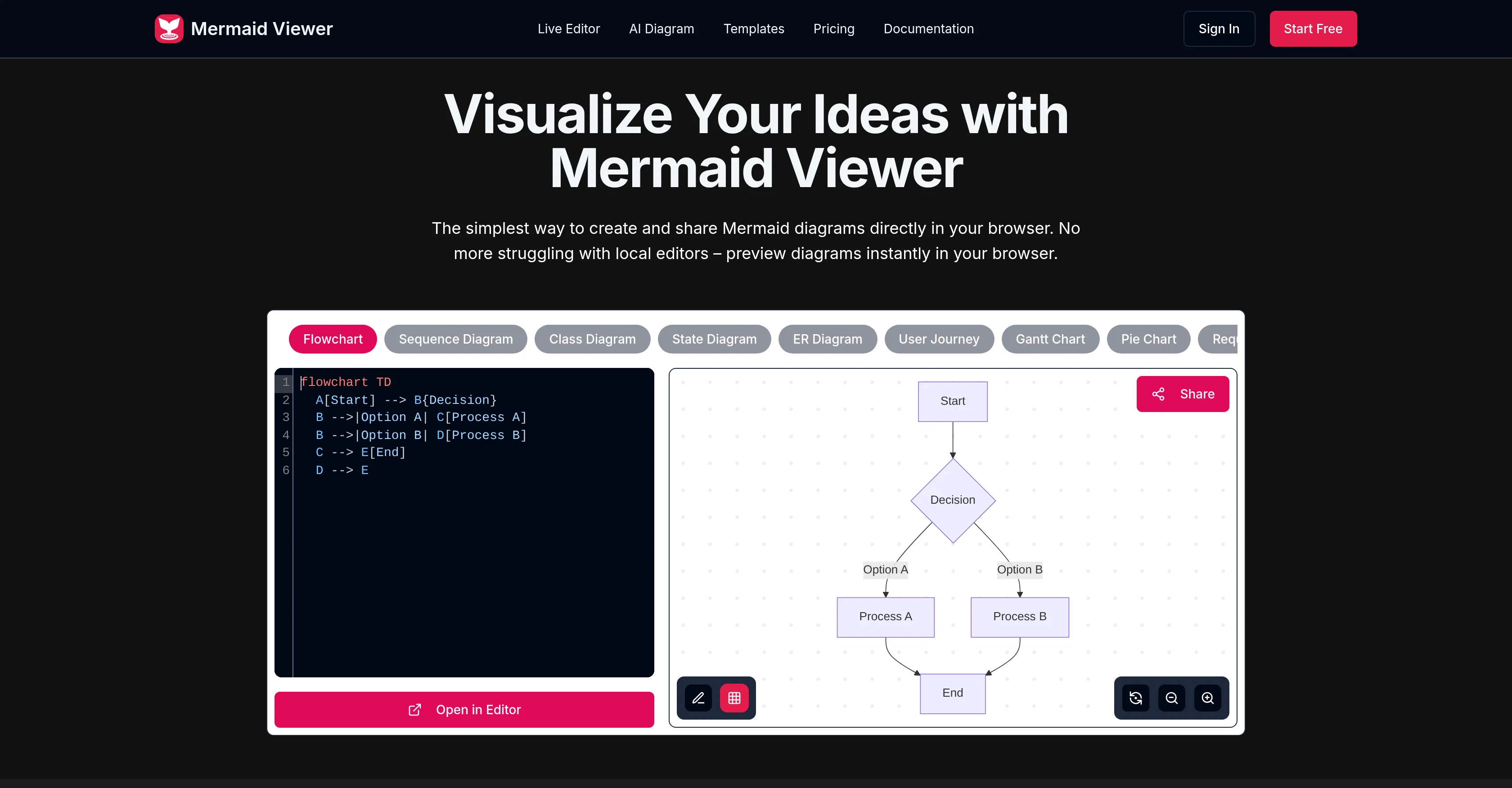
Mermaid Viewer is an online diagram editor that allows users to create and edit Mermaid diagrams directly in their browsers. The tool features live previews, eliminating the need for a 'Render' button, and users can visualize diagram changes instantly as they type. Mermaid Viewer also provides AI-Assisted Coding with a 'Generate with GPT-4' feature that converts text descriptions into Mermaid code. Users can export their diagrams in a variety of formats including SVG, PNG, and Markdown, with options for custom DPI and dark or light themes. Mermaid Viewer supports enterprise integration and offers features such as Docker private deployment and role-based access control. The tool also includes a smart debugging feature with syntax error highlighting and auto-correction suggestions. For collaboration, Mermaid Viewer supports real-time co-editing of diagrams through shareable editor links. It comes with recommended templates that allow users to quickly start diagramming. Data in Mermaid Viewer stays in the browser and is not stored on an external server, ensuring user data privacy. Help other people by letting them know if this AI was useful. Add your own prompts and outputs to help others understand how to use this AI.

Screenshot gallery

Mermaid Viewer screenshot

Pros & Cons

Pros

  • Browser-based diagram editor
  • Live preview capabilities
  • Smart export functionality
  • Supports SVG, PNG, Markdown
  • Customizable DPI for exports
  • Light or dark theme options
  • Supports Docker private deployment
  • Role-based access control
  • Syntax error highlighting
  • Auto-correction suggestions for errors
  • Real-time collaboration feature
  • Editor link sharing
  • Variety of diagram templates
  • Suitable for personal and professional use
  • Multiple plan options
  • Data remains in browser
  • No external server data storage
  • GPT-4 assisted coding
  • Enterprise-level integration
  • No need for 'Render' button
  • Instant visualization of changes
  • Diagramming use case templates
  • Supports real-time co-editing
  • No sign-up needed
  • Privacy-first approach

Cons

  • No offline mode
  • No mobile application
  • Lacks versioning feature
  • Limited free version
  • Doesn't support PDF export
  • Potential DPI customization limitations
  • No personal notes feature on lower plans
  • Limited diagram templates
  • Translation service absent
  • No customer support on free account

A Professional Framework to Evaluate Mermaid Viewer

When considering Mermaid Viewer for integration into your organizational workflow, we recommend deploying a structured score card across three critical operational pillars: Security & Compliance, Integration Friction, and long-term Price Scalability. Rather than looking only at basic feature lists, modern procurement teams must assess how a software platform behaves under high load and how well it fits into the team's data security guidelines.

1. Security and Database Compliance

Depending on your operating region and field, ensure that Mermaid Viewer supports standard security layers such as SOC 2 Type II certifications, GDPR compliance, or HIPAA-compliant database encryption. If the tool connects directly to client database tables or handles user passwords, verify that they implement multi-factor authentication (MFA), single sign-on (SSO) integrations, and end-to-end data encryption in transit and at rest.

2. API Coverage and Custom Integrations

Siloed data is the primary cause of operational friction. Evaluate if Mermaid Viewer has native connectors for your current project trackers, messaging hubs, and customer communication channels. For custom developer requirements, check if they provide a fully documented REST API with reasonable rate limits, comprehensive Webhooks support, and robust SDK packages in your language. A flexible API layer saves hundreds of hours of manual copy-paste overhead.

3. Total Cost of Ownership (TCO)

SaaS pricing packages are often deceptively simple. When reviewing Mermaid Viewer's billing structure, map out your team's projected expansion over the next 12 to 24 months. Determine how costs scale as your customer database increases or as you add team members. Factor in setup costs, mandatory support plan upgrades, API access fees, and storage overage rates to understand the true cost before committing to a contract.

By combining verified user reviews from our directory with internal workflow pilot tests, your procurement team can make an informed decision that drives productivity without creating capital waste.

Features of Mermaid Viewer

  • Mermaid Diagrams
  • No Sign Up
  • Diagramming
  • In Browser Editing
  • Data Visualization
  • Diagram Editor
  • Free + From $6.99/Mo

SaaS1to10 verified reviews for Mermaid Viewer

Overall rating

5.0

Based on 24 reviews

5.02 weeks ago

Review

When uploading a 30-minute video file, I was surprised to receive the transcript in just a few seconds. The speed and quality of the transcription process blew me away, especially considering the complexity of the video content.

Ângelo Deixa

5.02 weeks ago

Review

One of the most accurate API's I've used for speech to text and summarization. Cost effective w/ bulk contracts too.

Mery

5.02 weeks ago

Review

Really useful for podcast work. the transcription is accurate and speeds things up a lot.

John C

5.02 weeks ago

Review

Highly recommend it for anyone dealing with high-volume document processing. Simplifies the process of extracting data from multiple PDFs into clean, accurate spreadsheets.

Tarang

5.02 weeks ago

Review

I'm using it to significantly reduce time to make high-quality post. it works much better that regular chatgpt/claude

Islam Midov

5.02 weeks ago

Review

Useful tool. Highly recommended.

Junaid Muhammed

5.02 weeks ago

Review

I work on the @Tendem team, so take this with that context — but I also use the product constantly for my own work. I've used @Tendem to research AI directories — finding relevant ones, pulling submission requirements, organizing everything into a spreadsheet I could act on. I've also used it for copy edits — sending over drafts and getting back tightened, polished versions without going back and forth with a prompt ten times. The thing that keeps me coming back is how little I have to think about the handoff. I describe what I need, send it, and move on to something else. It's slower than getting a ChatGPT response, sure. But I get something finished — not a starting point I still need to rework. When you use AI tools for this kind of work, you trade waiting time for cleanup time. @Tendem flips that. I'd rather wait and get a result I can use than get a fast draft I have to fix myself.

Vladimir Gromozdin

5.02 weeks ago

Review

Super convenient especially for travel- highly recommend!

Luba Ismakov

5.02 weeks ago

Review

Use it for more focused, less hallucinated result

Fatih Baltacı

5.02 weeks ago

Review

Discover the power of meditation for stress relief and mindfulness. Learn easy techniques for beginners, and hear from people who've experienced the benefits firsthand.

Ayush

5.02 weeks ago

Review

Try doing anything real with @Lovable and welcome to the error loop. Has a lot of potential but @Lovable does not seem to be ready to produce real apps with multiple pieces that need to work together without getting stuck in error loops. Disappointing.

Joe LK

5.02 weeks ago

Review

This tool finally helps me understand what makes a great prompt. It doesn't just give me a better version, it shows me to get there by analyzing why the original prompt is weak and showing what to improve. The difference this makes to the final AI output is incredible. An essential tool for getting more accurate and detailed results, Great Job!

Milo Quinn

5.02 weeks ago

Review

Ideal for stock-watchlist and not missing trade setups that correspond to my strategy.

Builder

5.02 weeks ago

Review

When I want to sign up on the @Ideogram website with "Continue with Google" and press it, the sentence "Please choose an option to continue" appears below the banner and no action happens. Anybody can help me?

Michael Ryan

5.02 weeks ago

Review

Would be better if they let you use your own text as an option.

William Lowe

5.02 weeks ago

Review

I rarely leave reviews, but Elsa amazed me. After a few weeks of using it, I'm still excited. Props, guys.

Anton

5.02 weeks ago

Review

Great! I think @AI Lawyer is the best service I've ever seen. Perfect use. Prompting helps in the work

Yuri Gerasimov

5.02 weeks ago

Review

I think it's the best @Image Generator I ever found on the net. It gives more accurate image according to the prompt. And thank you for keeping it for free.

My Sawsiri

5.02 weeks ago

Review

Found it randomly and tested @Mermaid Chart with a small service architecture and it turned the prompt into editable diagram code almost instantly. The structure was accurate enough to refine, and being able to fix the syntax instead of fighting a locked image is a huge plus. Styling is still a little basic, but for technical diagrams it’s a strong 4.

Valentina Jara

5.03 weeks ago

Review

Create and share Mermaid diagrams instantly in your browser

Mahnaz Ghaurfar

5.03 weeks ago

Review

Really useful tool here. Saves a lot of time when creating diagrams. Made a video about it here: https://www.youtube.com/watch?v=ClySYyEBvno

J.I.

5.03 weeks ago

Review

Isn't it possible that when downloading a diagram from it, the diagram to have white background rather than black background.

shazil saqib

5.03 weeks ago

Review

nice! does exatly what i wanted it to do, takes text, makes a nice looking diagram.

Lenny Deus

5.03 weeks ago

Review

Didn't really do the graphs that i thought it would do. Good for simple graphs, like for a presentation

Timothy Unfried

Pricing

Starting Price

Free plan available

Free tier available with optional paid upgrades.

Where can Mermaid Viewer be deployed?

  • Cloud, SaaS, Web-Based

Recommended for you