5.01 months ago
“Review”
Where does the search volume data come from? Google Keyword Planner or your own source?
Seonix AI

Effortlessly plan projects with AI-powered Gantt charts
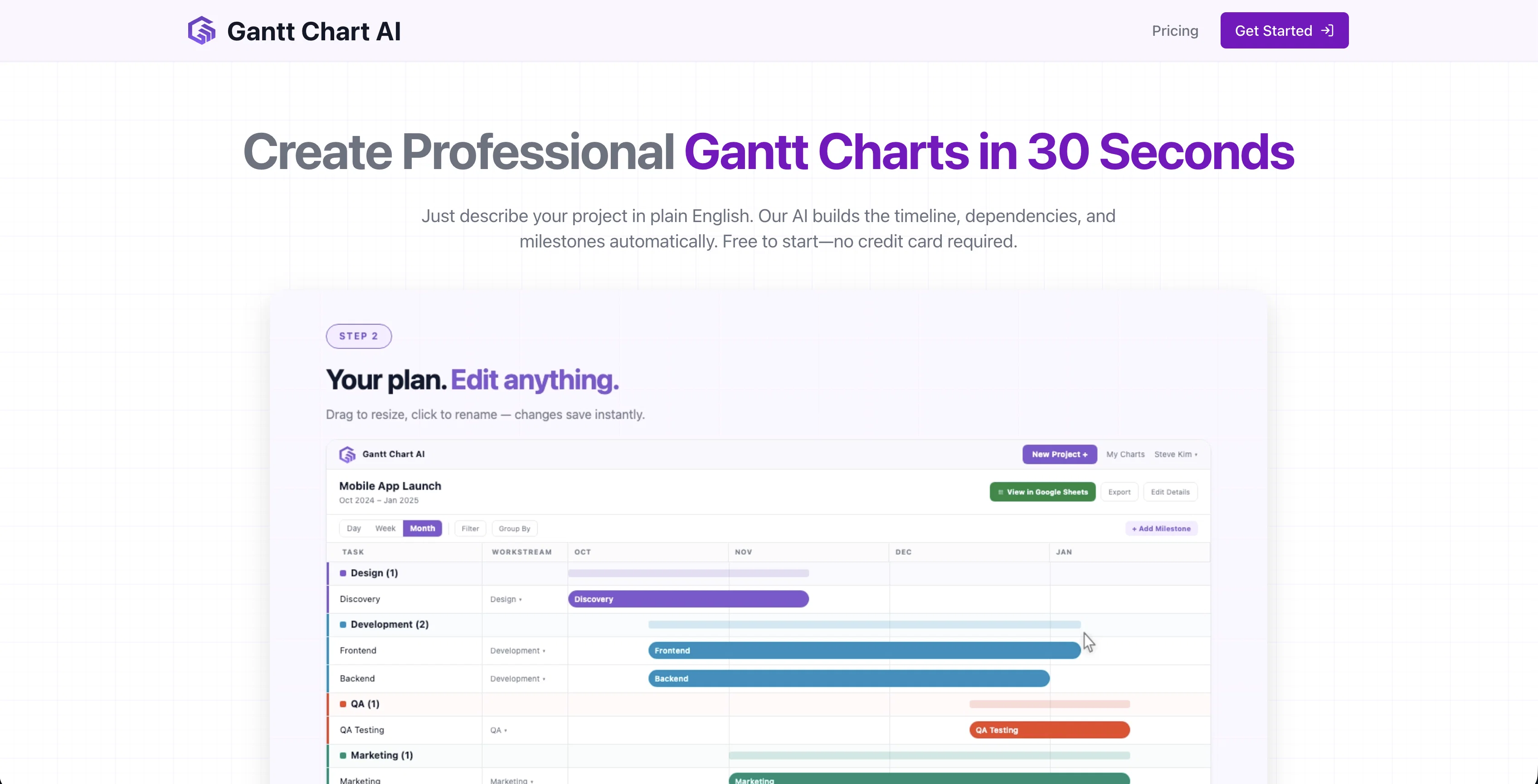
Gantt Chart AI is a tool designed to streamline project planning and management through AI-powered Gantt charts. Integrated directly within Google Spreadsheets, it allows users to simultaneously track and manage projects without needing to switch platforms. The tool has the ability to generate a full Gantt chart instantly from a given project summary, simplifying the process of visualizing timelines for project tasks. In addition, Gantt Chart AI supports export functionalities to Microsoft Excel for further data manipulation. The application ensures data security and respect for privacy, adhering to strict access management practices and conducting regular security audits. The intuitive interface of Gantt Chart AI aims at making project planning more accessible and user-friendly by minimizing the learning curve associated with complex project management tools. The shareability of the Gantt charts created with this tool supports pre-meetenings discussions, aimed at fostering more strategic and meaningful conversations during meetings. Lastly, Gantt Chart AI also provides customizable features allowing users to tailor the tool to their specific project planning needs. Help other people by letting them know if this AI was useful. Add your own prompts and outputs to help others understand how to use this AI.
When considering Gantt Chart AI for integration into your organizational workflow, we recommend deploying a structured score card across three critical operational pillars: Security & Compliance, Integration Friction, and long-term Price Scalability. Rather than looking only at basic feature lists, modern procurement teams must assess how a software platform behaves under high load and how well it fits into the team's data security guidelines.
Depending on your operating region and field, ensure that Gantt Chart AI supports standard security layers such as SOC 2 Type II certifications, GDPR compliance, or HIPAA-compliant database encryption. If the tool connects directly to client database tables or handles user passwords, verify that they implement multi-factor authentication (MFA), single sign-on (SSO) integrations, and end-to-end data encryption in transit and at rest.
Siloed data is the primary cause of operational friction. Evaluate if Gantt Chart AI has native connectors for your current project trackers, messaging hubs, and customer communication channels. For custom developer requirements, check if they provide a fully documented REST API with reasonable rate limits, comprehensive Webhooks support, and robust SDK packages in your language. A flexible API layer saves hundreds of hours of manual copy-paste overhead.
SaaS pricing packages are often deceptively simple. When reviewing Gantt Chart AI's billing structure, map out your team's projected expansion over the next 12 to 24 months. Determine how costs scale as your customer database increases or as you add team members. Factor in setup costs, mandatory support plan upgrades, API access fees, and storage overage rates to understand the true cost before committing to a contract.
By combining verified user reviews from our directory with internal workflow pilot tests, your procurement team can make an informed decision that drives productivity without creating capital waste.
Overall rating
Based on 15 reviews
Where does the search volume data come from? Google Keyword Planner or your own source?
Seonix AI
Really cool app to code faster and get less errors
Azam Ahmed
SO clean and such good snark, love getting to scheme anything - Halloween costumes, wedding dresses, what the statue of liberty would look like as the girl from the Ring?! #slay
Kendal Kulley
Thank you, if we can help with anything reach out any time!
Dan Mindru
yes,the good idea
Putri Destiani
@Whiteboard by Athena AI is a user-friendly, AI-powered tool that makes digital collaboration seamless. supports real-time brainstorming, and integrates easily with other apps—ideal for teams, educators, and remote learners alike.
hamed elghoul
Super convenient especially for travel- highly recommend!
Luba Ismakov
Would rate 4.9 if possible, but rounding up to 5 stars because this app truly excels compared to other AI coding tools. Why 5 Stars: Best-in-class AI coding assistance Huge improvements over competitors Actually works for real development Real Impact: I successfully built and published an actual app using this tool - that's game-changing for non-developers like me. Bottom Line: Yes, there's room for improvement, but this is already the top AI coding app available. The fact that ordinary people can create real apps with it says everything. Perfect for anyone wanting to turn ideas into actual apps!
Johnson
interesting ai tool, quickly let you create a good looking website.. thumbs up
avoda mehabait
Very interesting
Béatrice Duval
It's genius. Amazing tool. PDF generation might be improved, but apart from that is amazing.
Aleksander Lukashou
I think it's the best @Image Generator I ever found on the net. It gives more accurate image according to the prompt. And thank you for keeping it for free.
My Sawsiri
usefull for intial landing page design
WEB5LAB
wonderful tool tp impress a client
Haresh Chawla
I started using @Team Pulse recently, and I really like how simple it feels. Managing projects, tasks, and pipelines in one place is smooth, clean, and easy to understand without overcomplicating the workflow.
Zain Saeed
Starting Price
Free plan available
Free tier available with optional paid upgrades.


