5.01 months ago
“Review”
Time saving. Works well when you add great ideas. But also helps to build content easy and reduces stress, especially when you are running out of ideas. Overall a great tool!
Sabina D

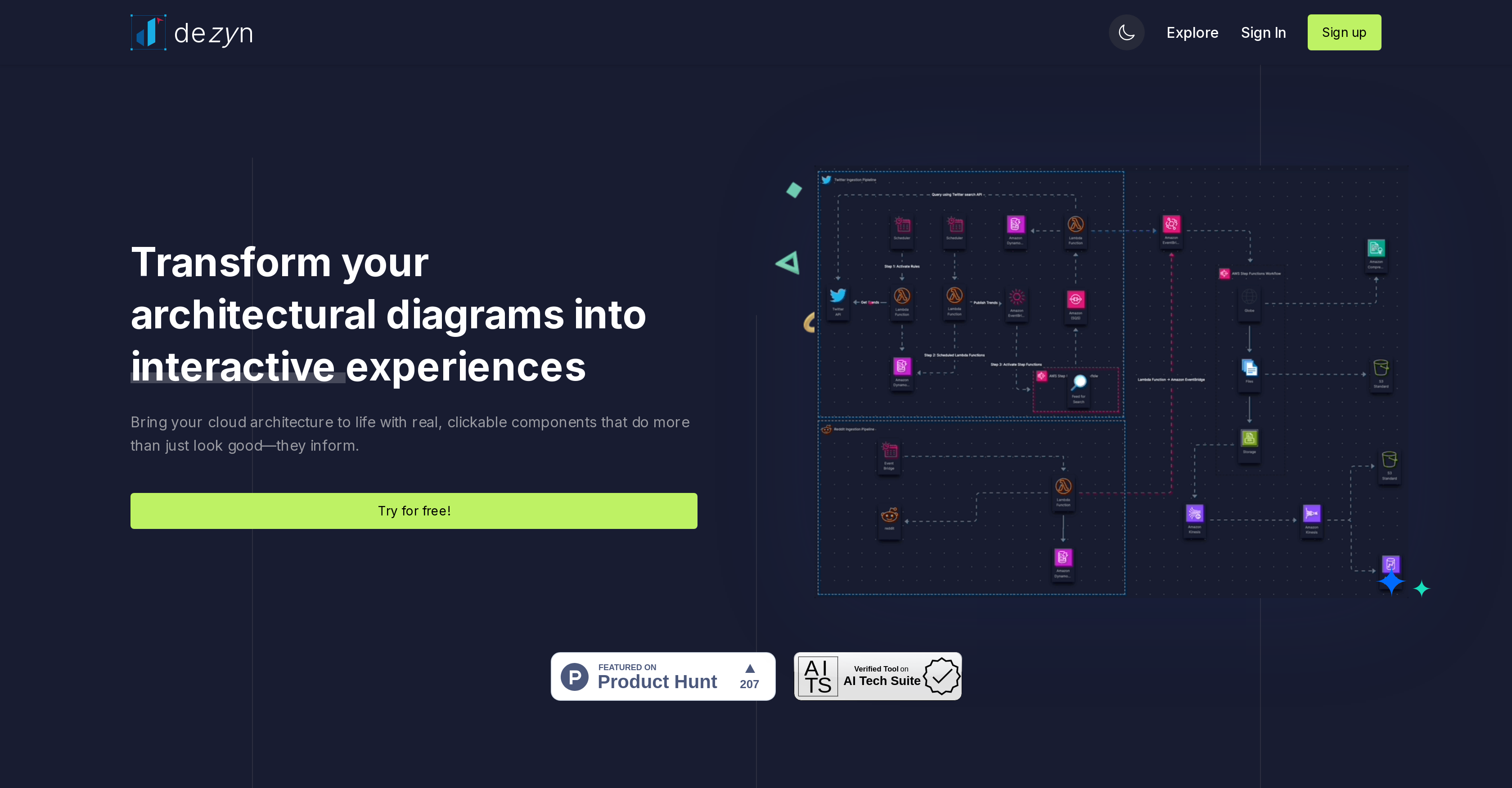
Turn architectural diagrams into interactive experiences.
Dezyn is an innovative tool geared towards architects, engineers, and designers, primarily utilized to transform architectural diagrams into interactive experiences. The core function of Dezyn is to facilitate an immersive experience of architectural visualization, granting users the capability to navigate and interact with design plans in a dynamic and user-friendly interface. This interactive aspect helps in fostering a better understanding and appreciation of the designs and can potentially aid decision-making processes in design-related projects. As a tool, Dezyn goes beyond being merely a design illustrator, bridging the gap between concept and reality by providing a more tangible and interactive interpretation of otherwise static architectural diagrams. This integration of interactivity is especially valuable in collaborative initiatives, increasing engagement and improving communication within project teams. Users of Dezyn can expect to have a more comprehensive grasp of design intricacies, owing to the tool's ability to transform architectural diagrams into holistic, interactive experiences. Help other people by letting them know if this AI was useful. Add your own prompts and outputs to help others understand how to use this AI.
When considering Dezyn for integration into your organizational workflow, we recommend deploying a structured score card across three critical operational pillars: Security & Compliance, Integration Friction, and long-term Price Scalability. Rather than looking only at basic feature lists, modern procurement teams must assess how a software platform behaves under high load and how well it fits into the team's data security guidelines.
Depending on your operating region and field, ensure that Dezyn supports standard security layers such as SOC 2 Type II certifications, GDPR compliance, or HIPAA-compliant database encryption. If the tool connects directly to client database tables or handles user passwords, verify that they implement multi-factor authentication (MFA), single sign-on (SSO) integrations, and end-to-end data encryption in transit and at rest.
Siloed data is the primary cause of operational friction. Evaluate if Dezyn has native connectors for your current project trackers, messaging hubs, and customer communication channels. For custom developer requirements, check if they provide a fully documented REST API with reasonable rate limits, comprehensive Webhooks support, and robust SDK packages in your language. A flexible API layer saves hundreds of hours of manual copy-paste overhead.
SaaS pricing packages are often deceptively simple. When reviewing Dezyn's billing structure, map out your team's projected expansion over the next 12 to 24 months. Determine how costs scale as your customer database increases or as you add team members. Factor in setup costs, mandatory support plan upgrades, API access fees, and storage overage rates to understand the true cost before committing to a contract.
By combining verified user reviews from our directory with internal workflow pilot tests, your procurement team can make an informed decision that drives productivity without creating capital waste.
Overall rating
Based on 19 reviews
Time saving. Works well when you add great ideas. But also helps to build content easy and reduces stress, especially when you are running out of ideas. Overall a great tool!
Sabina D
Absolutely in love. I could create my own custom AI and shared it with my colleuges to get instant support from me, i mean digital AI of me :)
Derek W.
This is a powerful and helpful real-life app.
Sue
has been an absolute game changer. Easy to use and offers the flexibility of enterprise level integrations at a fraction of the cost of some other tools. Training models are easy.
navin jeno
I completely agree with the previous comment. I first purchased the $5 package and then upgraded to the Pro package, hoping to create videos longer than 3.5 minutes. However, I was disappointed to find out that I needed to purchase the $99 package to create longer videos. It was not clear that the 5000 characters of script only equated to 3.5 minutes of video. To make things worse, the company has a strict no-refund policy, which feels unfair. They seem more focused on taking your money than providing quality service. I would highly recommend avoiding this service at all costs.
Yannis P.
I tested the app, and it works perfectly. If you're still experiencing any issues, feel free to contact the tool’s support team. Have fun and take care!
Daniel Garaiacu
Useful tool for visualizing traffic flowing through your website. Does what GA4 does but without the headache and unnecessary learning curve.
Nic Miller
easy onboarding, quick to set up.
Pluto Radigund
Hey Dillon, email me at bobby@revmo.ai and let’s see if we can figure out what’s going on.
Revmo
@KeywordSearch creates AI Ad Targeting audiences for YouTube
Aleric Heck
We will give you guys a go! thanks!
Silent Co
A little biased, but I think it's great.
Dawson Whitfield
Fantastic tool for anyone who is looking to promote their personal brand and gain followers on Linkedin with no experience. The tool has a lot of potential to grow and as someone who has recently purchased the tool I'm hoping for more topics in settings.
Ed Soltani
I already have another transcription tool, but this one is much better. I love the different features such as the summary, quiz, and chapters. It does a great job of them. I've only done one transcript so far to try it out, but I'm truly impressed and am going to grab another code. A couple things that would make it even better are: - the ability to rename the files and organize them through folders. - the ability to download a copy of the other features as well as the transcript. Copying and pasting it works, but doesn't keep the format.
dunn
I tried using it but the website has too many bugs.
João Neiva
It's sad to see people want to try your tool out but you have no free sample for them. This may be the best tool out there, but, as mentioned, going through with the AI for minutes to explain what you want, then being prompted to pay, without even knowing if it CAN create something, is discouraging. I hope we can get a free sample or preview at one point, im interested in this one.
Ron Jayson
I think it's the best @Image Generator I ever found on the net. It gives more accurate image according to the prompt. And thank you for keeping it for free.
My Sawsiri
I use AI Flowchart Generator to create flowcharts for my blog posts. It’s incredibly easy to use and saves me so much time. Now, I can turn my text to flowchart and make my posts more interesting and helpful for readers!
wang shiwei
👋 Hey, I'm the founder of Flowova! We built this because we were tired of spending hours dragging boxes in traditional flowchart tools. A few things you might not know: - Works with anything — text, images, PDFs, Word, PPT, Excel, even photos of whiteboard sketches - 40+ themes designed for presentations - Full Mermaid code support for developers Happy to answer any questions! 🚀
Jimmy
Starting Price
Contact vendor for pricing
Pricing may vary based on team size and features selected.


