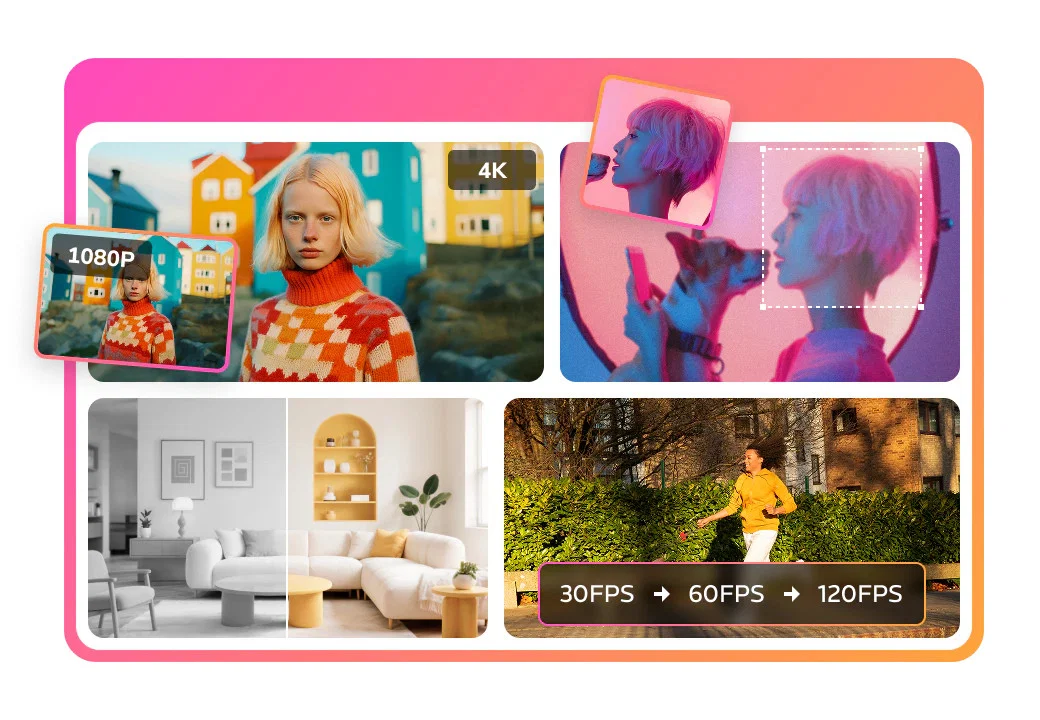
AI Video Enhancer is a professional-grade AI tool intended to upscale videos and significantly improve their quality. Offering the ability to enhance old, blurry footage into sharper 4K compliances, it employs intelligent algorithms to ensure the best possible video beneficial results.
This tool is not just restricted to enhancing video quality but also extends to optimizing color saturation and contrast. AI Video Enhancer possesses the ability to remove noise and grain from videos that were shot in low-light conditions.
It proves to be handy in optimizing YouTube videos converted from low-resolution, by fixing blurry details and optimizing overall image quality. Furthermore, this tool can upscale videos to various scales such as 100%, 200%, and 400% based on users' requirements, thereby affecting the level of details in the footage.
This feature can be particularly beneficial for in-depth analysis or extracting key information from low-resolution footage. In addition, AI Video Enhancer is also instrumental in restoring precious memories.
For instance, grainy, old, and faded recordings like home videos, wedding footage, and anniversaries can be restored to a better quality. The AI technology embedded into this tool automates the entire process, from uploading the source file to the AI-powered restoration of each frame, eliminating the need for manual intervention.
Help other people by letting them know if this AI was useful.
Add your own prompts and outputs to help others understand how to use this AI.
Screenshot gallery
Pros & Cons
Pros
+Upscales videos to 4K
+Restores detail, not just sharpening
+Flexible scale enhancement
+One-stop video enhancement workflow
+Removes visual noise
+Balanced sharpness, color, clarity improvement
+Deep reconstruction of details
+Specifically optimized for animated content
+Improves color saturation and contrast
+Qptimizes YouTube videos
+Restores old, faded recordings
+Automated video enhancement process
+Memory restoration feature
+Grain removal feature
+Low-light condition correction
+Resolution conversion capability
+Frame by frame enhancement
+Compatible with Any Video Converter
+Quality optimization feature
+Available in different scales
+Can be used for in-depth analysis
+Integrated in multi-functional suite
+Optimizes overall image quality
+Restores precious memories
+Optimizes downloaded low-resolution videos
+Allows export in different formats
+Handles blurriness and graininess
+Maintains visual quality when upscaled
+Part of Any Video Converter Ultimate
+One click preview enhancement effect
+Trims and enhances specific segments
+Naturally clearer video enhancement
+Repairs valuable memories
+Handles videos converted from low-resolutions
+Enhancement for detail, sharpness, color accuracy
+Restores textures and edges
+Works with videos from Vimeo, YouTube
+Converts restored videos to MP4
+Removes unwanted footage in trimming
+Provides various output options
+Real-time preview of enhancements
+24/7 professional email support
Cons
−Limited to 400% upscaling
−No manual frame restoration
−Doesn't support all video formats
−No explicit mention of speed and efficiency
A Professional Framework to Evaluate Any Video Converter | AI Video Enhancer
When considering Any Video Converter | AI Video Enhancer for integration into your organizational workflow, we recommend deploying a structured score card across three critical operational pillars: Security & Compliance, Integration Friction, and long-term Price Scalability. Rather than looking only at basic feature lists, modern procurement teams must assess how a software platform behaves under high load and how well it fits into the team's data security guidelines.
1. Security and Database Compliance
Depending on your operating region and field, ensure that Any Video Converter | AI Video Enhancer supports standard security layers such as SOC 2 Type II certifications, GDPR compliance, or HIPAA-compliant database encryption. If the tool connects directly to client database tables or handles user passwords, verify that they implement multi-factor authentication (MFA), single sign-on (SSO) integrations, and end-to-end data encryption in transit and at rest.
2. API Coverage and Custom Integrations
Siloed data is the primary cause of operational friction. Evaluate if Any Video Converter | AI Video Enhancer has native connectors for your current project trackers, messaging hubs, and customer communication channels. For custom developer requirements, check if they provide a fully documented REST API with reasonable rate limits, comprehensive Webhooks support, and robust SDK packages in your language. A flexible API layer saves hundreds of hours of manual copy-paste overhead.
3. Total Cost of Ownership (TCO)
SaaS pricing packages are often deceptively simple. When reviewing Any Video Converter | AI Video Enhancer's billing structure, map out your team's projected expansion over the next 12 to 24 months. Determine how costs scale as your customer database increases or as you add team members. Factor in setup costs, mandatory support plan upgrades, API access fees, and storage overage rates to understand the true cost before committing to a contract.
By combining verified user reviews from our directory with internal workflow pilot tests, your procurement team can make an informed decision that drives productivity without creating capital waste.
Features of Any Video Converter | AI Video Enhancer
Video Enhancement
AI Based Upscaling
AI Video Enhancement
4K Upscaling
4K Compliances
Video Restore
Free + From $29.95/Mo
SaaS1to10 verified reviews for Any Video Converter | AI Video Enhancer
Overall rating
★★★★★5.0
Based on 14 reviews
★★★★★5.02 months ago
“Review”
I mostly use ChatGPT and Claude for writing content. What I like @ChatGBot is that it saves me from multiple monthly payments for different AI tools. Everything works fine, accuracy included. Worth subscribing.
Samantha Stone
★★★★★5.02 months ago
“Review”
Image3D feels like a practical tool rather than just a demo. The workflow is simple, the preview loads in-browser, and I can export common formats like GLB, OBJ, STL, and PLY. I would recommend it for fast 3D asset drafts and 3D printing experiments.
刘中奎
★★★★★5.02 months ago
“Review”
I mainly used Himedia AI for image creation and got surprisingly realistic outputs. Prompt control feels intuitive compared with some other tools.
KoooU
★★★★★5.02 months ago
“Review”
Can we collaborate to make a quote retweet 👌 ?
Nadeem Muhammad
★★★★★5.02 months ago
“Review”
amazing apps
Anthony
★★★★★5.02 months ago
“Review”
You get 300 credits upon signing up, which is enough to test out the app and see its potential. I had a bit of fun with it. It takes a few minutes to generate content, but the results are impressive. There are many styles, modifiers, and customization options available. I would definitely use this for content creation or storytelling.
Daniel Garaiacu
★★★★★5.02 months ago
“Review”
Reducing manual efforts in first-pass during code-review process helps speed up the "final check" before merging PRs
Sahil Mohan Bansal
★★★★★5.02 months ago
“Review”
Went from a C to an A in Cognitive Psychology using @Thea!!
Sarah White
★★★★★5.02 months ago
“Review”
I mainly use the AVC AI Video Enhancer to process old videos and those with poor quality. The overall experience is quite stable. The most obvious feeling is that the video clarity has indeed improved. Especially for the parts that were originally blurry and had lost details, after upscaling, the edges become cleaner. On some low-resolution videos, the detail restoration is quite good. For example, the facial features and background outlines will be clearer than before.
Bella Hong
★★★★★5.02 months ago
“Review”
I love it, this software surprisingly colors my black and white family video images and fits this video perfectly. The effect is so stunning.
Harney Zheng
★★★★★5.02 months ago
“Review”
It works well on video upscaling. I can fix my blurry old videos.
Cuiyun Luo
★★★★★5.02 months ago
“Review”
Nice tool, easy to use
Your Papa
★★★★★5.02 months ago
“Review”
Not even close to being worth the heavy pricing.
foodisgood
★★★★★5.02 months ago
“Review”
Excellent to restore old interlaced video, and to add FPS in order to make the motion smooth. The best part is that is accessible in browser, from any device, no equipment request.
Sanja Trbojević Montina
Pricing
Starting Price
Free plan available
Free tier available with optional paid upgrades.
Where can Any Video Converter | AI Video Enhancer be deployed?