5.02 months ago
“Review”
One tool that really impressed me—I honestly can’t believe something this good is free. Even if it becomes paid later, I’d still keep using it. The results are just that good.
meta yi

Turn any song into viral music videos.
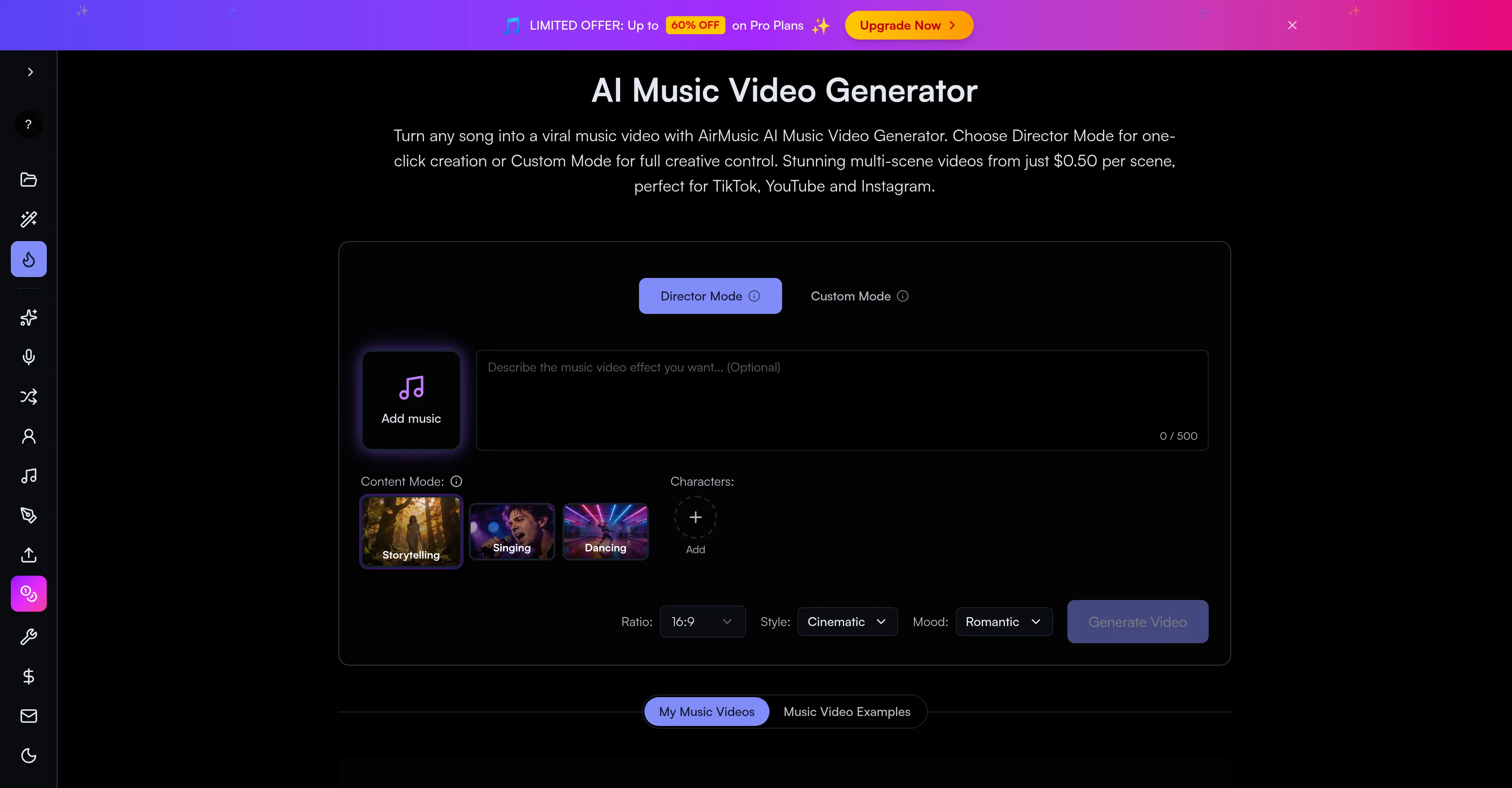
The AirMusic AI Music Video Generator is a powerful tool designed to transform any song into a visually stunning multi-scene music video. It facilitates the creation of narrative-driven music videos, complete with plot, scene transitions, dramatic storytelling, choreographed dance sequences, and more. It is built with two distinct modes: the Director Mode offers one-click creation, while Custom Mode gives users full creative control over their project. Notably, the AI performs storyboard generation based on uploaded songs specifying scene descriptions, transitions, and camera angles, which are tailored to the musical mood and lyrics. Users can also add character photos and descriptions, which the AI will consistently incorporate throughout the video. The service offers a variety of visual styles such as anime, cinematic, realistic, and more. Moreover, the AI Music Video Generator includes 10+ different video generation models, each offering unique qualities, speed, and style options. Combine these features with the Track Editor & Timeline tool for precise scene arrangement, clip trimming, section reordering, and final merging into a single MP4 video file. The platform is secure, ensuring user content is encrypted during processing and automatically deleted after 30 days. This tool is optimized for creating engaging content for platforms like TikTok, YouTube, Instagram, Spotify, and other streaming platforms, making it an ideal tool for creators seeking to improve their social media presence. 🚀 AirMusic AI Music Video Generator v2.6 Smarter Music Understanding, Editable Subtitles, and AI Lyrics Video Creation AirMusic AI Music Video Generator v2.6 introduces a smarter music-to-video workflow with improved song analysis, a cleaner creation interface, subtitle editing, and a new Lyrics Video Maker. This update helps creators better understand their music, generate more structured AI music videos, and create different types of visual content from the same song. 🎵 Enhanced AI Music Analysis for Better Video Creation AirMusic’s AI Music Analyzer has been upgraded with deeper music understanding capabilities. Before generating a music video, AirMusic can now analyze: · BPM and tempo · Musical key · Genre · Mood · Music style · Instruments · Vocal style · Song structure (intro, verse, chorus, bridge, outro) · Detailed style description These insights help AirMusic better understand the characteristics of each song and create visuals that better match the music’s rhythm, emotion, and style. 🎬 Redesigned AI Music Video Generator Experience The AI Music Video Generator interface has been redesigned with a cleaner and more intuitive layout. Improvements include: · Simplified page structure · Clearer creation steps · Easier video style selection · More focused controls during the generation process The updated workflow makes it easier for creators to go from uploading a song to generating a complete AI music video. 💬 Subtitle Editing for AI Music Videos AirMusic v2.6 adds subtitle editing support for AI-generated music videos. Creators can now customize subtitles and lyrics display directly inside the video creation workflow. This makes it easier to create: · Lyric-focused music videos · Social media music clips · Singing performance videos · Short-form videos for TikTok, YouTube Shorts, and Instagram Reels 🎤 New Lyrics Video Maker AirMusic introduces Lyrics Video Maker, allowing creators to turn songs into engaging lyric videos. Users can create videos with synchronized lyrics and visuals, making it easier to publish music content without traditional video editing tools. Perfect for: · Artists promoting new releases · YouTube lyric videos · Social media music content · AI-generated songs from platforms like Suno 🛠️ Bug Fixes & Workflow Improvements Based on user feedback, AirMusic v2.6 also includes multiple bug fixes and stability improvements. These updates improve reliability across music analysis, AI music video generation, and overall creation workflow. 🎯 Best For · Independent artists and musicians who want to turn songs into professional-looking AI music videos and lyric videos · Suno and AI music creators who want better music understanding and more ways to visualize generated songs · YouTube, TikTok, and Instagram creators who need faster ways to create music-based visual content · Creators making lyric videos who want synchronized subtitles without manual editing · Anyone creating AI music videos who wants a simpler workflow from song analysis to final video export With AirMusic AI Music Video Generator v2.6, creators can now transform songs into more structured, customizable, and engaging visual experiences — from AI music videos to lyric videos. 🚀 AirMusic AI Music Video Generator v2.5 23% Lower Video Cost, Mobile Optimization, and Smarter Generation Control AirMusic AI Music Video Generator v2.5 focuses on making AI music video creation more affordable, easier to use, and more reliable across devices. This update reduces the credit cost of music video generation, improves the mobile creation experience, refines the song upload and video style selection flow, and fixes reported video stuttering issues. 📌 Summary · AI music video generation now costs 23% fewer credits for the same video duration · Mobile-optimized workflow for creating music videos from phones · Improved song upload experience · Smoother video style selection flow · Cancel & regenerate support for slow image or video generations · No credits charged for cancelled or failed tasks · Fixes for reported video stuttering issues · AirMusic also adds 25+ AI music styles, making it easier to create songs before turning them into videos 💰 AI Music Video Cost Reduced by 23% AirMusic v2.5 optimizes the AI music video generation pipeline. Creating a video of the same duration now requires 23% fewer credits. This helps users create more music videos with the same credit balance, especially when testing different scenes, video styles, or versions of the same song. For creators who regularly make music videos for YouTube, TikTok, Instagram Reels, Shorts, or music promotion, this lowers the cost of repeated production. 📱 Mobile-Optimized AI Music Video Creation The AI Music Video Generator is now better adapted for mobile devices. Users can upload songs, choose video styles, adjust settings, and start generation more comfortably from a phone. This is useful for creators who produce and publish short-form music content directly from mobile workflows. 🎵 Improved Song Upload Flow The song upload experience has been refined to reduce friction at the first step of video creation. Users can move from uploading a track to choosing a video style more smoothly, whether they are using an original song, a Suno-generated track, or music created with AirMusic’s AI Music Generator. 🎨 Better Video Style Selection AirMusic v2.5 improves the video style selection experience. Users can choose the visual direction of the music video more clearly before generation starts. This helps when creating different types of videos, such as storytelling MVs, singing avatar videos, dance videos, lyric-style visuals, or social media clips. ⚡ Cancel & Regenerate Without Losing Credits If image or video generation is too slow, users can now cancel and regenerate without extra credit loss. This gives creators more control when testing different prompts, models, scenes, and visual styles. Instead of waiting for a slow generation to finish, users can restart the task and continue iterating. Cancelled or failed tasks do not consume additional credits. 🎬 Fixes for Video Stuttering Issues Based on user feedback, AirMusic v2.5 fixes a small number of reported video stuttering issues. This improves playback smoothness and helps exported music videos feel more stable, especially for social media publishing and music promotion. 🎶 25+ Music Styles for Better Music-to-Video Workflows AirMusic v2.5 also expands the AI Music Generator with 25+ music styles, including Pop, R&B, K-Pop, Hip Hop, Trap, Lo-Fi, House, Synthwave, Rock, Reggaeton, Afrobeats, Country, Jazz, Classical, Cinematic, and more. This helps users create music in a clearer style direction before turning it into an AI-generated music video. 🎯 Best For · Suno and AI music creators who want to turn generated songs into music videos with lower credit cost · YouTube, TikTok, Instagram Reels, and Shorts creators who need a mobile-friendly workflow for music-based videos · Artists and indie musicians who want to create promotional music videos without manual editing · High-volume creators and agencies who need lower per-video cost for repeated content production · Users testing multiple video styles who want to cancel slow generations and regenerate without wasting credits · Creators who experienced video stuttering and need smoother playback in exported music videos 🚀 AirMusic AI Music Video Generator v2.4 More Realistic AI Music Videos with 35% Better Lip-Sync and 27% Higher Reference Consistency AirMusic AI Music Video Generator v2.4 brings focused upgrades to video realism, scene consistency, character stability, reference image fidelity, and singing performance. This update is designed for creators who want their AI-generated music videos to look less random and more intentional — with characters, visual style, facial details, and performance quality staying more consistent from scene to scene. ✨ What’s New AirMusic now supports HappyHorse in the AI Music Video Generator. This model improves how closely generated videos follow uploaded reference images. In internal testing, reference image similarity improved by 27%, helping videos better preserve facial features, outfit style, character appearance, and visual direction across scenes. For users creating artist videos, character-based MVs, or visual stories, this means the video is less likely to drift away from the original reference image as scenes change. AirMusic v2.4 also adds the Hunyuan Avatar model for singing video generation. This upgrade improves lip-sync realism when a character sings in the video. In internal testing, lip-sync quality scores improved by 35%, with mouth movement better matched to vocals and facial motion appearing more natural during singing scenes. This helps AI singing videos feel more believable, especially for close-up performance shots where lip movement and facial expression matter most. AirMusic v2.4 improves generation stability across the full AI music video workflow. Failed video generation rate was reduced by 32%, and the average retry rate was reduced by 18%. This makes it easier to complete longer music video projects where multiple scenes need to stay visually consistent from start to finish. Instead of repeatedly regenerating broken scenes, creators can spend more time refining the video’s story, mood, and visual style. The image-to-video generation pipeline is now faster. In this version, image-to-video generation speed improved by 23%, helping users move from reference image input to usable video output more quickly. This is especially helpful when testing different scenes, character references, or visual styles for a complete music video. Based on user feedback and generation data, AirMusic removed lower-quality models from the image and video generation workflow. This model cleanup helps reduce weak outputs, visual artifacts, unstable character results, and inconsistent scene quality. Instead of offering too many uneven model choices, AirMusic now focuses on models that better support realistic AI music videos and consistent scene generation. 🎬 AirMusic AI Music Video Generator v2.4 Perfect For Artists and musicians who want realistic AI-generated music videos with stronger character and scene consistency for releases, demos, and promotion Social media creators on YouTube, TikTok, Instagram Reels, and Shorts who need eye-catching singing videos or music clips that look polished without manual editing Suno and AI music creators who want to turn AI-generated songs into visual content with more consistent characters, scenes, and style Creators making singing avatar videos who need more accurate lip-sync, natural facial movement, and believable performance shots Users working from character or style reference images who want generated videos to stay closer to the original look across multiple scenes Anyone creating high-quality AI music videos who wants fewer failed generations, fewer retries, and a faster creation workflow With AirMusic AI Music Video Generator v2.4, creators can generate more realistic and consistent music videos with 35% better lip-sync quality, 27% higher reference image similarity, 32% fewer failed video generations, 18% fewer retries, and 23% faster image-to-video generation. AI Music Video Generator — Higher Quality Models, Better Sync & Faster Output AirMusic v2.3 upgrades the AI music video generator with new image and video models, deeper music‑scene correlation, improved lip‑sync, and faster generation, giving creators significantly better quality and control over music‑to‑video outputs. 🎨 New Image & Video Models for Sharper Visuals We added multiple new generation engines so your AI music videos look more detailed and cinematic: — Nano Banana 2 & Nano Banana Pro — optimized for speed and quality previews while you adjust scenes Seedance 2.0 — produces photorealistic backgrounds, realistic lighting, and textured environments — Kling 3.0 — excels at dynamic camera angles, stylized visuals, and expressive character rendering — Video models such as Vidu 2.0 and Veo now handle motion frames differently, giving you smooth scene transitions, cleaner action sequences, and less jitter when the music tempo changes. 🎵 Minimax Music Model for Better Scene Matching AirMusic now uses the Minimax music model to analyze your track’s beats, tempo changes, and energy curves. Instead of generic scene timing, visuals now: — Match chorus hits with camera zooms or scene cuts — Reflect tempo shifts in motion intensity — Generate visuals that sync rhythmically to the music — especially useful for EDM, pop, and rap tracks This delivers noticeably better beat‑synced visual storytelling. ⚡ Faster, Smarter, More Reliable We improved performance in key areas: — 30–40% faster scene generation for both images and videos — Automatic model fallback ensures your project continues even if one model stalls — Fewer failed renders thanks to stability fixes — Improved handling of longer audio tracks without timeline breaks 🎤 Enhanced Character & Lip‑Sync Quality Singing mode now: — Trims song vocals per scene for more accurate lip movement — Keeps character visuals consistent across all scenes — Reduces out‑of‑sync mouth animation — Improves facial expression continuity This means your characters no longer feel “disconnected” from the vocals. 📣 Perfect For — Independent artists and musicians who want to turn Suno or other AI-generated tracks into polished music videos, helping them promote songs with professional-quality visuals without learning video editing. — Content creators for TikTok, YouTube, Instagram Reels who need videos that are rhythm-synced and visually engaging, enabling them to increase viewer engagement and reach. — Users creating performance-focused MVs who need realistic lip-sync and consistent characters, so they can produce believable AI singing videos that impress audiences. — Anyone producing music videos with high creative control, allowing them to experiment with multiple visual styles and scene compositions while generating videos faster and more reliably. AI Music Video Generator Gets More Realistic and More Controllable. AirMusic v2.2 improves the overall quality and reliability of our AI Music Video Generator, with major upgrades focused on realism, scene consistency, lip-sync quality, and workflow optimization. This release is designed for creators who want more professional-looking AI-generated music videos with better control over the final result. ✨ What’s New 🎬 Improved Character Consistency Characters now remain more visually consistent across scenes, helping music videos feel more cinematic and coherent from start to finish. 🎤 Enhanced Lip-Sync Performance Singing mode now delivers more accurate mouth movement and vocal synchronization for more realistic performance videos. 🎨 Better Scene Composition & Video Quality Scene generation has been optimized with improved camera framing, transitions, lighting consistency, and visual detail, resulting in cleaner and more polished music videos. ⚡ Faster & More Stable Generation Generation reliability has been improved across the entire workflow, reducing failed renders and making long music video projects more stable. 🧠 UX & Workflow Improvements The MV creation experience is now smoother and more intuitive, with faster project loading, cleaner editor interactions, and better overall responsiveness. 🎵 Perfect For Creating high-quality AI music videos for YouTube and TikTok Turning Suno-generated songs into professional-looking MVs Artists who want more realistic AI singing performances Creators looking for better visual consistency and cinematic scenes Users who want an easier and more controllable AI music video workflow With AirMusic v2.2, creating realistic and visually consistent music videos with an AI music video generator becomes faster, smoother, and more production-ready than ever. AI Music Video Generator — More Realistic, More Controllable, Higher Quality. AirMusic v2.1 brings a major upgrade to our music video generator, focused on improving realism, visual consistency, and creative control. This update is designed for creators who want high-quality music videos, not just quick AI outputs. 🎬 Enhanced Character Consistency One of the biggest improvements in v2.1 is character consistency across scenes. AI now maintains stable identity, appearance, and style throughout the entire video. Whether you're creating a solo artist performance or a story-driven MV, characters no longer change between frames. 🎤 Improved Lip-Sync and Vocal Performance Singing mode now features more accurate lip-sync, with scene-level audio processing. Characters’ mouth movements are better aligned with vocals, creating a more natural and believable singing performance — ideal for artist-focused music videos. 🎨 Higher Video Quality & Scene Optimization AirMusic v2.1 significantly improves visual quality and scene composition: · More detailed and coherent visuals · Better scene transitions and structure · Optimized camera angles and framing · Reduced visual artifacts and inconsistencies The result is a smoother, more professional-looking music video. ⚙️ More Control for Creators With improved generation logic and model handling, you now have greater control over the final output. Videos are more predictable, more consistent, and easier to refine — making AirMusic suitable for serious creators and production-level use. ✨ Better User Experience This release also includes multiple UX improvements to make the creation process faster and more intuitive, from setup to final export. With AirMusic v2.1, creators can generate more realistic, high-quality AI music videos with better control and consistency — making it the ideal AI music video generator for anyone serious about creating professional MVs. Help other people by letting them know if this AI was useful. Add your own prompts and outputs to help others understand how to use this AI.
When considering AirMusic - AI Music Video Generatorv2.6 for integration into your organizational workflow, we recommend deploying a structured score card across three critical operational pillars: Security & Compliance, Integration Friction, and long-term Price Scalability. Rather than looking only at basic feature lists, modern procurement teams must assess how a software platform behaves under high load and how well it fits into the team's data security guidelines.
Depending on your operating region and field, ensure that AirMusic - AI Music Video Generatorv2.6 supports standard security layers such as SOC 2 Type II certifications, GDPR compliance, or HIPAA-compliant database encryption. If the tool connects directly to client database tables or handles user passwords, verify that they implement multi-factor authentication (MFA), single sign-on (SSO) integrations, and end-to-end data encryption in transit and at rest.
Siloed data is the primary cause of operational friction. Evaluate if AirMusic - AI Music Video Generatorv2.6 has native connectors for your current project trackers, messaging hubs, and customer communication channels. For custom developer requirements, check if they provide a fully documented REST API with reasonable rate limits, comprehensive Webhooks support, and robust SDK packages in your language. A flexible API layer saves hundreds of hours of manual copy-paste overhead.
SaaS pricing packages are often deceptively simple. When reviewing AirMusic - AI Music Video Generatorv2.6's billing structure, map out your team's projected expansion over the next 12 to 24 months. Determine how costs scale as your customer database increases or as you add team members. Factor in setup costs, mandatory support plan upgrades, API access fees, and storage overage rates to understand the true cost before committing to a contract.
By combining verified user reviews from our directory with internal workflow pilot tests, your procurement team can make an informed decision that drives productivity without creating capital waste.
Overall rating
Based on 16 reviews
One tool that really impressed me—I honestly can’t believe something this good is free. Even if it becomes paid later, I’d still keep using it. The results are just that good.
meta yi
Viz makes the process of turning data into dashboards feel much simpler and more natural. Being able to upload or connect data, ask questions in plain language, and quickly get interactive visualizations is genuinely useful, especially for people who do not want to spend hours building dashboards manually. What I like most is that Viz feels focused: it is not just an AI chat tool, but a product designed to help users move from raw data to clear, shareable insights. Overall, it looks like a practical and intuitive tool for making data analysis faster and more accessible.
Giuseppe
Image3D feels like a practical tool rather than just a demo. The workflow is simple, the preview loads in-browser, and I can export common formats like GLB, OBJ, STL, and PLY. I would recommend it for fast 3D asset drafts and 3D printing experiments.
刘中奎
I mainly used Himedia AI for image creation and got surprisingly realistic outputs. Prompt control feels intuitive compared with some other tools.
KoooU
This tool is definitely good for basic stuff, no doubt. Just keep the prompts super duper simple and it gets the job done. But once I put in something a bit more complex at it… it kinda screwed up the thing. Still, I see potential here
Anil Felipe
Deploys the backend directly from chat!
Spam Trapper
Very interesting
Béatrice Duval
nice holistic
Amit ImmI
Maybe you don’t have a subscription, so there are no credits on your account, and a lot of features require credits to use.
Span Chen
I think it's the best @Image Generator I ever found on the net. It gives more accurate image according to the prompt. And thank you for keeping it for free.
My Sawsiri
Terrible experience. Spent over $200 to produce a music video that @Musid.ai was never able to complete. System crashed during the final production generation/rendering - over and over and over. Contacted support@Musid.ai - no response whatsoever after 2 days. Don't touch it! UPDATE: minutes after posting this @Musid.ai responded by reinstating all of the credits purchased. Doesn't compensate for the wasted time but better that a poke in the eye with a sharp stick! I'll review again once I get to the other side of this drama...
William Smith
I used the Punk subscription for 2 months and really went deep into it. @Plazmapunk offers great flexibility and a lot of option to create videos/animated visuals that can look stunning and cool. My favorite part is the Scene Editor where you can be your own story director. Sometimes videos won't turn out the way you like them, but upon refining you usually get it to be satisfying for you. So in short, I enjoyed it a lot :)
Eszter
Great tool! The most complete one if you want to create music video specifically.
Angelo Gallarello
Wow, so good
Neskwusss
To just upload my song and have AI figure out the rest so I can share my songs on tiktok etc... As a Suno user I've wanted something simple and affordable, this is finally it. Other tools want $50 credits then it turns out it's not even enough to learn the tool, never mind just get a usable video out.
Henrik Harju
The generation effect is good, the pictures are exquisite, and the transition animations of the pictures are smooth The only drawback is that it would be better if the generation time were a little faster
GraphThread
Starting Price
From $18.00/user/month
Pricing may vary based on team size and features selected.


