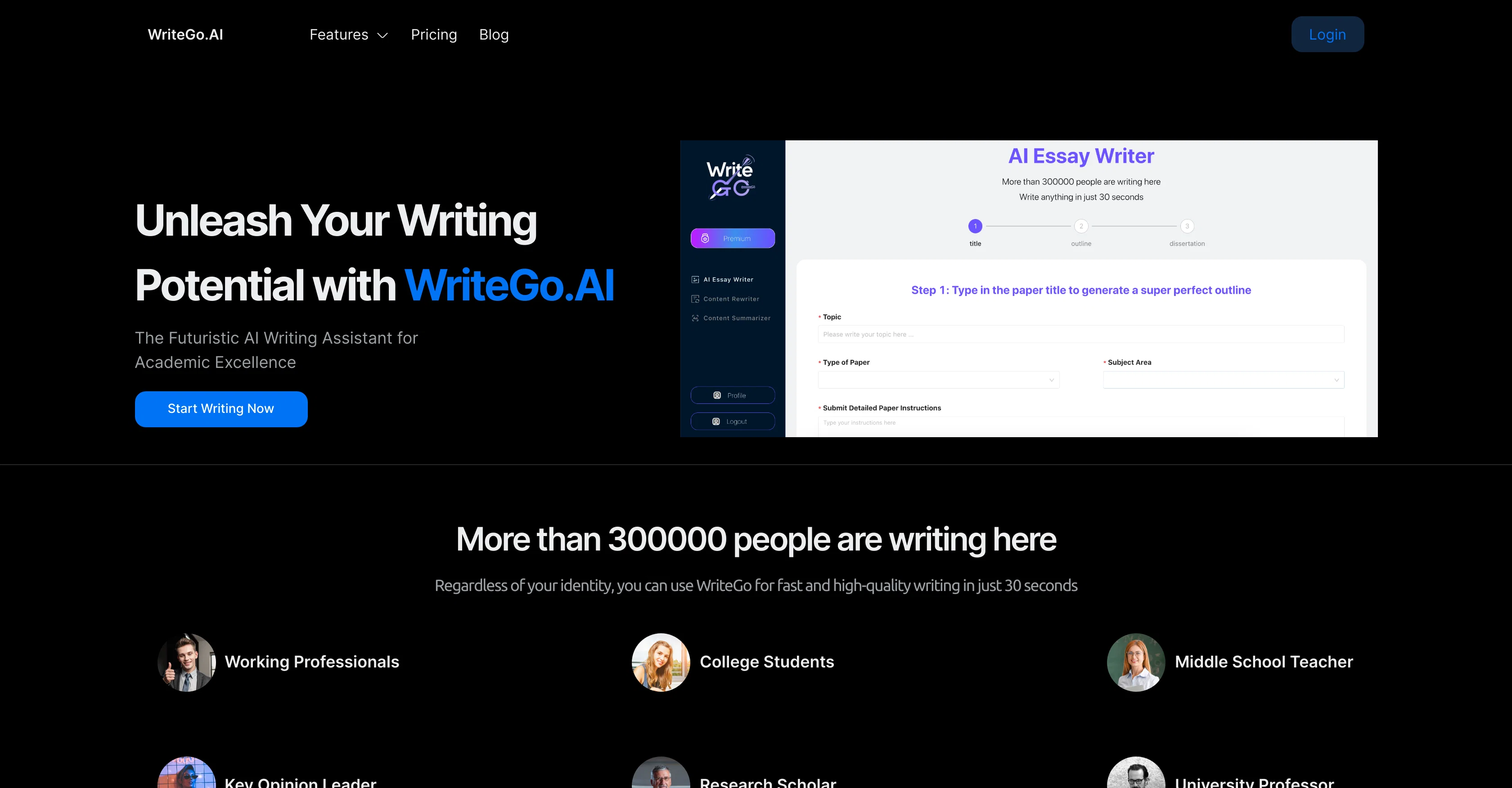
WriteGo.ai is an AI-powered tool designed to enhance your academic writing. It serves numerous users including professionals, students, teachers, scholars, and university professors, and is suitable for an array of disciplines.
The tool offers a collection of features that streamline the writing process, from outlining to final refinement. The 'Dynamic Outlining' feature enables users to create structured essay outlines with AI-driven technology, transforming ideas into well-organized drafts.
With the assistance of the AI tool, users can overcome writer's block, receiving prompts, suggestions, and examples to enhance their writing across diverse academic fields.
Additionally, the system allows for tailored content creation, understanding the nuances of your subject and adapting to your writing style and academic requirements for personalized results.
WriteGo.ai also provides an intuitive editing and refinement feature, assisting in the improvement of clarity, coherence, and academic tone with AI-powered suggestions and corrections.
Preservation of user privacy and data security is prioritised, with industry-leading encryption in place. The AI tool integrates seamlessly with various writing platforms, offering a flexible solution for both desktop and mobile devices.
Help other people by letting them know if this AI was useful.
Add your own prompts and outputs to help others understand how to use this AI.
Screenshot gallery
Pros & Cons
Pros
+Dynamic Outlining feature
+Aids in overcoming writer's block
+Provides writing prompts
+Offers suggestions and examples
+Personalized content creation
+Adapts to user's writing style
+Tailors to academic requirements
+Intuitive editing and refinement tools
+Improves clarity and coherence
+Assists in setting academic tone
+Preserves privacy and secures data
+Industry-leading encryption
+Seamless integration with writing platforms
+Compatible with desktop and mobile
+Suitable for various disciplines
+Services professionals, students, teachers
+Unlimited citations with Premium
+Unlimited Content Rewriter feature
+Supports 100 Articles per month
+Affordable Premium packages
+Cancellation flexibility with Premium
+Strict data security measures
Cons
−Focused solely on academic writing
−Might over-automize the writing process
−Limited to English literature
−Needs constant internet access
−Potential plagiarism risks
−Minimal human input
−Dynamic outlining may limit creativity
−Expensive for occasional users
−Viewed as 'cheating' in academia
−Privacy concerns over text input
A Professional Framework to Evaluate WriteGo
When considering WriteGo for integration into your organizational workflow, we recommend deploying a structured score card across three critical operational pillars: Security & Compliance, Integration Friction, and long-term Price Scalability. Rather than looking only at basic feature lists, modern procurement teams must assess how a software platform behaves under high load and how well it fits into the team's data security guidelines.
1. Security and Database Compliance
Depending on your operating region and field, ensure that WriteGo supports standard security layers such as SOC 2 Type II certifications, GDPR compliance, or HIPAA-compliant database encryption. If the tool connects directly to client database tables or handles user passwords, verify that they implement multi-factor authentication (MFA), single sign-on (SSO) integrations, and end-to-end data encryption in transit and at rest.
2. API Coverage and Custom Integrations
Siloed data is the primary cause of operational friction. Evaluate if WriteGo has native connectors for your current project trackers, messaging hubs, and customer communication channels. For custom developer requirements, check if they provide a fully documented REST API with reasonable rate limits, comprehensive Webhooks support, and robust SDK packages in your language. A flexible API layer saves hundreds of hours of manual copy-paste overhead.
3. Total Cost of Ownership (TCO)
SaaS pricing packages are often deceptively simple. When reviewing WriteGo's billing structure, map out your team's projected expansion over the next 12 to 24 months. Determine how costs scale as your customer database increases or as you add team members. Factor in setup costs, mandatory support plan upgrades, API access fees, and storage overage rates to understand the true cost before committing to a contract.
By combining verified user reviews from our directory with internal workflow pilot tests, your procurement team can make an informed decision that drives productivity without creating capital waste.
Features of WriteGo
Academic Writing
Writing Enhancement
AI Writing Tool
Scholarly Writing
Dynamic Outlining
Editing And Refinement
From $6.43/Mo
SaaS1to10 verified reviews for WriteGo
Overall rating
★★★★★5.0
Based on 17 reviews
★★★★★5.01 months ago
“Review”
I’ve been using it for a month now and I have decided to keep it for a year. There definitely are some kinks they can still work out like file management, but it’s very good at it’s core function: it generally does a good job answering questions and most times identifies PDFs automatically and correctly. The browser plugin works great, and it’s very nice that @Papers allows you to add your university’s library API so you can automatically download PDFs that are accessible through your institution (sometimes it refuses to download some @Papers, so you just have to downlow it yourself and manually add it). The iPad and Android apps are serviceable. Every once in a while it will mess up the PDF identification, especially with @Papers from either very old sources or online-only journals. Things they must work on: * A much better system to annotate PDFs (the post-it type notes are cumbersome). * Introduce a notepad attached to each PDF or some way to easily link and save the AI’s output to the PDF. Currently, you have to add a little post it note and then paste the text there. * Keep the AI answers available after closing the documents. If you close the document by mistake or have several open and wish to close some, the ai conversation will be reset. * I REALLY wish that you could get citations and links to where the info was from extracted from PDFs. Currently, I have found Coral.ai does a much better job of showing you where the info came from and it even highlights it for you. Give it a try, their 30-day no credit card needed trial allowed me to truly test it, and now I’m a yearly subscriber looking forward for new additions and releases.
JB
★★★★★5.01 months ago
“Review”
I want Research Theoretical Framework
nathaniel derder
★★★★★5.01 months ago
“Review”
Everything is working normally. Best,
Stefan Mitrovic
★★★★★5.01 months ago
“Review”
hmm it is un-real...literally...sounds robotic....far awy from Real
Dhhaval Joshi
★★★★★5.01 months ago
“Review”
Suppppeeeeerrr! Wowwww! @Mindsmith is absolutely fantastic! It is incredibly useful, easy to use, and very professional.
Claudia Scilletta
★★★★★5.01 months ago
“Review”
easy to pick up and you get a few free file imports. it gives you results pretty fast, unfortunately i can't find a way to get back to these, they're locked behind the paid service.
Ron Jayson
★★★★★5.01 months ago
“Review”
I'm still testing the tool yet it looks very promising. I tested it with a 5.5k words Academic text that I had previously red. I tested the Key points feature, it does work!
Ivana González
★★★★★5.01 months ago
“Review”
It is not free. So i couldnt test anything
Isa Venancio
★★★★★5.01 months ago
“Review”
Such an impressive platform for all of us who are looking for more efficient ways to do the investigation. @OpenRead has the potential to solve our problems.
Zhuohang Tong
★★★★★5.01 months ago
“Review”
Hello! I am writing about an error When using Asc Isaac. It is not the answer that appears, but the text of the HTML code. here is the first half of
Bari Hamelson
★★★★★5.01 months ago
“Review”
clean structure, solid content. only downside is the 3 credit limit on the free plan, since each page costs 1. would be nice to get a bit more flexibility for free users, but overall it’s a really good essay helper.
William Ben
★★★★★5.02 months ago
“Review”
@Aithor is an excellent tool for writing scientific essays. The best part is that it shows real references. This means your generated text is validated. Other tools, like Gemini or Chatgpt, frequently give wrong citations and references, even nonexistent ones.
Iftekhar Alam
★★★★★5.02 months ago
“Review”
Thank you for your kind words, Ruach Dak! We're thrilled to be a part of the writing journey for so many writers worldwide. If you ever need assistance or have any feedback, feel free to reach out to us at hello@Paperpal.com. We are always here to assist you. Happy writing!
Paperpal
★★★★★5.02 months ago
“Review”
The tool is posted since 2024-01-04.
Daniel Garaiacu
★★★★★5.02 months ago
“Review”
Great way to get concrete, organized supervisor-style feedback on papers pre-submission without text generation or ChatGPT-style high-level comments.
TK
★★★★★5.02 months ago
“Review”
It works great for generating your Thesis/Essay or research papers. The fact that it has in-source citations is what really makes it stand out from the competition. Also great that it has minimal AI detection😁
Koen Van velzen
★★★★★5.02 months ago
“Review”
Alternative for fast academic writing
Ivan Taslim
Pricing
Starting Price
From $12.00/user/month
Pricing may vary based on team size and features selected.