VideoAny Image to Video

5.0(23 reviews)

Turn images into AI video with cinematic motion.

Paid

VideoAny Image to Video Overview

What is VideoAny Image to Video?

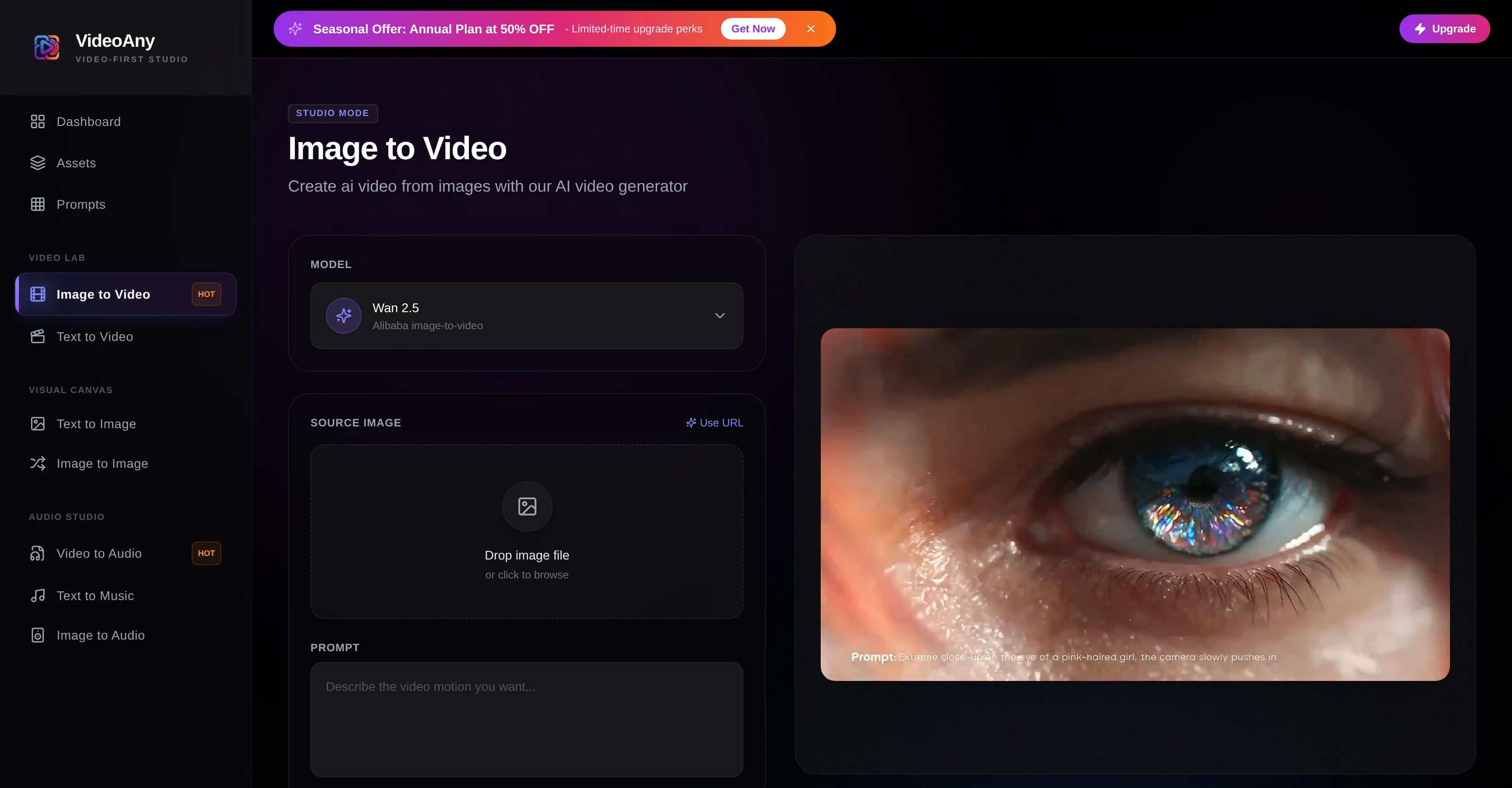
VideoAny's Image to Video AI Generator is an artificial intelligence-powered tool designed to convert images into videos. It is capable of animating still images, transforming static visuals into dynamic content suitable for social media, advertising, and various storytelling platforms. The element of motion can be controlled through pre-existing strength presets or can be customised according to user requirements. By accepting images in JPG, PNG, WebP, and HEIC formats, the generator aims to provide flexibility in source materials. The AI processes the uploaded image, interprets the user's intent, and subsequently builds high-quality assets. The output, a video, can be downloaded instantly once the AI completes its processing. For optimal results, the image dimensions should be at least 512x512 pixels. The standard output duration is short clips, allowing for rapid creation. The video resolution is standard HD, however, higher resolutions may be possible with certain models and plans. Overall, VideoAnys Image to Video AI Generator facilitates an innovative approach to digital content creation, enhancing static visuals with dynamic motion. Help other people by letting them know if this AI was useful. Add your own prompts and outputs to help others understand how to use this AI.

Screenshot gallery

VideoAny Image to Video screenshot

Pros & Cons

Pros

  • Still image animation
  • Customizable motion control
  • Accepts various image formats
  • High-quality asset creation
  • Instant video download
  • Optimal at 512x512 pixels
  • Produces short clips
  • Standard and HD resolution
  • Potential for higher resolutions
  • Suitable for social media
  • Ideal for advertising
  • Useful for storytelling platforms
  • Transforms static visuals
  • Rapid content creation
  • Interprets user intent
  • Annual plan discount
  • Inspiration view feature
  • Natural language prompt
  • Immediate high-quality export
  • Supports URL for images
  • Detailed FAQ section
  • Various output durations
  • Upgrade for enhanced features
  • Innovative approach to content
  • Motion strength presets

Cons

  • Limited to 4 image formats
  • Minimum image size requirements
  • Only standard HD output
  • Limited control over motion
  • Short video output duration
  • No specific customization options
  • High resolution only on select plans
  • Potential additional costs for enhancements
  • Image dimensions may affect quality

A Professional Framework to Evaluate VideoAny Image to Video

When considering VideoAny Image to Video for integration into your organizational workflow, we recommend deploying a structured score card across three critical operational pillars: Security & Compliance, Integration Friction, and long-term Price Scalability. Rather than looking only at basic feature lists, modern procurement teams must assess how a software platform behaves under high load and how well it fits into the team's data security guidelines.

1. Security and Database Compliance

Depending on your operating region and field, ensure that VideoAny Image to Video supports standard security layers such as SOC 2 Type II certifications, GDPR compliance, or HIPAA-compliant database encryption. If the tool connects directly to client database tables or handles user passwords, verify that they implement multi-factor authentication (MFA), single sign-on (SSO) integrations, and end-to-end data encryption in transit and at rest.

2. API Coverage and Custom Integrations

Siloed data is the primary cause of operational friction. Evaluate if VideoAny Image to Video has native connectors for your current project trackers, messaging hubs, and customer communication channels. For custom developer requirements, check if they provide a fully documented REST API with reasonable rate limits, comprehensive Webhooks support, and robust SDK packages in your language. A flexible API layer saves hundreds of hours of manual copy-paste overhead.

3. Total Cost of Ownership (TCO)

SaaS pricing packages are often deceptively simple. When reviewing VideoAny Image to Video's billing structure, map out your team's projected expansion over the next 12 to 24 months. Determine how costs scale as your customer database increases or as you add team members. Factor in setup costs, mandatory support plan upgrades, API access fees, and storage overage rates to understand the true cost before committing to a contract.

By combining verified user reviews from our directory with internal workflow pilot tests, your procurement team can make an informed decision that drives productivity without creating capital waste.

Features of VideoAny Image to Video

  • Image To Video Conversion
  • Video Generation
  • Image Processing
  • Content Animation
  • Dynamic Visuals
  • Still Image Animation
  • From $10/Mo

SaaS1to10 verified reviews for VideoAny Image to Video

Overall rating

5.0

Based on 23 reviews

5.02 weeks ago

Review

I joined Kin's beta program on my iPhone XR. After upgrading to an iPhone 13, I found that I couldn't log into my existing account on the new phone, forcing me to create a new account. Now, I have two separate Kin accounts on different phones. Today, when I accessed the beta version of Kin, I got a notification stating that the test version ended on Monday, September 23rd. It instructed me to back up my data and move to the official Kin app. I did as advised—backed up my data, confirmed, uninstalled the beta app via TestFlight, and installed the official Kin app. However, when I attempted to “log in”, I was still unable to access my existing account. This issue hasn't been resolved yet. I have been trying desperately to get in contact with the support team. I left feedback through the test flight app and sent emails. No response. Now trying to find a forums, Reddit posts, TAAFT comments☻

Desiree Miller

5.02 weeks ago

Review

It's sad to see people want to try your tool out but you have no free sample for them. This may be the best tool out there, but, as mentioned, going through with the AI for minutes to explain what you want, then being prompted to pay, without even knowing if it CAN create something, is discouraging. I hope we can get a free sample or preview at one point, im interested in this one.

Ron Jayson

5.02 weeks ago

Review

It is very receptive to the prompts and gives very aesthetically pleasing results.

Arianna

5.02 weeks ago

Review

It's not free, it forces you to input an email before shoving a price tag in your face.

Arvoly XSL

5.02 weeks ago

Review

🌟🌟🌟🌟🌟 This AI prompt generation tool is exceptional! It vividly brought to life the jungle scene I envisioned, capturing every detail with remarkable accuracy. The natural expressions, vibrant colors, and serene atmosphere were perfectly rendered. Highly recommended for creative projects!

Sukul Das PANIKA

5.02 weeks ago

Review

very good and hyper realistic

David Akers

5.02 weeks ago

Review

Needs to learn about different art schools, imo: doesn’t seem to understand the concept of cubism.

Catherine Karaguézian

5.02 weeks ago

Review

nice holistic

Amit ImmI

5.02 weeks ago

Review

your answer is much too general, so useless. You could have just tell me to ask Perplexity.

Ta

5.02 weeks ago

Review

Ya I would like to receive them as well

Jim Perez

5.02 weeks ago

Review

It doesn't want to follow the prompt (only up to 30%), so the strong stylization is too close to "coloring book art" rather than paintings, 2D, 3D, or any "handmade art," as strictly specified in the prompt and shown on the app's demo picture. It simply does whatever it wants, not whatever we want because it's a shiny-fancy rebel like R2D2 ;-) THX

Timeship

5.02 weeks ago

Review

There were no aristocratic Asians and Africans in ancient Rome.

Sándor Gajdos

5.02 weeks ago

Review

Not at all accurate…. The only thing similar between original and generated images were the clothes and accessories… face was absolutely new and unconnected.

Shvetank Sharma

5.02 weeks ago

Review

I think it's the best @Image Generator I ever found on the net. It gives more accurate image according to the prompt. And thank you for keeping it for free.

My Sawsiri

5.03 weeks ago

Review

What I like is how practical it is. No fancy setup—just type, generate, tweak, export. The paid plan is a good value if you’re making content regularly, because it cuts out a lot of editing time.

Shuyi

5.03 weeks ago

Review

its not free bullshit

mike rosa

5.03 weeks ago

Review

Requires credits to use and log-in

Elenimotoon

5.03 weeks ago

Review

I mainly used Himedia AI for image creation and got surprisingly realistic outputs. Prompt control feels intuitive compared with some other tools.

KoooU

5.03 weeks ago

Review

Many ai models help me create videos I love

long ff

5.03 weeks ago

Review

Requires previous login, not fully free

Elenimotoon

5.03 weeks ago

Review

Feels illegal to be this early, quick run with @Grok Imagine: great for teaser bits. The image-to-video pass holds up for shorts ~6s loops with decent motion and sound sync. Style range is solid. Access sits behind the Grok sub on mobile, so not fully free and I’d love longer clips!

Herbert Kemp

5.03 weeks ago

Review

a friend sent me this the other day. veo, grok, seedance all run from one upload and it's actually fast. ui doesn't fight me. no complaints.

owen_reeves

5.03 weeks ago

Review

Only app I could create video for free! Thanks

7even

Pricing

Starting Price

From $8.00/user/month

Pricing may vary based on team size and features selected.

Where can VideoAny Image to Video be deployed?

  • Cloud, SaaS, Web-Based

Recommended for you