Video Transcriber AI

5.0(38 reviews)

Transcribe video to text online free

Free

Video Transcriber AI Overview

What is Video Transcriber AI?

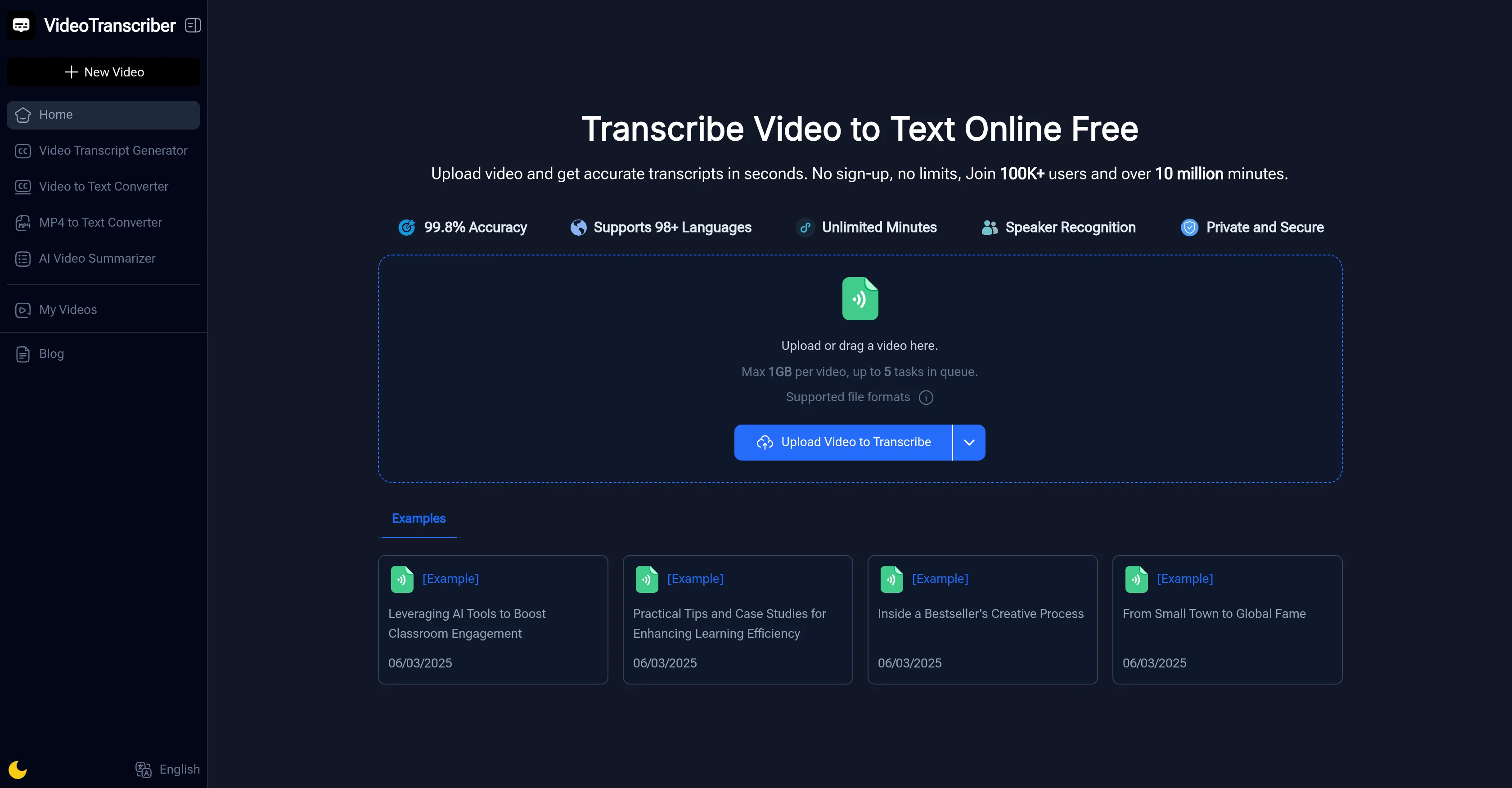
Video Transcriber AI is an AI-powered online tool that converts video content into written text. This versatile tool offers the convenience of transcribing video files from various popular formats like YouTube links, Zoom recordings, and MP4 files. The process is simple, requiring the user to upload a video file which the system then processes by converting all the spoken content into accurate text. Additional features include the ability to recognize multiple speakers and support transcription in various languages. Users can also adjust the balance between transcription speed and precision according to their needs. Once the transcription process is complete, the text can be copied, downloaded, or shared with colleagues. It is ideally suited to a range of users including students, educators, professionals, content creators and journalists who need accurate text transcriptions for studies, meetings, content creation and report writing. Video Transcriber AI is free to use, offering convenience with no requirement of sign-up or special software. Help other people by letting them know if this AI was useful. Add your own prompts and outputs to help others understand how to use this AI.

Screenshot gallery

Video Transcriber AI screenshot

Pros & Cons

Pros

  • Supports multiple file formats
  • Labels different speakers
  • Multilingual transcription
  • No sign-up required
  • Unlimited use time
  • Works for various roles (students, professionals, content creators)
  • Instant copying of transcriptions
  • Ability to download transcriptions
  • Sharing transcription feature
  • Optional transcription accuracy modes
  • Supports processing from YouTube
  • Processes Zoom recordings
  • Generate captions for videos
  • Recognized by top organizations
  • No download necessary
  • Video to text in seconds
  • Possibility to choose balance of speed and precision
  • Copy, download, or share transcript
  • No special tools required
  • Turns lectures into study notes
  • Suitable for lesson plan creation
  • Captures meetings and webinars
  • Creates captions for YouTubers
  • Converts interviews into text
  • Fast and accurate press conference transcription
  • User testimonials included
  • Supports bulk transcription
  • 1GB upload limit
  • Transcribes Zoom and other meeting platforms
  • Multiple speaker recognition
  • Supports English and many other languages

Cons

  • No offline functionality
  • Possible loss of privacy
  • Limited to 1GB file size
  • Limited to 5 tasks queue
  • Dependent on internet speed
  • Claims but unverified 99.8% accuracy
  • Audio quality affects accuracy
  • Multi-language but limited support
  • Requires manual adjustment for accuracy
  • No user feedback for improvement

A Professional Framework to Evaluate Video Transcriber AI

When considering Video Transcriber AI for integration into your organizational workflow, we recommend deploying a structured score card across three critical operational pillars: Security & Compliance, Integration Friction, and long-term Price Scalability. Rather than looking only at basic feature lists, modern procurement teams must assess how a software platform behaves under high load and how well it fits into the team's data security guidelines.

1. Security and Database Compliance

Depending on your operating region and field, ensure that Video Transcriber AI supports standard security layers such as SOC 2 Type II certifications, GDPR compliance, or HIPAA-compliant database encryption. If the tool connects directly to client database tables or handles user passwords, verify that they implement multi-factor authentication (MFA), single sign-on (SSO) integrations, and end-to-end data encryption in transit and at rest.

2. API Coverage and Custom Integrations

Siloed data is the primary cause of operational friction. Evaluate if Video Transcriber AI has native connectors for your current project trackers, messaging hubs, and customer communication channels. For custom developer requirements, check if they provide a fully documented REST API with reasonable rate limits, comprehensive Webhooks support, and robust SDK packages in your language. A flexible API layer saves hundreds of hours of manual copy-paste overhead.

3. Total Cost of Ownership (TCO)

SaaS pricing packages are often deceptively simple. When reviewing Video Transcriber AI's billing structure, map out your team's projected expansion over the next 12 to 24 months. Determine how costs scale as your customer database increases or as you add team members. Factor in setup costs, mandatory support plan upgrades, API access fees, and storage overage rates to understand the true cost before committing to a contract.

By combining verified user reviews from our directory with internal workflow pilot tests, your procurement team can make an informed decision that drives productivity without creating capital waste.

Features of Video Transcriber AI

  • AI Transcriber
  • Video Transcription
  • AI Transcription
  • Speech To Text
  • Content Creation
  • Audio Processing
  • Free

SaaS1to10 verified reviews for Video Transcriber AI

Overall rating

5.0

Based on 38 reviews

5.02 weeks ago

Review

This is my best bro! I communicate with him like my best friend, he always helps to direct my thoughts and ideas in the right direction, always tells me how to improve something and always gives detailed instructions during the conversation. Thanks to him, I’m launching a new project, in which he helps me take my ideas to a new level, just communication, during which you reassemble your concept and rethink your original idea, because you didn’t know how it would be better and more correct. @DeepSeek is my best assistant today, my creative inspiration, who gives me support and confidence in my business, guiding me to realize my dreams)

Gamer TOTORO

5.02 weeks ago

Review

superb, e gratis, merge blana, in EN se aude ideal

jon doe

5.02 weeks ago

Review

🌟🌟🌟🌟🌟 This AI prompt generation tool is exceptional! It vividly brought to life the jungle scene I envisioned, capturing every detail with remarkable accuracy. The natural expressions, vibrant colors, and serene atmosphere were perfectly rendered. Highly recommended for creative projects!

Sukul Das PANIKA

5.02 weeks ago

Review

Really impressive! The suggestions were simple, and the image came out beautifully well too!

Jojo

5.02 weeks ago

Review

Went from a C to an A in Cognitive Psychology using @Thea!!

Sarah White

5.02 weeks ago

Review

nice holistic

Amit ImmI

5.02 weeks ago

Review

Great tool. I use it a lot. It's free, you don't have to sign up, and it's quick. I also made a video on it https://youtu.be/wWQHOtY6cYE

J.I.

5.02 weeks ago

Review

this is completely free, and it is amazing that you can change pictures into art and animations without paying anything.

Ellio

5.02 weeks ago

Review

still background removing accuracy is required. it only 80% not 100%

Krutika Creations

5.02 weeks ago

Review

It's very easy to use, completely free, and even supports files up to 1GB in size.

pierre

5.02 weeks ago

Review

Love this app!

Chase O'Neal

5.02 weeks ago

Review

I often struggle to find the right words, but this tool helps me polish my expressions and make my writing flow naturally.

Sarah

5.02 weeks ago

Review

I think it's the best @Image Generator I ever found on the net. It gives more accurate image according to the prompt. And thank you for keeping it for free.

My Sawsiri

5.02 weeks ago

Review

Not at all accurate…. The only thing similar between original and generated images were the clothes and accessories… face was absolutely new and unconnected.

Shvetank Sharma

5.04 weeks ago

Review

This tool not only transcribes videos and audio, but also automatically generates summaries, which greatly helps me organize my study notes.

Sarah

5.04 weeks ago

Review

Very Useful Tool!

yiming zhou

5.04 weeks ago

Review

I really love this tool! Really easy to use.

Jennifer z

5.04 weeks ago

Review

this tool is really useful.

Estrella

5.04 weeks ago

Review

Amazing tool,i like it to transcribe meeting videos

Hazel H

5.04 weeks ago

Review

It's pretty good; it's a great tool for learning videos and creating derivative works from them.

meng

5.04 weeks ago

Review

Honestly, you've really helped me out a lot.

W Gregorin

5.04 weeks ago

Review

Nice tool to Video Transcriber

sum sum

5.04 weeks ago

Review

An incredible AI tool that accurately transcribes and summarizes videos/audio for free. An absolute must-have!

Sophie

5.04 weeks ago

Review

I love how simple it is. I can upload a recording of my class, and Video Transcriber turns it into text I can share with students who missed it.

kismettttt

5.04 weeks ago

Review

A great tool, and it's completely free! It transcribes both videos and audio, helping me transcribe many lectures.

Lucas Bennett

5.04 weeks ago

Review

This tool can help me extract and summarize content from videos for free, which is fantastic!

Jian

5.04 weeks ago

Review

Hi I don't know this app can you help me ?

Yasir Mehmood

5.04 weeks ago

Review

Excellent tool, when transcribing large audio files, I would choose this tool first.

Maxine

5.04 weeks ago

Review

One of my favorite transcription tools to date, but unfortunately it now forces users to upgrade. The free version is limited to just 4 transcriptions per day, which makes it less practical. While the pricing isn’t too expensive ($4/month for basic or $9/month for pro), the daily limit makes it hard to recommend.

Loaded Diper

5.04 weeks ago

Review

This is a really solid AI tool. I’ve also recently tried another AI transcriber and summarizer called Saveto AI, and it performed quite well too. Both tools are easy to use, and one thing I appreciated is that they offer a fairly generous free quota, which makes them convenient for regular testing or light daily use.

Jason zhang

5.04 weeks ago

Review

It’s a really solid transcription tool—both the user experience and the results exceeded my expectations. It actually reminded me of Saveto AI, which is quite similar. Plus, Saveto AI is 100% free.

Youlanda

5.04 weeks ago

Review

I’ve used this for a while and it’s genuinely really good. It’s fast, accurate, and makes subtitles and organizing content feel pretty effortless. You can tell it’s been well thought out. Lately I’ve also been using Saveto AI for the same kind of workflow, mainly turning videos into text and notes. It’s been pretty handy for quickly going back through long content and grabbing the key parts when I need them.

tingmin yan

5.04 weeks ago

Review

It translateed quite well my video and easy to use and edit. PLus the free version is good to hava a first try

Nicoleta Dragus

5.04 weeks ago

Review

Super helpful tool for content creators like myself. I have a Patreon where I give my Patreons quizzes and video summaries based on my YouTube video and this website speeds the whole process up tremendously.

Terzian Teaching

5.04 weeks ago

Review

It doesn't allow me to upload a file with less then 1GB and sends the message "Tenant ID missing"...

Fil Ca

5.04 weeks ago

Review

Fast - probably the fastest tool I've tried for transcribing from an uploaded MP3. Accuracy was good. My samples was a ~30 min university lecture recorded alone (recorded with a mic and laptop, not in a lecture hall). Only complaint is that the logical sectioning or paragraphing isn't great. (It's hard to do with these stream-of-consciousness type lectures, but some tools do a great job.) If I didn't need the logical breaks, I'd likely come back to this tool solely for the speed and accuracy. Great job!

Lisa Prowse

5.04 weeks ago

Review

A very clean website — simple, clear, and fast to generate results.

yiming zhou

5.04 weeks ago

Review

Best PDF to Explainer Videos AI Tool

Alex Cao

Pricing

Starting Price

Free plan available

Free tier available with optional paid upgrades.

Where can Video Transcriber AI be deployed?

  • Cloud, SaaS, Web-Based

Recommended for you