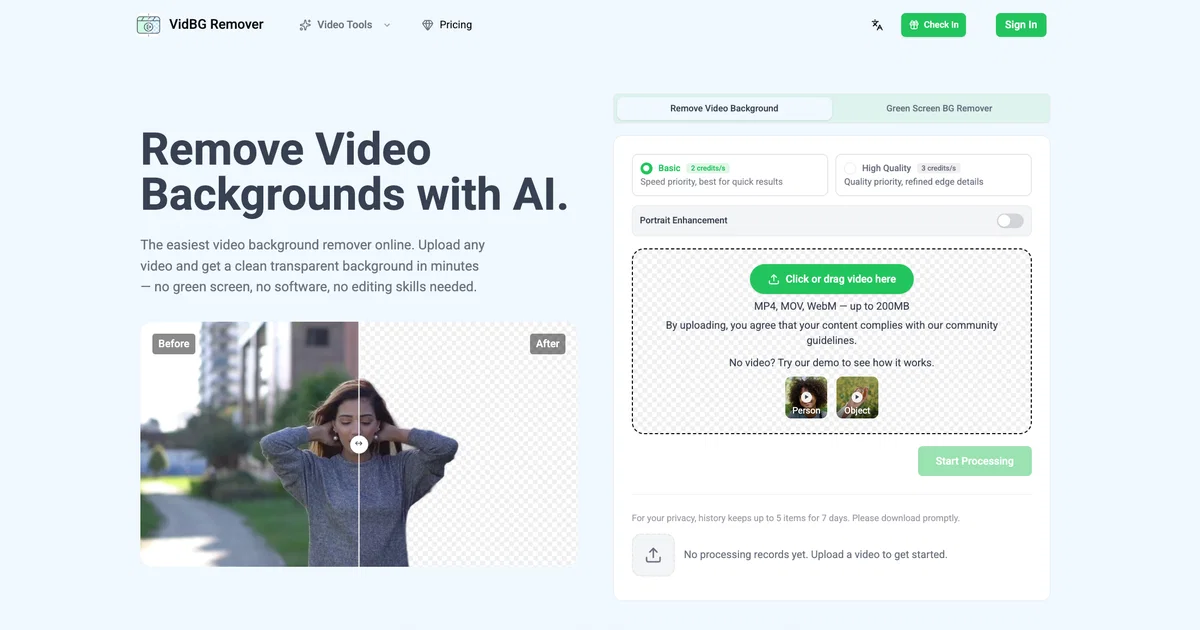
VidBG Remover is an AI-powered tool used for removing video backgrounds without the need for a green screen. It establishes a simple and swift option for content developers, marketers, and creators seeking professional results.
Users can upload videos in formats such as MP4, MOV, or WebM. The video background remover automatically renders videos, providing a clean transparent background while maintaining the stability of edges.
This is particularly useful for various content types like talking head videos, e-commerce ads, online course videos, action shots, animal memes, and car effect videos.
The tool is engineered to handle complex motion like shaky footage and objects passing in front of the subject, preserving natural edges on hair, fingers, and shoulders regardless of the pace of the subject's movement.
Background-free video outputs are available as WebM (VP9) or MOV (ProRes 4444), both of which contain a true alpha channel for genuine transparency. This feature enables creators to drag their videos into video editing software such as Premiere, DaVinci Resolve, After Effects, or CapCut directly, eliminating the need for additional processing.
VidBG Remover ensures secure cloud storage for user files and permits temporary history up to five items for seven days. It encourages privacy by steering clear local processing.
Help other people by letting them know if this AI was useful.
Add your own prompts and outputs to help others understand how to use this AI.
Screenshot gallery
Pros & Cons
Pros
+Cloud-based
+Supports MP4, MOV, WebM
+Handles up to 200MB
+Maintains clean edges
+Before and after preview
+Exports WebM, MOV with alpha
+Useful for different scenarios
+No green screen required
+Stability in complex motion
+Handles shaky footage
+Capability to reuse content
+Compatible with Premiere, DaVinci, AfterEffects, CapCut
+Secure cloud storage
+Temporary history storage
+Upload videos directly
+Automatic rendering
+Genuine transparency in outputs
+Maintains natural edges
+Crisp edges for composite
+Swift option for developers
+Privacy-focused processing
+Processes most clips in minutes
+Maintains stable edges frame by frame
+No flickering in output
+Good for quick results
+Works with various content types
+Provides refined edge details
+Does not require local processing
+Person segmentation capability
+Pay-as-you-go pricing
+No subscription trap
+Fast processing speed
+Real transparent export
+Simple, transparent pricing
+Credits never expire
+Can handle max 60 seconds duration
+Good handling of shaky footage
+Excellent edge stability
+Effective for heavy video processing
+No software installation required
+Handles natural and studio lighting
+No space required for physical green screen
Cons
−Limited to 200MB files
−Only WebM, MOV export
−Lacks local processing
−No multi-video batch processing
−No green screen option
−Limited temporary history storage
−Specific compatible software
−Requires internet connection
−Lacks real-time processing
−Per-use pricing system
A Professional Framework to Evaluate VidBG Remover
When considering VidBG Remover for integration into your organizational workflow, we recommend deploying a structured score card across three critical operational pillars: Security & Compliance, Integration Friction, and long-term Price Scalability. Rather than looking only at basic feature lists, modern procurement teams must assess how a software platform behaves under high load and how well it fits into the team's data security guidelines.
1. Security and Database Compliance
Depending on your operating region and field, ensure that VidBG Remover supports standard security layers such as SOC 2 Type II certifications, GDPR compliance, or HIPAA-compliant database encryption. If the tool connects directly to client database tables or handles user passwords, verify that they implement multi-factor authentication (MFA), single sign-on (SSO) integrations, and end-to-end data encryption in transit and at rest.
2. API Coverage and Custom Integrations
Siloed data is the primary cause of operational friction. Evaluate if VidBG Remover has native connectors for your current project trackers, messaging hubs, and customer communication channels. For custom developer requirements, check if they provide a fully documented REST API with reasonable rate limits, comprehensive Webhooks support, and robust SDK packages in your language. A flexible API layer saves hundreds of hours of manual copy-paste overhead.
3. Total Cost of Ownership (TCO)
SaaS pricing packages are often deceptively simple. When reviewing VidBG Remover's billing structure, map out your team's projected expansion over the next 12 to 24 months. Determine how costs scale as your customer database increases or as you add team members. Factor in setup costs, mandatory support plan upgrades, API access fees, and storage overage rates to understand the true cost before committing to a contract.
By combining verified user reviews from our directory with internal workflow pilot tests, your procurement team can make an informed decision that drives productivity without creating capital waste.
Features of VidBG Remover
Background Removal
Video Editing
AI For Video Editing
Content Creation
Green Screen Alternative
Video Transformation
Free + From $9.9
SaaS1to10 verified reviews for VidBG Remover
Overall rating
★★★★★5.0
Based on 14 reviews
★★★★★5.02 months ago
“Review”
Hey Michael 🙂 Thanks for the honest feedback , and I totally understand where you're coming from. We recently added the tutorial to help new users understand the app quickly, but we hear you , we’ll look into making it optional. Also, just to clarify: we do offer a free plan! You should be able to create and preview documents without paying. If you ran into any issues, please reach out to us at support@WriteDoc.ai , we’d be happy to give you extra free credits and make things right. We’d love the chance to turn that 2⭐️ into a 5⭐️ , and your input helps us get better. Appreciate you giving it a shot! Best, The @WriteDoc.ai Team
Ezzaky Ab.
★★★★★5.02 months ago
“Review”
An amazing and simple tool
Yonatan Fisher
★★★★★5.02 months ago
“Review”
It just feels seamless when I ask it to generate my Q2 marketing docs and polish my email replies. I mean you don't need to write a long prompt and copy all the Re:Re:Re:Re email to it like other LLMs do. You just give a clear instruction and it gets things done.
Alex Zhao
★★★★★5.02 months ago
“Review”
Great free tool. Simple and easy to use. Best of all don't need any subscriptions.
Ecko Max
★★★★★5.02 months ago
“Review”
The generation effect is good, the pictures are exquisite, and the transition animations of the pictures are smooth The only drawback is that it would be better if the generation time were a little faster
GraphThread
★★★★★5.02 months ago
“Review”
Only app I could create video for free! Thanks
7even
★★★★★5.02 months ago
“Review”
I like this. Helped me a lot in dark times. I have elevated anxiety and overthinking but this piece of software comea in handy when I need help. Also it’s affordable so kudos to the team 🤝🏻🤝🏻
Mesut Berk Karataş
★★★★★5.02 months ago
“Review”
NOt transparent, pricing not given, you cannot choose plan prior to registering, or even after that. One prompt free.
Tibor Prievara
★★★★★5.02 months ago
“Review”
You get 300 credits upon signing up, which is enough to test out the app and see its potential. I had a bit of fun with it. It takes a few minutes to generate content, but the results are impressive. There are many styles, modifiers, and customization options available. I would definitely use this for content creation or storytelling.
Daniel Garaiacu
★★★★★5.02 months ago
“Review”
This is my best bro! I communicate with him like my best friend, he always helps to direct my thoughts and ideas in the right direction, always tells me how to improve something and always gives detailed instructions during the conversation. Thanks to him, I’m launching a new project, in which he helps me take my ideas to a new level, just communication, during which you reassemble your concept and rethink your original idea, because you didn’t know how it would be better and more correct. @DeepSeek is my best assistant today, my creative inspiration, who gives me support and confidence in my business, guiding me to realize my dreams)
Gamer TOTORO
★★★★★5.02 months ago
“Review”
Reducing manual efforts in first-pass during code-review process helps speed up the "final check" before merging PRs
Sahil Mohan Bansal
★★★★★5.02 months ago
“Review”
I got some top quality results after learning how to prompt songs 🤩
Claes Lanng
★★★★★5.02 months ago
“Review”
Went from a C to an A in Cognitive Psychology using @Thea!!
Sarah White
★★★★★5.02 months ago
“Review”
WE USE @D-ID AT THE COLORADO VIRTUAL CREATIVE FACTORY...AND LOVE IT.