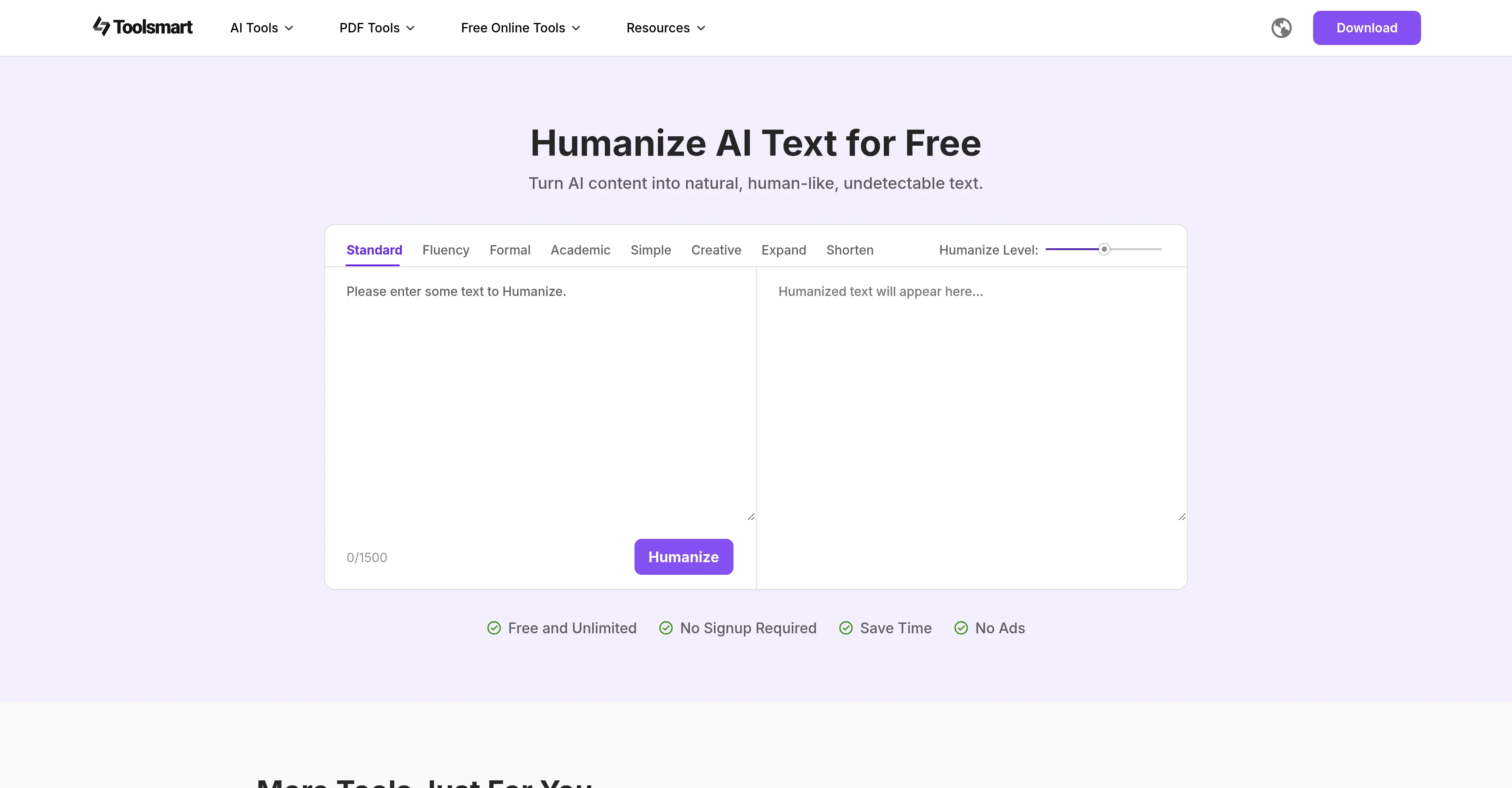
Toolsmart Humanize AI

5.0(25 reviews)

Turn AI text into undetectable human-like content.

Toolsmart Humanize AI Overview

What is Toolsmart Humanize AI?

Humanize AI is a tool developed to refine AI-generated text into a more human-like and natural form. It seeks to improve the tone, clarity, and fluency of the writing, thereby making it more appealing and understandable to the reader. Primarily, Humanize AI assists in transforming robotic verbiage into engaging content that emulates human writing. This tool can be effective for a range of text types, including emails, blog posts, academic reports, and more. Humanize AI offers eight customizing modes that users can choose based on their specific writing needs. These modes enable users to fine-tune their text, aligning with various writing goals such as simplicity, creativity, formality, and academic finesse. Moreover, the users can adjust the level of 'humanized' text intensity according to their preferences. This feature allows users to achieve the desired balance of natural flow and clarity for any type of textual context. Irrespective of the writing style or context, Humanize AI provides the capability to refine AI-written content into a more human-friendly, reader-ready and authentically effortless version. Help other people by letting them know if this AI was useful. Add your own prompts and outputs to help others understand how to use this AI.

Screenshot gallery

Toolsmart Humanize AI screenshot

Pros & Cons

Pros

  • Improves tone, clarity, fluency
  • Transforms robotic verbiage
  • Handles range of text types
  • Offers 8 customizing modes
  • Aligns with varying writing goals
  • Adjustable 'humanized' text intensity
  • Versatile for any textual context
  • Creates reader-friendly text
  • Achieves engaging content
  • Enhances creativity, Academic Finesse
  • Formality level adjustment
  • Free and unlimited usage
  • No signup required
  • Saves time
  • Ad-free
  • Provides multiple humanizing modes
  • Expands short ideas
  • Trims wordy paragraphs
  • Customizable 'human-like' levels
  • Subtle human feel to expressive
  • Improves formal reports to casual blogs

Cons

  • No mobile application
  • No real-time editing feature
  • Not multilingual
  • Limited customization options
  • No grammar check feature
  • No document import capability
  • No text-to-speech function
  • No collaboration feature
  • Not compatible with Microsoft Office
  • No offline mode

A Professional Framework to Evaluate Toolsmart Humanize AI

When considering Toolsmart Humanize AI for integration into your organizational workflow, we recommend deploying a structured score card across three critical operational pillars: Security & Compliance, Integration Friction, and long-term Price Scalability. Rather than looking only at basic feature lists, modern procurement teams must assess how a software platform behaves under high load and how well it fits into the team's data security guidelines.

1. Security and Database Compliance

Depending on your operating region and field, ensure that Toolsmart Humanize AI supports standard security layers such as SOC 2 Type II certifications, GDPR compliance, or HIPAA-compliant database encryption. If the tool connects directly to client database tables or handles user passwords, verify that they implement multi-factor authentication (MFA), single sign-on (SSO) integrations, and end-to-end data encryption in transit and at rest.

2. API Coverage and Custom Integrations

Siloed data is the primary cause of operational friction. Evaluate if Toolsmart Humanize AI has native connectors for your current project trackers, messaging hubs, and customer communication channels. For custom developer requirements, check if they provide a fully documented REST API with reasonable rate limits, comprehensive Webhooks support, and robust SDK packages in your language. A flexible API layer saves hundreds of hours of manual copy-paste overhead.

3. Total Cost of Ownership (TCO)

SaaS pricing packages are often deceptively simple. When reviewing Toolsmart Humanize AI's billing structure, map out your team's projected expansion over the next 12 to 24 months. Determine how costs scale as your customer database increases or as you add team members. Factor in setup costs, mandatory support plan upgrades, API access fees, and storage overage rates to understand the true cost before committing to a contract.

By combining verified user reviews from our directory with internal workflow pilot tests, your procurement team can make an informed decision that drives productivity without creating capital waste.

Features of Toolsmart Humanize AI

  • AI Text Refinement
  • Natural Language Processing
  • Content Optimization
  • Human Like Writing
  • Language Personalization
  • Tone Adjustment

SaaS1to10 verified reviews for Toolsmart Humanize AI

Overall rating

5.0

Based on 25 reviews

5.02 weeks ago

Review

Hey bro, I wanted to share some important feedback. Have the tools been upgraded recently? I’ve noticed a significant drop in quality over the last few days. I am using the exact same prompts that used to generate shockingly realistic results, but now the output just doesn't look the same. The realism is missing. I’ve been a heavy user of your platform and have tried almost all your tools—you guys usually do amazing work—but the current state of the tools is really concerning for me. Could you please consider restoring the previous update? Or, even better, add an option to switch between the 'Older Version' and the 'New Version'? This would allow users to choose the model that works best for them. Please look into this. Thanks!"

Kunnu Mixer

5.02 weeks ago

Review

tried @Veo 3 today and it honestly feels like a sneak peek into the future. one short prompt and it gave me a crisp 4K video with perfect audio and cinematic camera moves. not flawless yet, but wow.

Lark Cube

5.02 weeks ago

Review

I recently started using @Napkin AI, and I couldn't be more impressed! This tool is incredibly user-friendly and intuitive, making it easy to generate clear visual representations from text. Moreover, the interface is clean and visually appealing, which enhances the overall user experience. @Napkin AI is a fantastic companion. Highly recommended for anyone looking to elevate their creative process!

Jobin Mathew

5.02 weeks ago

Review

🌟🌟🌟🌟🌟 5-Star Review "@Art Prompts Generator is a fantastic tool for artists seeking inspiration. It offers vivid, imaginative prompts that ignite creativity and help overcome creative blocks. Highly recommended for anyone looking to explore new artistic ideas!"

Sukul Das PANIKA

5.02 weeks ago

Review

I rarely leave reviews, but Elsa amazed me. After a few weeks of using it, I'm still excited. Props, guys.

Anton

5.02 weeks ago

Review

Prompt asked for did not include any forbidden content and was not remotely touching on any serious or borderline content, yet it would never generate a single prompt and end up just tapping its fingers even after the generate button reverted from generating to generate.

Jackson Kewitsch

5.02 weeks ago

Review

This is a fantastic tool. It helps me a lot to illustrate my poems and short stories.

Carlos Ponce

5.02 weeks ago

Review

It follows the prompt almost precisely and offers a free 4x upscale ;-)

Timeship

5.02 weeks ago

Review

An amazing app, I love the share feature and the comment section summaries

Silvia Cho

5.02 weeks ago

Review

🌟🌟🌟🌟🌟 This AI prompt generation tool is exceptional! It vividly brought to life the jungle scene I envisioned, capturing every detail with remarkable accuracy. The natural expressions, vibrant colors, and serene atmosphere were perfectly rendered. Highly recommended for creative projects!

Sukul Das PANIKA

5.02 weeks ago

Review

Really impressive! The suggestions were simple, and the image came out beautifully well too!

Jojo

5.02 weeks ago

Review

your answer is much too general, so useless. You could have just tell me to ask Perplexity.

Ta

5.02 weeks ago

Review

Not at all accurate…. The only thing similar between original and generated images were the clothes and accessories… face was absolutely new and unconnected.

Shvetank Sharma

5.02 weeks ago

Review

It's accurate, it's fast, it's honest, it's free without sign-up.

Gablo Mo

5.02 weeks ago

Review

nice holistic

Amit ImmI

5.02 weeks ago

Review

I think it's the best @Image Generator I ever found on the net. It gives more accurate image according to the prompt. And thank you for keeping it for free.

My Sawsiri

5.03 weeks ago

Review

Tool seems to be working just fine :D

Daniel Garaiacu

5.03 weeks ago

Review

Dear user, our tool is functioning normally. If you encounter any issues while using it, please feel free to contact us for assistance (marta@wps.com).

Marta Growth

5.03 weeks ago

Review

Tool not working on web

Neha Bhoir

5.03 weeks ago

Review

is it possible to add slovak language?

Zuzana Feriancová

5.03 weeks ago

Review

Best one! The only one that does not add mistakes to fool AI detectors.

Handofaek

5.03 weeks ago

Review

V1.0 Launched :)

Ezzaky Ab.

5.03 weeks ago

Review

@Clever AI Humanizer is a smart solution for making AI text more 'human' at no cost. I've tried it myself, and the results are truly natural, not robotic. Highly recommended for those who frequently use AI for content! 👍🏼

JEFRIE DYLAN

5.03 weeks ago

Review

Hey TAAFT, real talk. AI gives you ideas. But, it doesn't give you a voice. Enter @Humanize.sh. We make AI text sound like a real person, not a bot. Fast, private, and low effort. How: Paste. @Humanize. Copy. Done. Works with ChatGPT, Gemini, Claude, and all the usual suspects. Made for students who want clear essays, honest emails to profs, and captions that don’t scream “generated”. Teachers, creators, everyone welcome. Privacy: we never store your text. Want a demo? Drop one sentence and we'll @Humanize it live :)

Humanize

5.03 weeks ago

Review

Zero GPT which is supposed to be covered detects it with 100% certainty. So... No.

Stephan Tual

Pricing

Starting Price

Contact vendor for pricing

Pricing may vary based on team size and features selected.

Where can Toolsmart Humanize AI be deployed?

  • Cloud, SaaS, Web-Based

Recommended for you