Mumble AI: Voice-first workspace for Mac & iOS1.0

5.0(30 reviews)

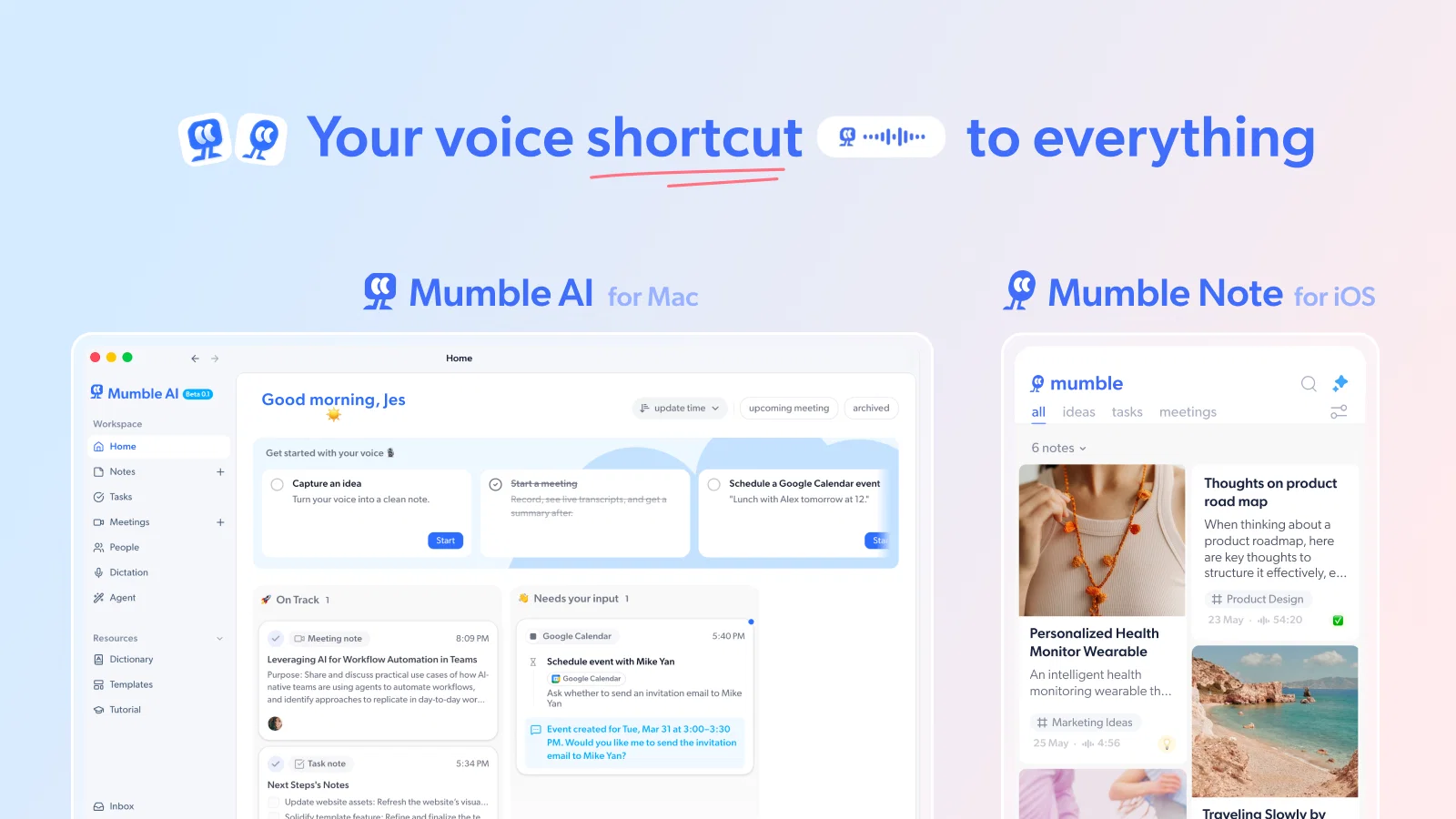
Voice-first AI workspace for meetings, notes, and dictation. Works offline.

Freemium

Mumble AI: Voice-first workspace for Mac & iOS1.0 Overview

What is Mumble AI: Voice-first workspace for Mac & iOS1.0?

One Mac app for meeting, dictation, and voice notes. Meeting notes Dictation Voice notes Local mode Tasks page Templates People 🎙️ AirPods & Bluetooth Recording - Record voice notes with AirPods and other Bluetooth microphones ✅ Smart To-Do Extraction - Automatically extract action items from your notes and sync to Apple Reminders or Google Tasks 📋 One-Click Copy Action Items - Copy and share generated action items as bullet points ⌚ Enhanced Apple Watch App - Select note types directly when recording on your watch 💾 50% Smaller Audio Files - Same quality recordings, half the storage space 🗑️ Flexible Audio Management - Delete audio while keeping transcripts to save space 🧵 Voice Follow-Up Add voice follow-ups to existing notes. Your new voice input will be transcribed and appended to the end of the original note. ✅ Task List Sync Choose a specific list in Apple Reminders or Google Tasks for synced to-dos. ⌚ Apple Watch Upgrades Pause/resume recordings and select note type directly on your watch. 📝 Default Note Format Set your preferred note format (bullet, paragraph, dictation) as default. 📅 Date & Time-Aware Task Sync Tasks with dates/times are synced to calendar and task apps accordingly. 🗑️ Task Deletion Sync Deleted tasks in Mumble are now removed from connected apps too. ⚡️ Performance Improvements Faster uploads, better voice processing under poor network conditions. ⭐️ Starter Plan You can now record up to 3000 minutes of voice notes per month, with up to 120 minutes per note, at a more accessible price with Starter Plan. a perfect alternative to Pro Plan for light to moderate users. 📝 Draft AI Notes You can now ask Mumble AI to draft a summary note for your Collection based on all the notes inside. Just give it a simple voice command, and watch your scattered thoughts turn into one clean, structured note. 🔊 Voice Follow-ups Voice follow-ups are now supported. Add a new voice note to an existing one by tapping the "Add follow-up" button from the bottom menu. 🖼️ AI Mode for Images AI Mode now also support image notes. When you save an image to Mumble, it will: Let you record a voice note or extract text from the image Auto-suggest the most relevant Collection based on the content Extract action items from the text if any are found 📎 Other Updates You can now set a time for recommended to-dos. Once accepted, they’ll be automatically added to your connected calendars at the specified time. Tooltips have been added for key AI features to help you use them more effectively. Temporary Removal of AI Cover Images We’ve temporarily removed AI-generated cover images for Collections. This feature is being refined for better stability and will be brought back in a future update. 🖤 Dark Mode Dark Mode has been one of the most requested features, and it’s finally here. You can now switch between Light, Dark, or System default themes in Settings → Theme. It’s a small change that makes a big difference, especially for night owls, ADHD users or anyone who prefers a calmer interface. 📅 New App Integrations The app integrations tab is finally here, and this is just the beginning. For this batch, we’re starting with three. You can now link Mumble Note with: Things: Automatically send tasks to your Things inbox. Apple Reminders: Sync voice-captured to-dos with Reminders. Apple Calendar: Add time-based action items to your calendar directly. Google Calendar & Task Integration: With the new Google integration, you can connect your account once and have events and action items mentioned in your voice notes will automatically show up in Google Calendar &Google Tasks Once set up, tasks can flow out of Mumble without copy-pasting or manual entry. 🎙️ Note Types Not all notes are the same. Now you can tell Mumble what kind of note you’re making before you hit record. This helps the AI tailor the structure and content to your goal — whether you’re jotting down tasks or capturing full meeting notes. Choose from: Task – Extract clear action items and send them to your inbox Meeting – Automatically transcribe and summarize key points, decisions, and follow-ups. It works like a personal meeting summary tool Idea – Speak freely, and Mumble will organize your brainstorm into a coherent layout Quick Note – Just capture what’s on your mind, no structure needed Whether you’re planning, recording, or reflecting, Mumble helps turn raw audio into useful output. 🖼️ Extract Image Text You can now extract text and key info directly from images. Whether you’re sending a screenshot or starting a voice note with images, just tap “Extract image text”—Mumble will summarize it or combine it with your voice note. 📝 AI-Recommended Collections When you create a new voice note but don’t have the right collection for it yet, Mumble will suggest one based on the content. You can accept or reject with a tap. It’s a small step to keep everything organized faster. Less manual sorting, more flow. 🖼️ Extract Image Text You can now extract text and key info directly from images. Whether you’re sending a screenshot or starting a voice note with images, just tap “Extract image text”—Mumble will summarize it or combine it with your voice note. 📝 AI-Recommended Collections When you create a new voice note but don’t have the right collection for it yet, Mumble will suggest one based on the content. You can accept or reject with a tap. It’s a small step to keep everything organized faster. Less manual sorting, more flow. Try out these exciting updates now and elevate the way you capture and organize your thoughts! Help other people by letting them know if this AI was useful. Add your own prompts and outputs to help others understand how to use this AI.

Screenshot gallery

Mumble AI: Voice-first workspace for Mac & iOS1.0 screenshot

Pros & Cons

Pros

  • Converts voice notes instantly
  • Transforms ideas into actionable notes
  • Allows image insertion
  • Image annotation with voice
  • Link summarization
  • Creates to-do lists
  • Automated note categorization
  • Easy note retrieval
  • Effortless navigation
  • Connects scattered notes
  • Generates creative output
  • Ensures privacy and security
  • Encrypts sensitive information
  • Voice note editing
  • Structured note formation
  • Supports instant idea dumping
  • Allows note modification
  • Auto-organizes with memory nodes
  • Supports iOS platform
  • Available for beta testing
  • In-app and external image addition
  • Automated note restructuring
  • Voice input transformation beyond transcription
  • Adjustable structured notes
  • Automated note organization for retrieval

Cons

  • no web app
  • No manual tags
  • Dependence on voice clarity
  • No Android version
  • Voice editing limitations

A Professional Framework to Evaluate Mumble AI: Voice-first workspace for Mac & iOS1.0

When considering Mumble AI: Voice-first workspace for Mac & iOS1.0 for integration into your organizational workflow, we recommend deploying a structured score card across three critical operational pillars: Security & Compliance, Integration Friction, and long-term Price Scalability. Rather than looking only at basic feature lists, modern procurement teams must assess how a software platform behaves under high load and how well it fits into the team's data security guidelines.

1. Security and Database Compliance

Depending on your operating region and field, ensure that Mumble AI: Voice-first workspace for Mac & iOS1.0 supports standard security layers such as SOC 2 Type II certifications, GDPR compliance, or HIPAA-compliant database encryption. If the tool connects directly to client database tables or handles user passwords, verify that they implement multi-factor authentication (MFA), single sign-on (SSO) integrations, and end-to-end data encryption in transit and at rest.

2. API Coverage and Custom Integrations

Siloed data is the primary cause of operational friction. Evaluate if Mumble AI: Voice-first workspace for Mac & iOS1.0 has native connectors for your current project trackers, messaging hubs, and customer communication channels. For custom developer requirements, check if they provide a fully documented REST API with reasonable rate limits, comprehensive Webhooks support, and robust SDK packages in your language. A flexible API layer saves hundreds of hours of manual copy-paste overhead.

3. Total Cost of Ownership (TCO)

SaaS pricing packages are often deceptively simple. When reviewing Mumble AI: Voice-first workspace for Mac & iOS1.0's billing structure, map out your team's projected expansion over the next 12 to 24 months. Determine how costs scale as your customer database increases or as you add team members. Factor in setup costs, mandatory support plan upgrades, API access fees, and storage overage rates to understand the true cost before committing to a contract.

By combining verified user reviews from our directory with internal workflow pilot tests, your procurement team can make an informed decision that drives productivity without creating capital waste.

Features of Mumble AI: Voice-first workspace for Mac & iOS1.0

  • Agent
  • AI Note Taker
  • Dictation
  • Idea Capture
  • Local
  • Meeting Notes
  • Free + From $3/Mo

SaaS1to10 verified reviews for Mumble AI: Voice-first workspace for Mac & iOS1.0

Overall rating

5.0

Based on 30 reviews

5.02 weeks ago

Review

I don’t know if it’s appropriate to give a rating at this point as the product is not released but the rating I’m giving is based on the overall concept of the company which I think is pretty genius. I’ve always been hesitant to utilize technology that basically gives full access to my data from sales calls and presentations that in many cases include very valuable information as far as our IP and having it instead be completely local where the data never leaves my Mac, is an incredibly good value proposition. Looking forward to when they release it as I certainly will be a customer if the results mirror the claims made at this point on the website. I think more companies should start focusing on localizing AI products as I see this being a significant value as AI continues to advance.

Brandon Gillespie

5.02 weeks ago

Review

This is my favourite, so handy and works brilliant

Colin Fitzpatrick

5.02 weeks ago

Review

Useful to quickly explore the content of and interconnections between research papers. Makes it a more fun process.

Jon Hasworth

5.02 weeks ago

Review

Keep improving!

Abubakr Jajja

5.02 weeks ago

Review

I liked it, it was easy to use and the generated website was perfect.

Ibrahim Taisir

5.02 weeks ago

Review

Went from a C to an A in Cognitive Psychology using @Thea!!

Sarah White

5.02 weeks ago

Review

I swear this actually saved me a lot. 100% recommend to anyone.

307LLL

5.02 weeks ago

Review

Suppppeeeeerrr! Wowwww! @Mindsmith is absolutely fantastic! It is incredibly useful, easy to use, and very professional.

Claudia Scilletta

5.02 weeks ago

Review

O GPT faz uma análise melhor e mais personalizada.

Vinicius Vilela

5.02 weeks ago

Review

I can't explain how impressed i am by this. I've seen tools to help you brainstorm ideas, but not one to break your task down into big steps, then little steps for each of these. Plus "games" to help come up with more ideas for your project. I'm excited to use this!

ImpulseOscar

5.02 weeks ago

Review

No other tool quite like this, it's pretty straightforward. Needed to extract a long interview from YouTube and it extracted everything, providing it in different meaningful formats in less than two minutes. Awesome

Juan Sierra

5.02 weeks ago

Review

This is actually amazing. It has all the main features I need to be very efficient at my work.

Abroad in China

5.02 weeks ago

Review

Very interesting

Béatrice Duval

5.02 weeks ago

Review

I joined Kin's beta program on my iPhone XR. After upgrading to an iPhone 13, I found that I couldn't log into my existing account on the new phone, forcing me to create a new account. Now, I have two separate Kin accounts on different phones. Today, when I accessed the beta version of Kin, I got a notification stating that the test version ended on Monday, September 23rd. It instructed me to back up my data and move to the official Kin app. I did as advised—backed up my data, confirmed, uninstalled the beta app via TestFlight, and installed the official Kin app. However, when I attempted to “log in”, I was still unable to access my existing account. This issue hasn't been resolved yet. I have been trying desperately to get in contact with the support team. I left feedback through the test flight app and sent emails. No response. Now trying to find a forums, Reddit posts, TAAFT comments☻

Desiree Miller

5.02 weeks ago

Review

Really like how it finds connection in the content that I save. I don't think any other tool can do that.

amix ffx

5.02 weeks ago

Review

This tool i found is super cool, I created 5 books from this tool to sell them online, which gives me great profit. I am creating more valuable books to spread knowledge, and earn some bucks as well 🤑.

Bilal Ashraf

5.02 weeks ago

Review

wow, I just tried this and I'm actually shocked as to how good this is... Half the price of using GPT/Claude to help me with my notetaking and it's honestly 10x faster. This is a gamechanger for me, thank you!!

Ashton Tarantino

5.02 weeks ago

Review

I think it's the best @Image Generator I ever found on the net. It gives more accurate image according to the prompt. And thank you for keeping it for free.

My Sawsiri

5.03 weeks ago

Review

I capture my fleeting thoughts with this tool. Thumbs up.

Samantha Ash

5.03 weeks ago

Review

Very handy tool to take notes on the go. I like that it's easy to attach photos and images to the note taken.

2002AndThen

5.03 weeks ago

Review

Very interesting tool and useful ❤️👌🏽👏🏽🙏🏽

Béatrice Duval

5.03 weeks ago

Review

Is app not available for Android users

satish patel

5.03 weeks ago

Review

Unfortunately, yes. It looks like the app is available only on iOS, as of today.

Alexandru Bostina

5.03 weeks ago

Review

cant use with android

Shake

5.03 weeks ago

Review

Love the auto collection and to-do list feature. I just dump my thoughts with voice and get organized notes. My tasks are synced to my task and calendar apps automatically.

Eric

5.03 weeks ago

Review

I love this and the support that they give seriously for somebody with ADHD. I have a hard time being able to take notes this organizes them and does so much more AI. Allows you to ask follow-up questions etc. Definitely the app for somebody with adhd, and that needs to organize our thoughts

Bella Blast

5.03 weeks ago

Review

Very useful app..but not work in android...

Markus

5.03 weeks ago

Review

Mumble Note is a game-changer if you're on IOS and rely on voice notes. It's great for ADHD minds or anyone who thinks out loud. That said, it's frustrating that there's no Android version yet and sometimes it can mishear things if your voice isn't clear, but I think it's one of the smartest note-takers out there. :D

Efat Borges

5.03 weeks ago

Review

Super simple, beautiful integration into a broad range of workflows.

David Samuels

5.03 weeks ago

Review

Hey this is Tan, I'm the creator of NotesBot. I created this tool because I needed it for my own meetings. After using myself and getting great summarization reviews from my peers, I decided to release it to the public. After release, we realized people were also using it for Dungeons and Dragons, I then added a DnD mode. This tool is non-invasive, very easy to set up, and perfect for meetings. I hope you enjoy using it!

Tan Arin

Pricing

Starting Price

Free plan available

Free tier available with optional paid upgrades.

Where can Mumble AI: Voice-first workspace for Mac & iOS1.0 be deployed?

  • Cloud, SaaS, Web-Based

Recommended for you