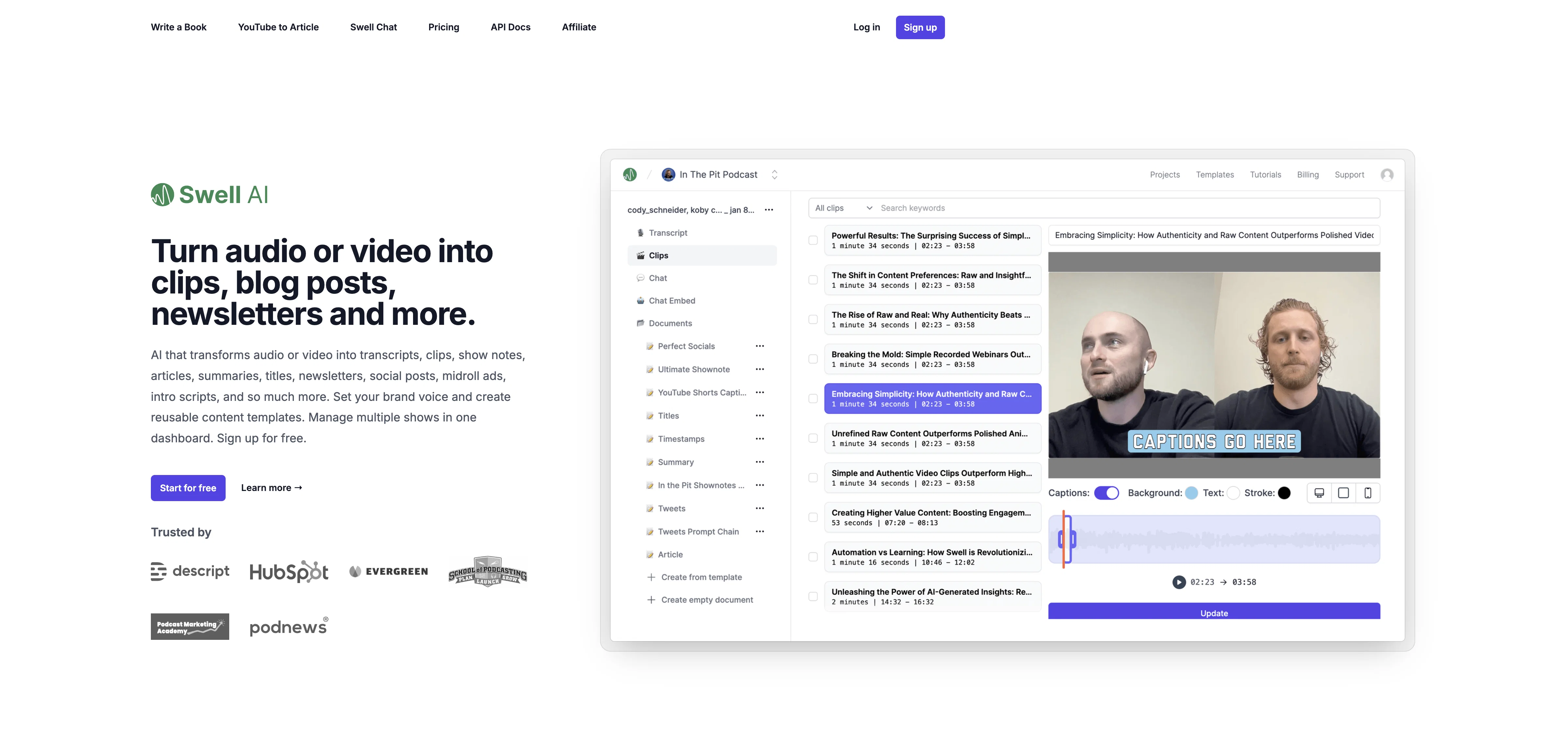
Swell AI is a versatile tool designed to repurpose audio or video content across multiple marketing channels. Its principal function involves transforming podcasts or videos into diverse output formats such as transcripts, clips, show notes, articles, summaries, titles, newsletters, and social posts.
This tool provides an easy-to-use interface where users can upload their media files, generate content, and export it to any desired channel. Users also have the liberty to preset their brand voice and form reusable content templates.
The platform facilitates the management of multiple shows in a single dashboard. To enhance the user experience, Swell AI includes a sophisticated transcript editor which allows users to highlight and clip sections of transcripts and saves these clips automatically for team access.
Additionally, Swell AI recognizes individual speakers and labels them automatically in the transcript. It also comes with a public sharing feature which enables users to share their work with either their team or the wider public.
Swell AI is suitable for those looking to streamline content creation from audio or video sources and optimize it for various marketing purposes.
Help other people by letting them know if this AI was useful.
Add your own prompts and outputs to help others understand how to use this AI.
Screenshot gallery
Pros & Cons
Pros
+Automates content writing
+Content from podcasts and videos
+Generates summaries, transcripts
+Creates show notes, social media posts
+Produces SEO-ready content
+Long format, readable content
+Offers API integration
+Handles Apple Podcast and RSS feed import
+Exports to Dropbox or Google Drive
+Chat interface powered by ChatGPT
+Different pricing plans
+Free sign up with limited usage
+Useful for podcasters, content creators, businesses
−Potential compatibility issues with specific podcast platforms
−No multi-language support
−Limited brand voice customization
−Sophistication of chatbot chatGPT uncertain
A Professional Framework to Evaluate Swell AI
When considering Swell AI for integration into your organizational workflow, we recommend deploying a structured score card across three critical operational pillars: Security & Compliance, Integration Friction, and long-term Price Scalability. Rather than looking only at basic feature lists, modern procurement teams must assess how a software platform behaves under high load and how well it fits into the team's data security guidelines.
1. Security and Database Compliance
Depending on your operating region and field, ensure that Swell AI supports standard security layers such as SOC 2 Type II certifications, GDPR compliance, or HIPAA-compliant database encryption. If the tool connects directly to client database tables or handles user passwords, verify that they implement multi-factor authentication (MFA), single sign-on (SSO) integrations, and end-to-end data encryption in transit and at rest.
2. API Coverage and Custom Integrations
Siloed data is the primary cause of operational friction. Evaluate if Swell AI has native connectors for your current project trackers, messaging hubs, and customer communication channels. For custom developer requirements, check if they provide a fully documented REST API with reasonable rate limits, comprehensive Webhooks support, and robust SDK packages in your language. A flexible API layer saves hundreds of hours of manual copy-paste overhead.
3. Total Cost of Ownership (TCO)
SaaS pricing packages are often deceptively simple. When reviewing Swell AI's billing structure, map out your team's projected expansion over the next 12 to 24 months. Determine how costs scale as your customer database increases or as you add team members. Factor in setup costs, mandatory support plan upgrades, API access fees, and storage overage rates to understand the true cost before committing to a contract.
By combining verified user reviews from our directory with internal workflow pilot tests, your procurement team can make an informed decision that drives productivity without creating capital waste.
Features of Swell AI
API
Content Repurposing
Audio To Text
Video To Text
Content Marketing
Content Transformation
Free + From $29/Mo
SaaS1to10 verified reviews for Swell AI
Overall rating
★★★★★5.0
Based on 18 reviews
★★★★★5.01 months ago
“Review”
For professional copy the constraint is usually voice consistency across a team rather than raw output. Is there a way to hold a house style - words the brand avoids, claims it is not allowed to make, the reading level it writes to - and enforce it across everyone using the account? That is the part manual editing never manages to keep up with.
Seonix AI
★★★★★5.02 months ago
“Review”
Great product! Summaries, social media content, promo content and more, all generated once we upload our episode. It's saved us a ****load of time!!
Mark S
★★★★★5.02 months ago
“Review”
page is down
St. W
★★★★★5.02 months ago
“Review”
NOT FREE! DO NOT USE. ITS REQUIRED $99.99 A YEAR OR $15 A MONTH!!!!
John Doe
★★★★★5.02 months ago
“Review”
It took me less than 20 minutes to create infographic perfection- all the other AI design sites I tried, and I tried them all, weren't able to give me what I wanted in 1 way or another. Outline Ninja helped me create my infographic
Gay Shirer
★★★★★5.02 months ago
“Review”
It doesn't allow me to upload a file with less then 1GB and sends the message "Tenant ID missing"...
Fil Ca
★★★★★5.02 months ago
“Review”
Finally, a prompt optimizer that makes sense, adding power to my own words. Easy to expand details, easy to go deeper and to get exactly what I need to squeeze out incredible results with ChatGPT. The Prompt_Enhancer setting is something serious. Thanks guys, keep on providing excellent AI tools!
Hollie Arsement
★★★★★5.02 months ago
“Review”
Such an impressive platform for all of us who are looking for more efficient ways to do the investigation. @OpenRead has the potential to solve our problems.
Zhuohang Tong
★★★★★5.02 months ago
“Review”
No good at pdfs
Chris Cox
★★★★★5.02 months ago
“Review”
No longer cites works and the free version only allows for 275 words. Expensive subscription for subpar output. Help team is also non responsive.
Kar Bar
★★★★★5.02 months ago
“Review”
Seems to be working for me. Maybe try again?
Aramis
★★★★★5.02 months ago
“Review”
I didn't get to the voices. I don't give my credit card information up front. I clicked away as soon as I saw that. It's a shame too, the pricing structure looked great.
David Marshall
★★★★★5.02 months ago
“Review”
Really like how it finds connection in the content that I save. I don't think any other tool can do that.
amix ffx
★★★★★5.02 months ago
“Review”
I tried using it but the website has too many bugs.
João Neiva
★★★★★5.02 months ago
“Review”
An amazing app, I love the share feature and the comment section summaries
Silvia Cho
★★★★★5.02 months ago
“Review”
It seems to be working fine right now. Maybe try again and double check if you’re using the book’s original or most recognized title. That might make a difference.
Alexandru Bostina
★★★★★5.02 months ago
“Review”
I'm still testing the tool yet it looks very promising. I tested it with a 5.5k words Academic text that I had previously red. I tested the Key points feature, it does work!
Ivana González
★★★★★5.02 months ago
“Review”
I played around with @PodScribe.IO for just 5 minutes, and it helped me save at least 35 minutes when transcribing my first podcast (for free - have not subscribed to the paid version yet). That's pretty sweet! The way it presents and separates podcast data into different formats is really well done. It makes it super easy to find what you're looking for.