5.01 months ago
“Review”
Not at all accurate…. The only thing similar between original and generated images were the clothes and accessories… face was absolutely new and unconnected.
Shvetank Sharma

Generate and translate video subtitles automatically
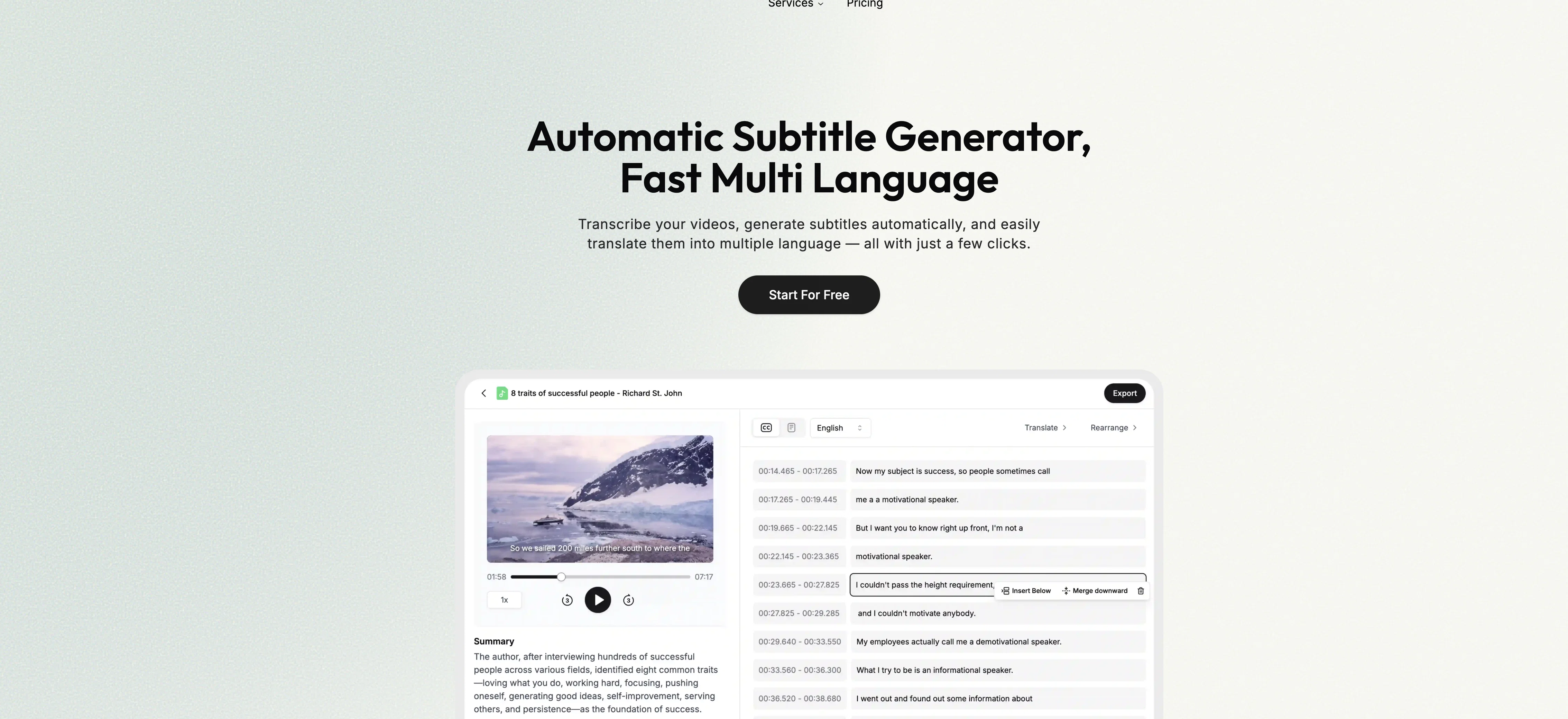
SubtitleGen is an advanced AI platform designed to streamline your subtitling process. This tool offers a simple workflow for transcribing video or audio content into text, automatically generating accurate subtitles, and customizing them to your needs. Beyond transcription and automatic subtitle generation, it has the ability to translate subtitles into multiple languages, ensuring your content is accessible and engaging for global audiences. User experience is one of the platforms key strengths. After uploading your video, the system auto-generates subtitles which are then available for review and prompt editing. It also features an online subtitle editor to facilitate real time edits right in your browser. In addition to subtitle generation and editing, users can easily export the final output. The tool supports a wide array of languages, providing the flexibility to generate subtitles in your preferred language. The system is advanced, providing accurate transcriptions, automatic subtitles, and multi-language translations. Its online accessibility means there is no software to install and it is compatible with any device that supports a web browser. The platform prioritizes data security, ensuring enterprise-grade protection for your content. Help other people by letting them know if this AI was useful. Add your own prompts and outputs to help others understand how to use this AI.
When considering SubtitleGen for integration into your organizational workflow, we recommend deploying a structured score card across three critical operational pillars: Security & Compliance, Integration Friction, and long-term Price Scalability. Rather than looking only at basic feature lists, modern procurement teams must assess how a software platform behaves under high load and how well it fits into the team's data security guidelines.
Depending on your operating region and field, ensure that SubtitleGen supports standard security layers such as SOC 2 Type II certifications, GDPR compliance, or HIPAA-compliant database encryption. If the tool connects directly to client database tables or handles user passwords, verify that they implement multi-factor authentication (MFA), single sign-on (SSO) integrations, and end-to-end data encryption in transit and at rest.
Siloed data is the primary cause of operational friction. Evaluate if SubtitleGen has native connectors for your current project trackers, messaging hubs, and customer communication channels. For custom developer requirements, check if they provide a fully documented REST API with reasonable rate limits, comprehensive Webhooks support, and robust SDK packages in your language. A flexible API layer saves hundreds of hours of manual copy-paste overhead.
SaaS pricing packages are often deceptively simple. When reviewing SubtitleGen's billing structure, map out your team's projected expansion over the next 12 to 24 months. Determine how costs scale as your customer database increases or as you add team members. Factor in setup costs, mandatory support plan upgrades, API access fees, and storage overage rates to understand the true cost before committing to a contract.
By combining verified user reviews from our directory with internal workflow pilot tests, your procurement team can make an informed decision that drives productivity without creating capital waste.
Overall rating
Based on 23 reviews
Not at all accurate…. The only thing similar between original and generated images were the clothes and accessories… face was absolutely new and unconnected.
Shvetank Sharma
Not really worth it, not only does it only support Youtube, but can only generate up to 30s of video and has no options to control the image style.
Martin Tsolov
Scam, start you with zero credits.
Mr Trick
Asks for payment straight away, no way to establish an opinion without subscription.
Dustin Helies
Pricing too steep for the offered quality.
Richard Stone
I swear this actually saved me a lot. 100% recommend to anyone.
307LLL
Thanks for free credits. Please 🙏 adapt for mobile💪
Budget Plusit
typed in my prompts and boooooom. clean descriptions in secs lol. handy if you suck at writing (like me). lowkey a cheat code (no san andreas)
Liam Therrien
Selamat siang saya akan membagikan tutorial gimana caranya mengedit video di aplikasi capcut
Rhyben Rinto
We will give you guys a go! thanks!
Silent Co
I got some top quality results after learning how to prompt songs 🤩
Claes Lanng
This tool i found is super cool, I created 5 books from this tool to sell them online, which gives me great profit. I am creating more valuable books to spread knowledge, and earn some bucks as well 🤑.
Bilal Ashraf
Helped condense 2-3 hours of work to 30 minutes, just gotta review well. 5 stars
Pete
no free option to try
AbandonedMuse
Great tool for my video content
Silvia Cho
It's very helpful
Syed Zaid i
I think it's the best @Image Generator I ever found on the net. It gives more accurate image according to the prompt. And thank you for keeping it for free.
My Sawsiri
tried @Submagic and it does the job, auto captions came out clean and it’s super easy to use. free trial lets you upload 3 vids which is enough to test it out, but the watermark on them means you can’t really use those exports anywhere. still, pretty solid tool overall :p
Devandra Daniel
Amazing functionality! I created stunning animations for my online courses.
Mikael
It doesn't create the subtitles and it doesn't let you upload them. You can only create them manually
francesco tagliamonte
starts in 59$mo
Igor Medeiros
Amazing tool! Just started working on my videos and I’m loving everything @RenderCut offers. It’s super easy to use and saves me a ton of time with subtitles. 5 tacos, no doubt!
Render Cut
This one is CRAAAAAZY! drop your MP4/MOV, it locks captions to speech cleanly (also multi-language), the in-browser editor is solid and you can either export SRT for youtube or burn the subs in shorts with a couple clicks. it's a W for creators :D
Chris Studioz
Starting Price
Free plan available
Free tier available with optional paid upgrades.


