5.01 months ago
“Review”
Such an impressive platform for all of us who are looking for more efficient ways to do the investigation. @OpenRead has the potential to solve our problems.
Zhuohang Tong

AI-powered snipping tool for smarter image analysis
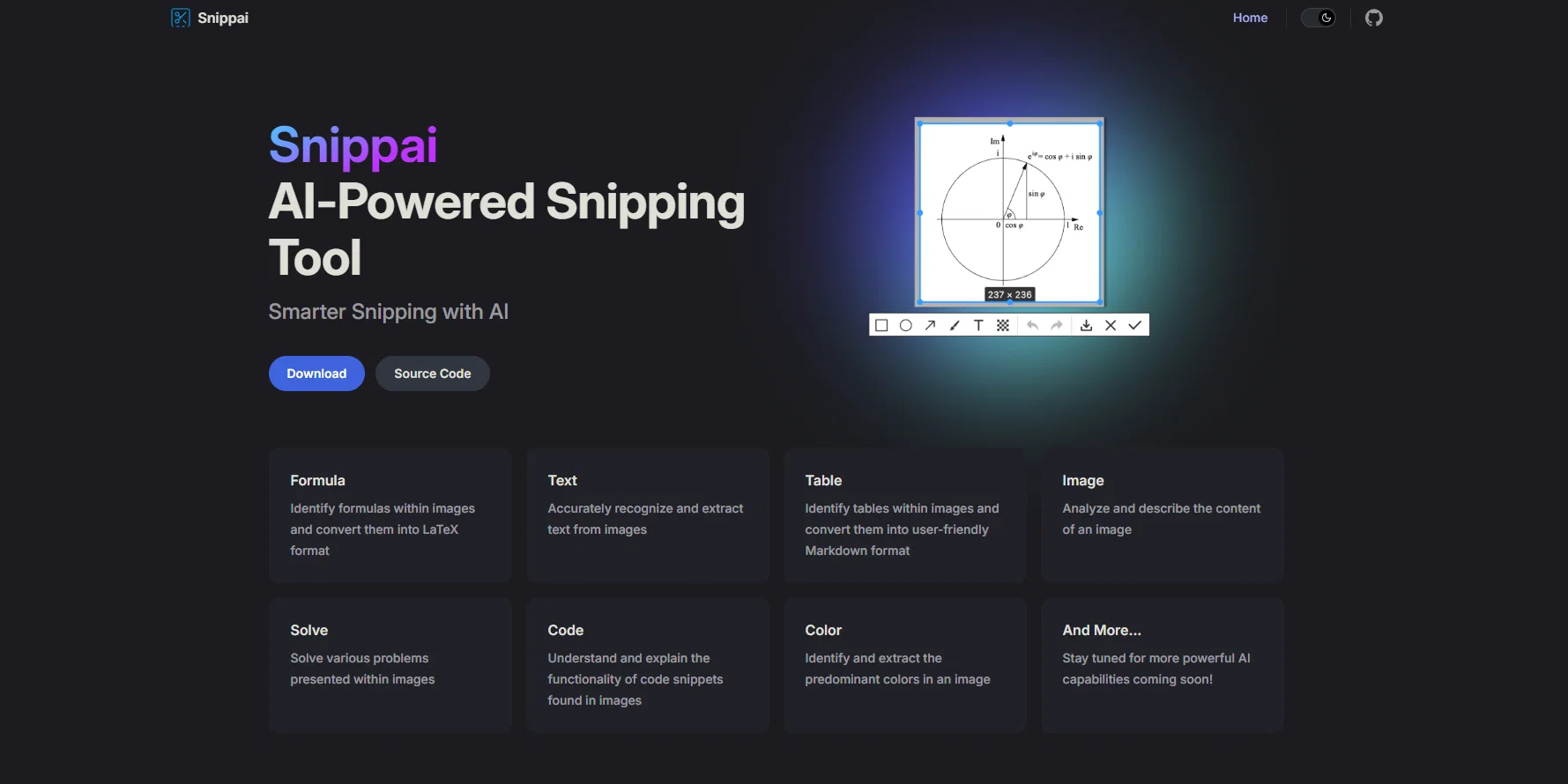
Snippai is an AI-powered snipping tool designed to make elements within screenshots and images more accessible and usable. Offering a more intelligent way to snip, the application uses AI to analyze and decipher different elements in an image. This tool includes a variety of functionalities: 1. Formula Identification: Snippai can identify mathematical formulas within images and then convert these formulas into the universally recognized LaTeX format.2. Text Extraction: It has the capability to recognize and extract text from an image, effectively turning a picture into editable text. 3. Table Recognition: Snippai is capable of picking out tables from within images and converting those into user-friendly Markdown format.4. Image Analysis: It can analyze and describe what the content of an image is, providing basic image recognition capabilities.5. Problem Solving: It can solve problems presented in image format, demonstrating basic comprehension and decision-making capabilities. 6. Code Explanation: Understands the functionality of code snippets found in images, allowing for more sophisticated comprehension and description of technical elements. 7. Color Identification: Snippai identifies and extracts the most prominent colors in an image. With all these functionalities, the tool aims to continuously update and add more capabilities to enhance its utility for users. Help other people by letting them know if this AI was useful. Add your own prompts and outputs to help others understand how to use this AI.
When considering Snippai for integration into your organizational workflow, we recommend deploying a structured score card across three critical operational pillars: Security & Compliance, Integration Friction, and long-term Price Scalability. Rather than looking only at basic feature lists, modern procurement teams must assess how a software platform behaves under high load and how well it fits into the team's data security guidelines.
Depending on your operating region and field, ensure that Snippai supports standard security layers such as SOC 2 Type II certifications, GDPR compliance, or HIPAA-compliant database encryption. If the tool connects directly to client database tables or handles user passwords, verify that they implement multi-factor authentication (MFA), single sign-on (SSO) integrations, and end-to-end data encryption in transit and at rest.
Siloed data is the primary cause of operational friction. Evaluate if Snippai has native connectors for your current project trackers, messaging hubs, and customer communication channels. For custom developer requirements, check if they provide a fully documented REST API with reasonable rate limits, comprehensive Webhooks support, and robust SDK packages in your language. A flexible API layer saves hundreds of hours of manual copy-paste overhead.
SaaS pricing packages are often deceptively simple. When reviewing Snippai's billing structure, map out your team's projected expansion over the next 12 to 24 months. Determine how costs scale as your customer database increases or as you add team members. Factor in setup costs, mandatory support plan upgrades, API access fees, and storage overage rates to understand the true cost before committing to a contract.
By combining verified user reviews from our directory with internal workflow pilot tests, your procurement team can make an informed decision that drives productivity without creating capital waste.
Overall rating
Based on 19 reviews
Such an impressive platform for all of us who are looking for more efficient ways to do the investigation. @OpenRead has the potential to solve our problems.
Zhuohang Tong
Wow, wonderful project.
Palash Roy
This tool i found is super cool, I created 5 books from this tool to sell them online, which gives me great profit. I am creating more valuable books to spread knowledge, and earn some bucks as well 🤑.
Bilal Ashraf
Went from a C to an A in Cognitive Psychology using @Thea!!
Sarah White
After my first use, I think it's surprisingly good. The only drawback so far is the PDF export option for the report which is formatless.
Alejandro Correa
I like some of the ideas it showed, but i'm stuck thinking about the initial investment some of them need. Is there a way you can add that info later?
jessica.joyride
Thanks, works!
Canada Centrist
Great accuracy and easy to crosscheck with the provided hyperlinks to the sources.
Marius Schmitt
I would highly recommend for researches and students. useful to manage your articles and use AI to get the key points.
Hamed Mousavi
Finally, a prompt optimizer that makes sense, adding power to my own words. Easy to expand details, easy to go deeper and to get exactly what I need to squeeze out incredible results with ChatGPT. The Prompt_Enhancer setting is something serious. Thanks guys, keep on providing excellent AI tools!
Hollie Arsement
too expensive for me, I just want to make memes, not pay that much
Grzegorz Rolnik
I joined Kin's beta program on my iPhone XR. After upgrading to an iPhone 13, I found that I couldn't log into my existing account on the new phone, forcing me to create a new account. Now, I have two separate Kin accounts on different phones. Today, when I accessed the beta version of Kin, I got a notification stating that the test version ended on Monday, September 23rd. It instructed me to back up my data and move to the official Kin app. I did as advised—backed up my data, confirmed, uninstalled the beta app via TestFlight, and installed the official Kin app. However, when I attempted to “log in”, I was still unable to access my existing account. This issue hasn't been resolved yet. I have been trying desperately to get in contact with the support team. I left feedback through the test flight app and sent emails. No response. Now trying to find a forums, Reddit posts, TAAFT comments☻
Desiree Miller
Suppppeeeeerrr! Wowwww! @Mindsmith is absolutely fantastic! It is incredibly useful, easy to use, and very professional.
Claudia Scilletta
This is going to be a contender in the Chat era. I tried it and it pulled information up that others could not. You have to be very precise when asking a question to get a correct response. I like it.
Leonie McLeggan
This is a powerful and helpful real-life app.
Sue
Useful tool for visualizing traffic flowing through your website. Does what GA4 does but without the headache and unnecessary learning curve.
Nic Miller
No working links.
Allan Jackson
Very unique document parser. Works extremely well even on complex PDF tables and emails
Zhou
I’ve used ChatGPT, I’ve tried scraping tools, and this just blew my mind. @Chat4Data is like GPT got tired of talking and started doing things. I literally type ‘get me all the product listings from this page’ — and boom, it’s done. No code. No setup. Just results. 10/10 would recommend.
Kevin Liu
Starting Price
Free plan available
Free tier available with optional paid upgrades.


