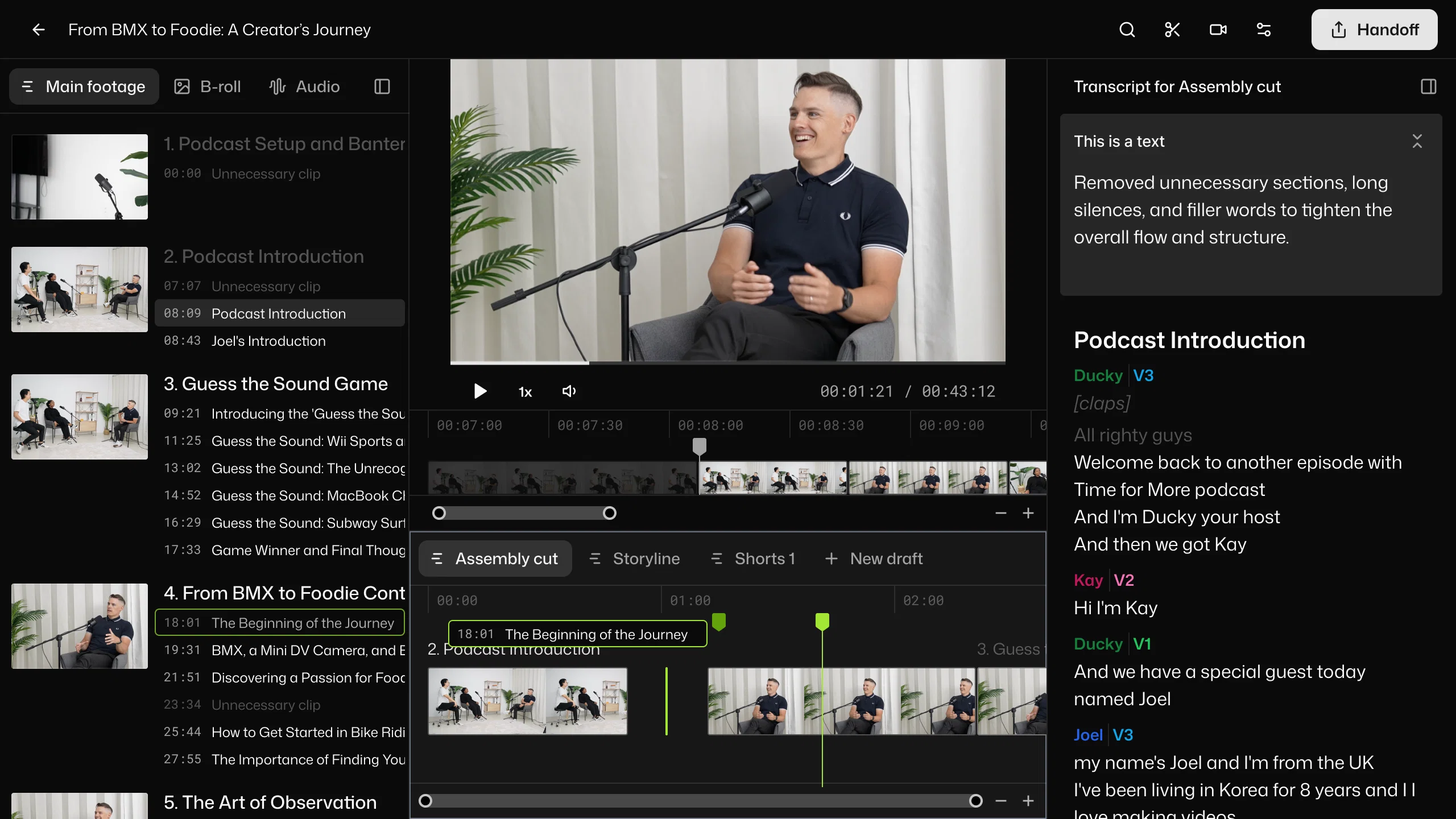
Selects by Cutback is an AI-powered tool designed to streamline and automate the post-production process for creators and studios. The tool focuses heavily on automating the prep phase, reducing the time spent on preliminary tasks such as sorting, organizing, and reviewing raw footage.
Features include the ability to drop raw videos and have them ready for further editing within minutes, saving valuable time for creative work. The tool also provides task differentiation, catering to various types of projects such as podcasts, livestreams, documentaries, events, and vlogs.
It has advanced features for syncing multi-camera files and supports both 4K and 360 videos, offering a comprehensive solution for complex editing processes.
One distinctive feature is the 'smart stringout with chapters', where the footage is automatically organized into topic-based chapters, streamlining the reviewing process.
It supports a natural language search to find moments instantly and allows seamless handover to popular editing tools like Adobe Premiere Pro, Final Cut, and DaVinci Resolve.
The tool is also designed with a narrative perspective, allowing for easy transformation of prepped footage into story-driven rough cuts. A focus is also placed on clarity, providing organized, color-coded chapters, markers, labels and transcripts for effective project management.
For increased convenience and collaboration, it gives users the power to easily share transcripts or export videos. Tested and trusted by reputed studios, Selects by Cutback aims at bringing efficiency and creativity to video editing processes.
New: Automated storyline generation for faster edits
Selects now includes Storyline generation, which lets you create a new rough cut by describing the edit you want instead of manually assembling clips. You can set the target length, audience, key message, and moments to include, and Selects automatically generates a structured draft based on those instructions.
This makes it easier to experiment with different edits, create alternate versions of long-form content, and shape interviews or podcasts before opening a traditional NLE. Once the draft is ready, you can hand it off to Premiere Pro, Final Cut Pro, or DaVinci Resolve with organized tracks, chapters, captions, and full access to unused clips.
Help other people by letting them know if this AI was useful.
Add your own prompts and outputs to help others understand how to use this AI.
Screenshot gallery
Pros & Cons
Pros
+Raw video prep automation
+Time-saving
+Adobe Premiere Pro compatible
+Final Cut compatible
+DaVinci Resolve compatible
+Supports different projects types
+Pro-grade multi-cam support
+Smart stringout with chapters
+Precision cutting
+Natural language search
+Structured, navigable footage
+Non-destructive editing
+Transcript sharing
+Video exporting
+Automated preprocessing
+Raw footage organization
+Project management feature
+Task differentiation
+4K video support
+360 video support
+Story-focused rough cuts
+Color-coded organization
+Narrative perspective
+Studio use suitability
+Podcast editing support
+Livestream editing support
+Event editing support
+Vlog editing support
+Documentary editing support
+Versatile post-production tool
+Efficient review process
+Seamless workflow integration
+Intuitive interface
+Effortless footage navigation
+Top studios approval
+Effective project management
+Flexible output options
+Clarity-focused features
+Eradicates time-consuming tasks
+Topic-based chapter organization
+Filler removal capability
+Supports complex editing processes
+Minutes preprocessing
+Supports creative workflow
+Elevated efficiency
+Transcript availability
+Seamless handover to other tools
Cons
−Limited editing software compatibility
−Not fully-adjustable automation
−No built-in video editing
−Limited language support
−Limited transcript exporting options
−Dependent on external NLEs
−Lacks advanced editing capabilities
−No mobile version available
−No direct social media export
−No feature for image editing
A Professional Framework to Evaluate Selectsv2.44.11
When considering Selectsv2.44.11 for integration into your organizational workflow, we recommend deploying a structured score card across three critical operational pillars: Security & Compliance, Integration Friction, and long-term Price Scalability. Rather than looking only at basic feature lists, modern procurement teams must assess how a software platform behaves under high load and how well it fits into the team's data security guidelines.
1. Security and Database Compliance
Depending on your operating region and field, ensure that Selectsv2.44.11 supports standard security layers such as SOC 2 Type II certifications, GDPR compliance, or HIPAA-compliant database encryption. If the tool connects directly to client database tables or handles user passwords, verify that they implement multi-factor authentication (MFA), single sign-on (SSO) integrations, and end-to-end data encryption in transit and at rest.
2. API Coverage and Custom Integrations
Siloed data is the primary cause of operational friction. Evaluate if Selectsv2.44.11 has native connectors for your current project trackers, messaging hubs, and customer communication channels. For custom developer requirements, check if they provide a fully documented REST API with reasonable rate limits, comprehensive Webhooks support, and robust SDK packages in your language. A flexible API layer saves hundreds of hours of manual copy-paste overhead.
3. Total Cost of Ownership (TCO)
SaaS pricing packages are often deceptively simple. When reviewing Selectsv2.44.11's billing structure, map out your team's projected expansion over the next 12 to 24 months. Determine how costs scale as your customer database increases or as you add team members. Factor in setup costs, mandatory support plan upgrades, API access fees, and storage overage rates to understand the true cost before committing to a contract.
By combining verified user reviews from our directory with internal workflow pilot tests, your procurement team can make an informed decision that drives productivity without creating capital waste.
Features of Selectsv2.44.11
Raw Footage Organization
Video Editing
Automated Preprocessing
Rough Cut
Post Production
Video Preparation
From $16/Mo
SaaS1to10 verified reviews for Selectsv2.44.11
Overall rating
★★★★★5.0
Based on 19 reviews
★★★★★5.02 months ago
“Review”
You have the option to waitlist or you can login with your email/pass or google account. I chose google. Once inside you have a suite of tools but im sure when you go to publish you have to sign up for a paid plan. So if your looking for a free option it will be branded. Use at your own risk. Thanks
Col Cooper
★★★★★5.02 months ago
“Review”
easy onboarding, quick to set up.
Pluto Radigund
★★★★★5.02 months ago
“Review”
Hey Dillon, email me at bobby@revmo.ai and let’s see if we can figure out what’s going on.
Revmo
★★★★★5.02 months ago
“Review”
⭐️⭐️⭐️⭐️⭐️ To say the least, Hyper Realism is absolutely phenomenal. I’ve been testing a lot of AI tools lately, and this one instantly stood out as a game‑changer. It’s not just hype — the results speak for themselves. Here’s what blew me away: - **Enhance & 4x Upscale** → The clarity jump is insane. Details that were muddy or soft in the original suddenly pop with crisp definition. It feels like breathing new life into your images. - **Background Replacement** → Super smooth and natural. I was able to swap out entire environments without losing the integrity of the subject. No weird edges, no awkward blending — it just works. - **Extra Features** → There are other editing options tucked in, and while it processes one at a time (and takes a little patience), the quality makes the wait worth it. What really seals the deal for me: **it’s 100% free.** No hidden paywalls, no “gotcha” credits system. Just pure, accessible power for creators who want professional‑grade results without breaking the bank. Yes, it’s one‑at‑a‑time and not lightning fast, but honestly, I’ll take that tradeoff any day for the level of polish it delivers. Every image I ran through came out looking like it belonged in a high‑end portfolio. If you’re on the fence, don’t be. Hyper Realism is the kind of tool that makes you excited to create again. It’s reliable, it’s powerful, and it’s free. I can’t recommend it enough — give it a try and see for yourself. 🔥 Verdict: Hyper Realism is a must‑use for anyone serious about AI image quality.
ChiChi
★★★★★5.02 months ago
“Review”
Reducing manual efforts in first-pass during code-review process helps speed up the "final check" before merging PRs
Sahil Mohan Bansal
★★★★★5.02 months ago
“Review”
We will give you guys a go! thanks!
Silent Co
★★★★★5.02 months ago
“Review”
This tool i found is super cool, I created 5 books from this tool to sell them online, which gives me great profit. I am creating more valuable books to spread knowledge, and earn some bucks as well 🤑.
Bilal Ashraf
★★★★★5.02 months ago
“Review”
It's really frustrating when you try to select something you want, only to be immediately redirected to a subscription-based payment model. There's no opportunity to even test things out, which kills the enthusiasm right away. It seems like everything is geared towards subscriptions nowadays, and it's a turn-off. Companies should prioritize transparency and give customers a chance to try out products before committing to a subscription. Practices like these erode consumer trust and deter many potential customers.
X X
★★★★★5.02 months ago
“Review”
your answer is much too general, so useless. You could have just tell me to ask Perplexity.
Ta
★★★★★5.02 months ago
“Review”
I think it's the best @Image Generator I ever found on the net. It gives more accurate image according to the prompt. And thank you for keeping it for free.
My Sawsiri
★★★★★5.02 months ago
“Review”
Not at all accurate…. The only thing similar between original and generated images were the clothes and accessories… face was absolutely new and unconnected.
Shvetank Sharma
★★★★★5.02 months ago
“Review”
Protaige really made my life easier in creating Campaign across different platforms in a single click just by providing my Briefs. Thank you! Awesome Time Saving AI Tool. Really loved using it.
Imtiaz Mohammed
★★★★★5.02 months ago
“Review”
It’s an very interesting project, it helps me a lot to speed up my process.
Max Reverey
★★★★★5.02 months ago
“Review”
Suppppeeeeerrr! Wowwww! @Mindsmith is absolutely fantastic! It is incredibly useful, easy to use, and very professional.
Claudia Scilletta
★★★★★5.02 months ago
“Review”
Very interesting
Béatrice Duval
★★★★★5.02 months ago
“Review”
makes actually good clips
fourleafclover
★★★★★5.02 months ago
“Review”
Bro, @Captions is actually straight fire for short-form content. Script in, clean @Captions and edits out, and it makes talking-head clips feel way more polished in minutes. Big w for creators
Chris Studioz
★★★★★5.02 months ago
“Review”
Selamat siang saya akan membagikan tutorial gimana caranya mengedit video di aplikasi capcut
Rhyben Rinto
★★★★★5.02 months ago
“Review”
Video editing
Amrit kuli Amrit kuli
Pricing
Starting Price
From $23.00/user/month
Pricing may vary based on team size and features selected.