ScreenApp v6.20.12

5.0(21 reviews)

Your Second Brain - Convert Recordings into Insights

Freemium

ScreenApp v6.20.12 Overview

What is ScreenApp v6.20.12?

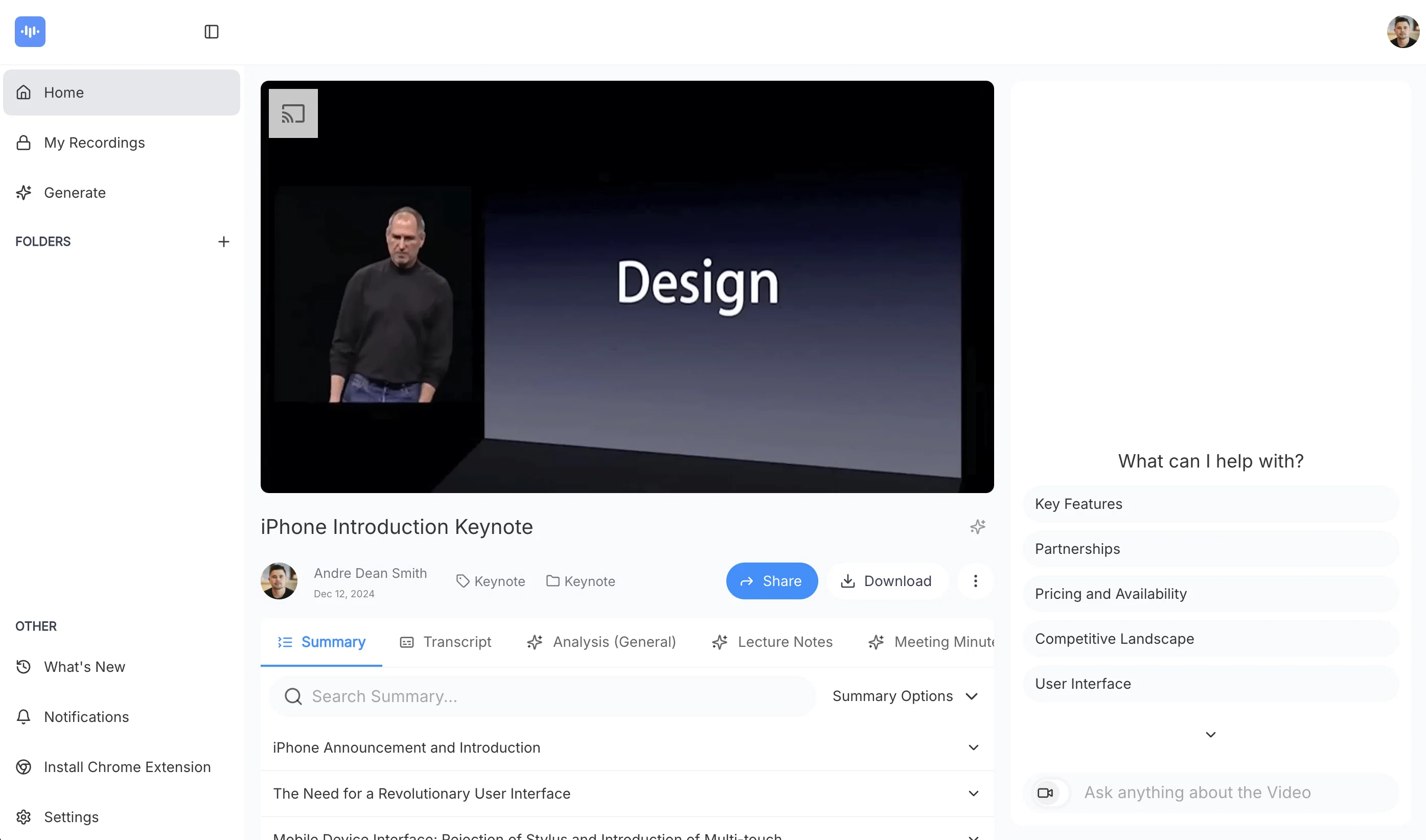
Turn audio and video into actionable insights with AI-powered transcription, summarization, and analysis. Save time, extract key points, and never lose important details. Perfect for professionals, teams, and businesses looking to streamline workflows and enhance productivity. v6.20.12 – Smarter, Faster, and More Collaborative This update brings major improvements to folder permissions, making collaboration even more seamless. We've also introduced editable transcripts, a better chapter summary UI with thumbnails, and team logo customization for a more personalized experience. 🚀 What’s New? ✅ Analyze visual content in videos ✅ Folder Permissions – Manage access with improved team controls ✅ Editable Transcripts – Edit your transcripts directly in-app ✅ Hungarian Language Added – Expanded support for translations ✅ Better Chapter Summaries – Now with thumbnails for easier navigation ✅ Team Logo Customization – Personalize your workspace ✅ New UI Theme & Enhancements – A more modern and intuitive interface 🔧 Improvements & Fixes 🔹 Faster & More Accurate Transcriptions – Upgraded engine for improved speed & precision 🔹 Disable Email Notifications for Transcriptions – Stay focused without inbox clutter 🔹 Install ScreenApp as a Web App – Easy access anytime, anywhere 🔹 Custom Template Persistence – Your settings now save automatically 🔹 Webhooks Overhaul – More reliable and responsive integrations 🔹 Multi-Video Actions & Note-Taking – Capture notes during recordings 🔹 Google Calendar Meeting Bot (Beta) – AI joins & records your meetings 🔹 Redesigned Sidebar & Folder Navigation – Faster access to your content 🔹 Performance Optimizations & Bug Fixes – A smoother, more reliable experience This update builds on our ongoing mission to make ScreenApp the ultimate tool for capturing, analyzing, and transforming your recordings. 🚀 Got feedback? We’d love to hear from you! Help other people by letting them know if this AI was useful. Add your own prompts and outputs to help others understand how to use this AI.

Screenshot gallery

ScreenApp v6.20.12 screenshot

Pros & Cons

Pros

  • Free online tool
  • Cross-platform support
  • Select recording area
  • Include webcam footage
  • Secure storage
  • Collaboration-friendly
  • Download recordings
  • Cloud backup
  • Shareable links
  • Used by major brands
  • Browser-based
  • Efficient review of content
  • Facilitates knowledge transfer
  • Intuitive interface
  • Multiple use-cases
  • Supports Windows/MAC/Ubuntu
  • Records with or without audio
  • High customer trust
  • Transcribes videos to text
  • Local implementation
  • No software downloads required
  • Quick video downloads
  • Webcam and screen recording
  • Provides insights
  • Customizable platform
  • Stores recordings in cloud
  • Creates shareable links
  • Transcribes spoken words
  • Applicable to various content types
  • Quality business video sharing
  • Personalize video with webcam
  • ScreenApp Recording Plugin
  • Live chat support
  • Extracts valuable knowledge
  • Multi-language support
  • Instant recording
  • High user ratings
  • No watermark
  • Lag free recording
  • Can record PC, tab, or window
  • Integrable into websites or apps
  • API and Plugin availability
  • Recordings accessible from any device
  • Supports Google Chrome, Opera, Firefox
  • Secure business video implementation
  • No installation
  • Written record creation
  • Allows video accessibility later
  • High-quality business videos sharing
  • Ideal for training sessions, tech tutorials

Cons

  • Limited to online use
  • No local storage option
  • Dependent on internet speed
  • Potential privacy issues
  • No multi-language transcription
  • No offline version
  • Limited to certain browsers
  • May not record accurately
  • Specific OS needed

A Professional Framework to Evaluate ScreenApp v6.20.12

When considering ScreenApp v6.20.12 for integration into your organizational workflow, we recommend deploying a structured score card across three critical operational pillars: Security & Compliance, Integration Friction, and long-term Price Scalability. Rather than looking only at basic feature lists, modern procurement teams must assess how a software platform behaves under high load and how well it fits into the team's data security guidelines.

1. Security and Database Compliance

Depending on your operating region and field, ensure that ScreenApp v6.20.12 supports standard security layers such as SOC 2 Type II certifications, GDPR compliance, or HIPAA-compliant database encryption. If the tool connects directly to client database tables or handles user passwords, verify that they implement multi-factor authentication (MFA), single sign-on (SSO) integrations, and end-to-end data encryption in transit and at rest.

2. API Coverage and Custom Integrations

Siloed data is the primary cause of operational friction. Evaluate if ScreenApp v6.20.12 has native connectors for your current project trackers, messaging hubs, and customer communication channels. For custom developer requirements, check if they provide a fully documented REST API with reasonable rate limits, comprehensive Webhooks support, and robust SDK packages in your language. A flexible API layer saves hundreds of hours of manual copy-paste overhead.

3. Total Cost of Ownership (TCO)

SaaS pricing packages are often deceptively simple. When reviewing ScreenApp v6.20.12's billing structure, map out your team's projected expansion over the next 12 to 24 months. Determine how costs scale as your customer database increases or as you add team members. Factor in setup costs, mandatory support plan upgrades, API access fees, and storage overage rates to understand the true cost before committing to a contract.

By combining verified user reviews from our directory with internal workflow pilot tests, your procurement team can make an informed decision that drives productivity without creating capital waste.

Features of ScreenApp v6.20.12

  • API
  • Audio Notetaker
  • Video Analyzer
  • Video Summarizer
  • Transcription
  • Free + From $14/Mo

SaaS1to10 verified reviews for ScreenApp v6.20.12

Overall rating

5.0

Based on 21 reviews

5.02 weeks ago

Review

The most humanly AI i have used so far but the problem is as soon as you start piling up messages in single chat session , it starts getting slow and at some point it starts freezing and also uses a lot of resources. For time being its okay to do 3 4 messages but as soon as we continue it has messages limitation and also starts getting very very slow . For the price of £18 per month this is unacceptable and with the newly introduced feature called project, if we start new chat within the project we cannot continue with the context we provided in other chats within same project. There are lot of improvements for them to work on. And to start with the its speed and its price

Bibash Katel

5.02 weeks ago

Review

Fantastic tool for anyone who is looking to promote their personal brand and gain followers on Linkedin with no experience. The tool has a lot of potential to grow and as someone who has recently purchased the tool I'm hoping for more topics in settings.

Ed Soltani

5.02 weeks ago

Review

This tool i found is super cool, I created 5 books from this tool to sell them online, which gives me great profit. I am creating more valuable books to spread knowledge, and earn some bucks as well 🤑.

Bilal Ashraf

5.02 weeks ago

Review

Suppppeeeeerrr! Wowwww! @Mindsmith is absolutely fantastic! It is incredibly useful, easy to use, and very professional.

Claudia Scilletta

5.02 weeks ago

Review

It's sad to see people want to try your tool out but you have no free sample for them. This may be the best tool out there, but, as mentioned, going through with the AI for minutes to explain what you want, then being prompted to pay, without even knowing if it CAN create something, is discouraging. I hope we can get a free sample or preview at one point, im interested in this one.

Ron Jayson

5.02 weeks ago

Review

O GPT faz uma análise melhor e mais personalizada.

Vinicius Vilela

5.02 weeks ago

Review

Best AI powered course builder! Love it!

Katya Komarova

5.02 weeks ago

Review

I recently started using @Napkin AI, and I couldn't be more impressed! This tool is incredibly user-friendly and intuitive, making it easy to generate clear visual representations from text. Moreover, the interface is clean and visually appealing, which enhances the overall user experience. @Napkin AI is a fantastic companion. Highly recommended for anyone looking to elevate their creative process!

Jobin Mathew

5.02 weeks ago

Review

@FineVoice Video to Audio feature is now live. Generate high-quality sound effects and music that perfectly matches the visuals, actions, and environment in your videos.

Fineshare

5.02 weeks ago

Review

Finally, a prompt optimizer that makes sense, adding power to my own words. Easy to expand details, easy to go deeper and to get exactly what I need to squeeze out incredible results with ChatGPT. The Prompt_Enhancer setting is something serious. Thanks guys, keep on providing excellent AI tools!

Hollie Arsement

5.02 weeks ago

Review

i would say it gives the mind a sense of clarity

Emmanuella Marshall

5.02 weeks ago

Review

I already have another transcription tool, but this one is much better. I love the different features such as the summary, quiz, and chapters. It does a great job of them. I've only done one transcript so far to try it out, but I'm truly impressed and am going to grab another code. A couple things that would make it even better are: - the ability to rename the files and organize them through folders. - the ability to download a copy of the other features as well as the transcript. Copying and pasting it works, but doesn't keep the format.

dunn

5.02 weeks ago

Review

I'm still testing the tool yet it looks very promising. I tested it with a 5.5k words Academic text that I had previously red. I tested the Key points feature, it does work!

Ivana González

5.02 weeks ago

Review

As the service was in beta-testing stage, I created there a dozen of AI-generated courses for free. I wanted to use them. Those courses remained in my account as they started subscription tiers. But recently I have found out that they were deleted. The support didn't answer to my e-mail at all.

Oldfag TV

5.02 weeks ago

Review

your answer is much too general, so useless. You could have just tell me to ask Perplexity.

Ta

5.02 weeks ago

Review

I think it's the best @Image Generator I ever found on the net. It gives more accurate image according to the prompt. And thank you for keeping it for free.

My Sawsiri

5.03 weeks ago

Review

Its not free

Enrique Portillo

5.03 weeks ago

Review

Thanks - are you looking to generate business ideas from the transcript as an extra feature?

Robbie Tilleard

5.03 weeks ago

Review

Did you install the extension through the chrome web store? It shouldn't add anything to your desktop or send you an email haha. If you look at the extension page it says my email is andre@not.pizza, please shoot me a line and I'll help figure out what's going on

Andre Popovitch

5.03 weeks ago

Review

I was able to get a summary for a half hour video in just under 2 minutes. An hour long video took 5 minutes. Saved me a phenomenal amount of time having to watch videos for courses!

Linda Kolean

5.03 weeks ago

Review

Hey! @Summify developer here. which summary style did you tried in which language? could you send us the video to examine? Best, Ry contact@Summify.io

Ray

Pricing

Starting Price

Free plan available

Free tier available with optional paid upgrades.

Where can ScreenApp v6.20.12 be deployed?

  • Cloud, SaaS, Web-Based

Recommended for you