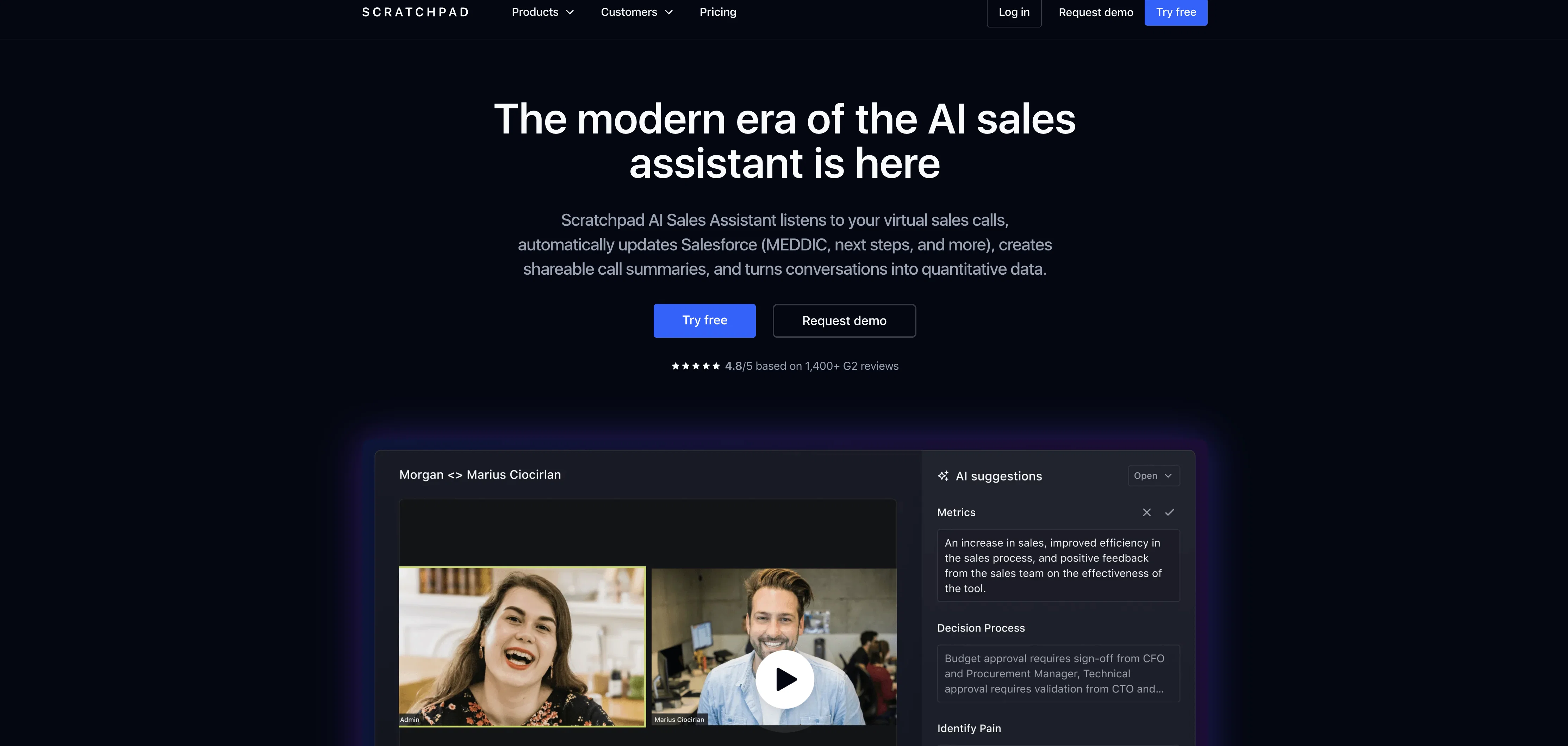
AI Sales Assistant for Salesforce is specifically designed to enhance modern sales operations. It allows users to effortlessly manage, update Salesforce operations, interact with team members on deals and manage pipelines.
The AI assistant facilitates live call summaries, provides AI prompts for sales procedures and generates real-time notes, transcripts and summaries of calls.
The tool integrates with the Salesforce system and utilizes artificial intelligence for filling MEDDIC, next steps, or any fields directly into Salesforce, boosting process efficiency.
It features a user-friendly interface for taking notes and updating Salesforce from the web. Furthermore, the assistant promotes team collaboration, and automates new deal rooms for post-sales handoffs, enhancing productivity.
It offers change history for each deal and provides real-time visibility for deal movement. The tool comes with features for tracking deal status at every level, capturing a historical record of pipeline changes, and providing insight into forecast changes over time.
It also improves Salesforce hygiene, adds collaborator automatically, and provides a user-friendly way to update Salesforce from Slack. The tool is made to be agile and interactive, delivering no-code instant Salesforce updates, thus facilitating seamless sales operations.
Help other people by letting them know if this AI was useful.
Add your own prompts and outputs to help others understand how to use this AI.
Screenshot gallery
Pros & Cons
Pros
+Salesforce integration
+User-friendly interface
+Real-time notes generation
+Automated Salesforce field filling
+Team collaboration features
+Automated post-sales deal rooms
+Deal movement real-time visibility
+Deal history tracking
+Forecast changes insights
+Salesforce hygiene improvement
+Collaborator addition feature
+Salesforce updating from Slack
+No-code Salesforce updates
+Pipeline changes historical record
+Real-time interaction and agility
+Web-based Salesforce notes updating
+MEDDIC automation
+Direct Salesforce field updating
+Salesforce updating shortcuts
+Slack deal room automation
+Alerts and notifications
+Sales enablement cards
+No-code Slack automations guide
+Full audit history of changes
+Deal problem area spotting
+Sales trends analytics
+Pipeline non-compliant action
+Waterfall Analytics
+Salesforce hygiene process compliance
+Automations and sales enablement
+Next-gen call recording
+Sales operations enhancements
+Workflow tiles for shortcuts
+Productivity optimization
+Process compliance tracking
+Pipeline management
+Call Intelligence
+Task Management features
+Beautifully simple note taking
+Automate deal collaboration
+Streamline hand-offs
+Instant analysis
+Customer data updating
+Automations library
+Sales enablement cards
Cons
−Exclusively Salesforce integrated
−No multi-language support
−Lacks offline functionality
−Not feature-rich
−Limited personalization options
−No manual transcription option
−Limited integration options
−No mobile app
−Reliance on high-quality audio
−No email support
A Professional Framework to Evaluate Scratchpad AI Sales Assistant
When considering Scratchpad AI Sales Assistant for integration into your organizational workflow, we recommend deploying a structured score card across three critical operational pillars: Security & Compliance, Integration Friction, and long-term Price Scalability. Rather than looking only at basic feature lists, modern procurement teams must assess how a software platform behaves under high load and how well it fits into the team's data security guidelines.
1. Security and Database Compliance
Depending on your operating region and field, ensure that Scratchpad AI Sales Assistant supports standard security layers such as SOC 2 Type II certifications, GDPR compliance, or HIPAA-compliant database encryption. If the tool connects directly to client database tables or handles user passwords, verify that they implement multi-factor authentication (MFA), single sign-on (SSO) integrations, and end-to-end data encryption in transit and at rest.
2. API Coverage and Custom Integrations
Siloed data is the primary cause of operational friction. Evaluate if Scratchpad AI Sales Assistant has native connectors for your current project trackers, messaging hubs, and customer communication channels. For custom developer requirements, check if they provide a fully documented REST API with reasonable rate limits, comprehensive Webhooks support, and robust SDK packages in your language. A flexible API layer saves hundreds of hours of manual copy-paste overhead.
3. Total Cost of Ownership (TCO)
SaaS pricing packages are often deceptively simple. When reviewing Scratchpad AI Sales Assistant's billing structure, map out your team's projected expansion over the next 12 to 24 months. Determine how costs scale as your customer database increases or as you add team members. Factor in setup costs, mandatory support plan upgrades, API access fees, and storage overage rates to understand the true cost before committing to a contract.
By combining verified user reviews from our directory with internal workflow pilot tests, your procurement team can make an informed decision that drives productivity without creating capital waste.
Features of Scratchpad AI Sales Assistant
AI Powered Sales Assistant
Salesforce Management
Salesforce Integration
Salesforce Updates
Pipeline Management
Sales Operations Enhancement
Free + From $19/Mo
SaaS1to10 verified reviews for Scratchpad AI Sales Assistant
Overall rating
★★★★★5.0
Based on 14 reviews
★★★★★5.01 months ago
“Review”
No other tool quite like this, it's pretty straightforward. Needed to extract a long interview from YouTube and it extracted everything, providing it in different meaningful formats in less than two minutes. Awesome
Juan Sierra
★★★★★5.01 months ago
“Review”
I already have another transcription tool, but this one is much better. I love the different features such as the summary, quiz, and chapters. It does a great job of them. I've only done one transcript so far to try it out, but I'm truly impressed and am going to grab another code. A couple things that would make it even better are: - the ability to rename the files and organize them through folders. - the ability to download a copy of the other features as well as the transcript. Copying and pasting it works, but doesn't keep the format.
dunn
★★★★★5.01 months ago
“Review”
Suppppeeeeerrr! Wowwww! @Mindsmith is absolutely fantastic! It is incredibly useful, easy to use, and very professional.
Claudia Scilletta
★★★★★5.01 months ago
“Review”
B12 exceeded my expectations especially after I tried a few similar tools. Signing up took under a minute and because I offer a very specific set of services as a consultant, I didn't expect the AI to be able to capture my work, but it did a great job with creating content for me. I only had to make a few edits, add my bio, and was able to publish that same day. Now I get lots of compliments on my site and I've even tried their other tools like email marketing, which is great because the emails match my site's appearance. Overall I would recommend B12 as an effective, affordable, and easy to use website solution.
Katie G
★★★★★5.01 months ago
“Review”
The AI reuse all your last posts to know you. It's impressive.
Nicolas RedactAI
★★★★★5.01 months ago
“Review”
Thanks for your great feedback Gregory. A feature in @Macky that is designed for more specific industry-specific information is the "Ask @Macky" one. In this feature you can use your own promopting to get outputs that are specific to the business question being asked. Also, at the end of each output you have an opportunity to ask any detailed question you want about the output to get more specific responses. You can drill down several times to get further insights using this feature. Hope this helps!
Kinetic Consulting
★★★★★5.01 months ago
“Review”
Auto-categorization is a must, it allows me to find influencers in any niche. Tracking saves me a looot of time.
AIInfluencer
★★★★★5.01 months ago
“Review”
@Quuu is a really magical experience. It really feels like it gets to know you and your brand and the content it finds is laser-focussed. It's magical!
Peter Day
★★★★★5.01 months ago
“Review”
It doesn't work, at least for me in Mexico. I asked for a list of Insurance Independent Agents in Mexico (country) and it delivered just 5 executives of companies. Then I asked for independent dental professionals in Mexico City. It delivered 0 leads.
Jorge Pinkus
★★★★★5.01 months ago
“Review”
Thank you so much!
Nevo David
★★★★★5.01 months ago
“Review”
I have used Jobsolv for my job applications, and one thing I love so much about them is that they tailored my resume to suit each application. That was really awesome!
Ijeoma Onwuka
★★★★★5.01 months ago
“Review”
I tested a one-month planner, and it was amazing. Kudos to the team!
EasyDine
★★★★★5.01 months ago
“Review”
filters my spam calls
Robin Haw
★★★★★5.01 months ago
“Review”
It's genius. Amazing tool. PDF generation might be improved, but apart from that is amazing.
Aleksander Lukashou
Pricing
Starting Price
Free plan available
Free tier available with optional paid upgrades.
Where can Scratchpad AI Sales Assistant be deployed?