5.01 months ago
“Review”
A valuable resource. I think I will be using this site quite regularly.
Slavica Voss

Organize life in weekly sprints, achieve dreams quarterly.
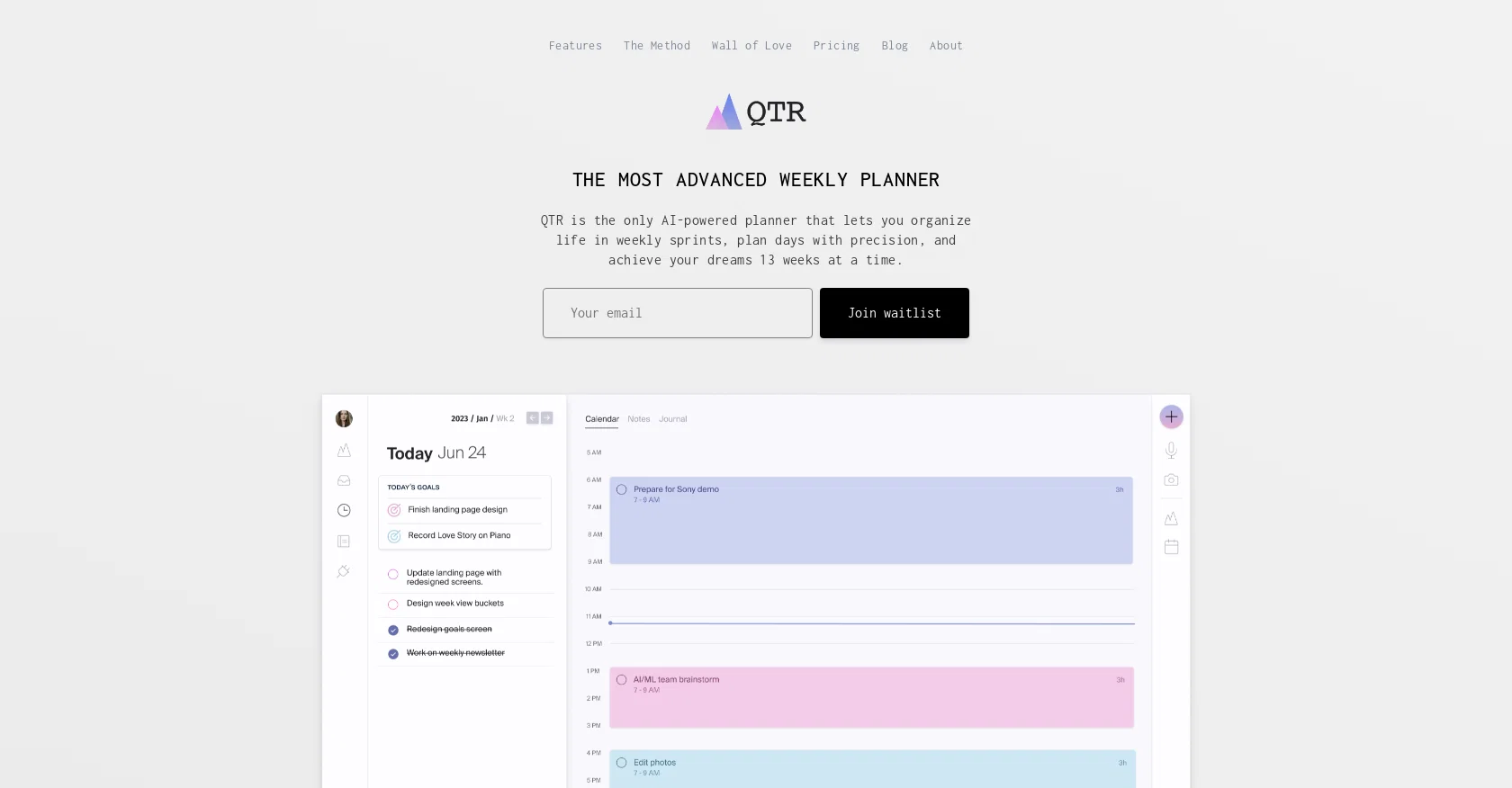
QTR is an advanced quarterly planner that offers a unique approach to organizing and planning your life. Unlike other productivity tools, QTR combines long-term planning with daily planning, allowing users to seamlessly transition from setting goals for the quarter to planning their days in precise detail. With QTR, users can organize their lives in weekly sprints, ensuring a structured and focused approach to their tasks and priorities. The tool also offers a time-blocking feature, enabling users to plan their days with precision by dragging tasks directly into time slots and syncing with their calendars. In addition to task and time management, QTR provides a journaling feature that allows users to maintain separate journals for daily, weekly, quarterly, and yearly reflections. This flexibility sets QTR apart from other digital systems. QTR also supports project planning, offering various brainstorming tools such as lists, boards, trees, mind maps, stickies, easels, and notes. Users can track their goals, define timeframes, link them to projects, and monitor their progress.Overall, QTR stands out as an all-in-one productivity tool that combines goal setting, organization, time management, and journaling. Its unique approach to planning, flexibility, and integration of various features make it an appealing option for individuals seeking a comprehensive tool to help them achieve their ambitions. Help other people by letting them know if this AI was useful. Add your own prompts and outputs to help others understand how to use this AI.
When considering QTR for integration into your organizational workflow, we recommend deploying a structured score card across three critical operational pillars: Security & Compliance, Integration Friction, and long-term Price Scalability. Rather than looking only at basic feature lists, modern procurement teams must assess how a software platform behaves under high load and how well it fits into the team's data security guidelines.
Depending on your operating region and field, ensure that QTR supports standard security layers such as SOC 2 Type II certifications, GDPR compliance, or HIPAA-compliant database encryption. If the tool connects directly to client database tables or handles user passwords, verify that they implement multi-factor authentication (MFA), single sign-on (SSO) integrations, and end-to-end data encryption in transit and at rest.
Siloed data is the primary cause of operational friction. Evaluate if QTR has native connectors for your current project trackers, messaging hubs, and customer communication channels. For custom developer requirements, check if they provide a fully documented REST API with reasonable rate limits, comprehensive Webhooks support, and robust SDK packages in your language. A flexible API layer saves hundreds of hours of manual copy-paste overhead.
SaaS pricing packages are often deceptively simple. When reviewing QTR's billing structure, map out your team's projected expansion over the next 12 to 24 months. Determine how costs scale as your customer database increases or as you add team members. Factor in setup costs, mandatory support plan upgrades, API access fees, and storage overage rates to understand the true cost before committing to a contract.
By combining verified user reviews from our directory with internal workflow pilot tests, your procurement team can make an informed decision that drives productivity without creating capital waste.
Overall rating
Based on 11 reviews
A valuable resource. I think I will be using this site quite regularly.
Slavica Voss
@Ulog was born out of the vision to empower individuals, helping them unlock their fullest potential. We believe that AI-driven journals will play an integral role in our interaction with the AI companions of the future. By logging elements of our daily lives, these AI companions gain a deeper understanding of us, becoming better equipped to cater to our needs and automate tasks that may hinder our progress. Think about a future where you have 20 different AI companions, each performing their own assigned tasks. How wonderful would it be to have a centralized place to stay in the loop with all of them? That's where @Ulog comes in. It provides a home base for users to keep their AI counterparts updated, and eventually, it could even serve as a platform for AI to log information from other AI entities. So, regardless of who you are, @Ulog is for you – offering you an innovative way to stay on track, reduce friction in your life, and connect with the exciting realm of AI companions. Welcome to a world where technology and human needs seamlessly intertwine, creating a future that's productive, efficient, and highly personalized.
Micheal Reed
It's great, I really enjoy using this app. Am on a hunt for the perfect journal, and this one is in my Top 3
Laila R
Use full workspaces multiple people can use this ai
Rajkumar Dyagala
I can't explain how impressed i am by this. I've seen tools to help you brainstorm ideas, but not one to break your task down into big steps, then little steps for each of these. Plus "games" to help come up with more ideas for your project. I'm excited to use this!
ImpulseOscar
Thanks for the feedback, and also for the tip for the community. One more tip: if you upload an image directly, you can add context that might be missing in the image. For example, the duration is 3 hours or prefix every event title with Name:
Caren Cioffi
This is a powerful and helpful real-life app.
Sue
Really like how it finds connection in the content that I save. I don't think any other tool can do that.
amix ffx
easy to pick up and you get a few free file imports. it gives you results pretty fast, unfortunately i can't find a way to get back to these, they're locked behind the paid service.
Ron Jayson
O GPT faz uma análise melhor e mais personalizada.
Vinicius Vilela
Very helpful, use daily.
Daan van Rossum
Starting Price
Free plan available
Free tier available with optional paid upgrades.


