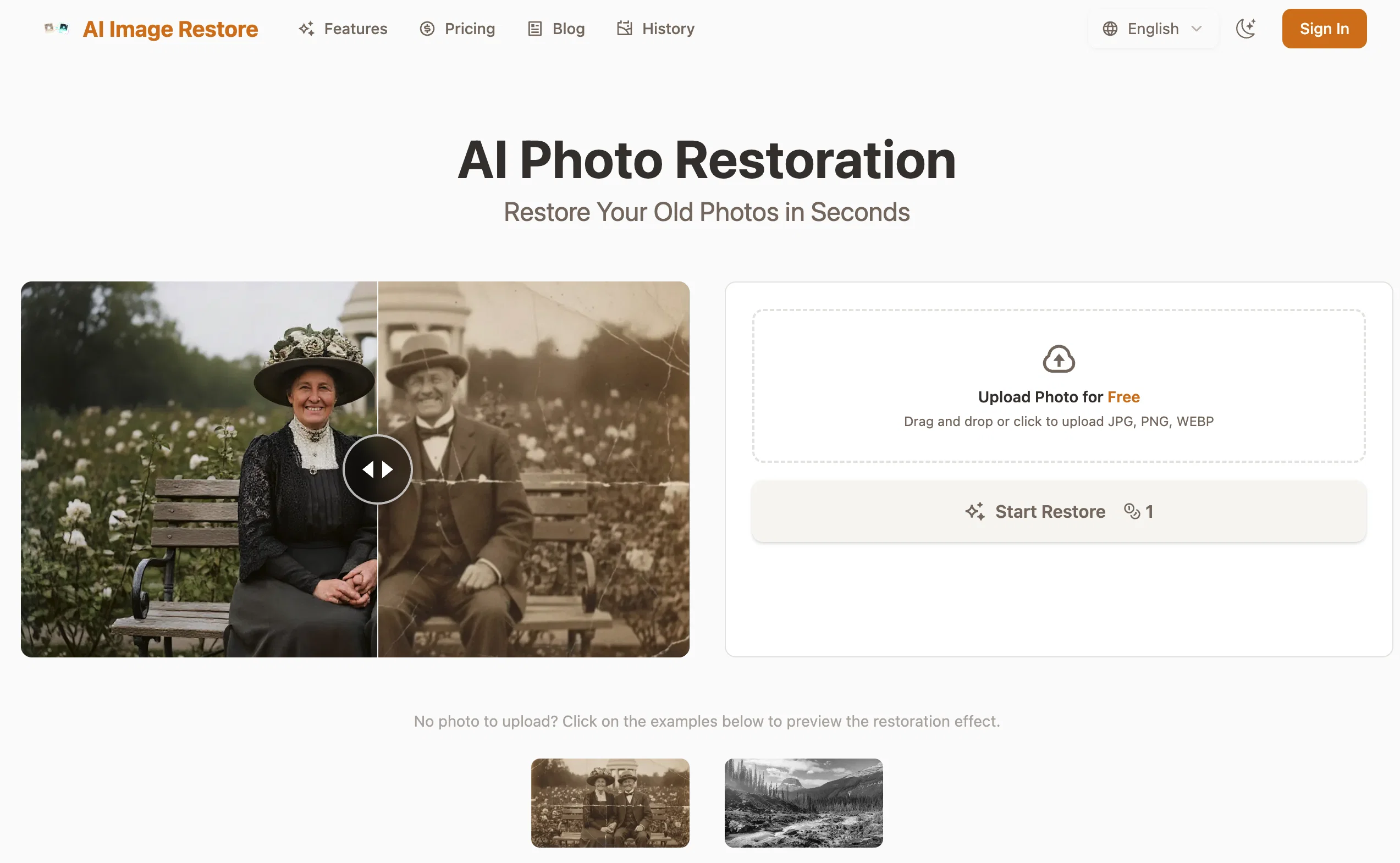
PhotoRestore.ai is an AI-powered tool designed to restore, unblur, and colorize old or damaged photos. Users can upload photos in JPG, PNG, or WEBP format to make use of these intelligent restoration protocols.
The tool's key capabilities include unblurring, colorization, and seamless repair of underlying issues such as tears, creases, mold or coffee stains. The artificial intelligence in play employs context-aware 'filling', the AI analyzes surrounding pixels to restore missing patterns and textures without leaving a trace.
The color restoration module goes beyond just adding color to black and white images; it considers the era, lighting, and physical texture to reconstruct historically accurate colors.
Additionally, the software pioneers in face reconstruction, through advanced AI learning from millions of faces, it brilliantly sharpens and details facial features in old photos.
Importantly, the tool offers a secure environment for your photos, deleting original photos automatically after 24 hours and granting users full control over the deletion of the restored images.
In terms of pricing, PhotoRestore.ai operates through a credit system with multiple flexible pricing plans including monthly subscriptions, though a free trial is available.
The process is fairly straightforward with three steps - upload, process with AI restoration, and download your revitalized photo.
Help other people by letting them know if this AI was useful.
Add your own prompts and outputs to help others understand how to use this AI.
Screenshot gallery
Pros & Cons
Pros
+Restores, unblurs and colorizes photos
+Repairs damages with context-aware filling
+Identifies and repairs various issues
+Reconstructs historically accurate colors
+Supports JPG, PNG, WEBP
+Three-step process: upload, process, download
+Enhances photos clarity, resolution, color balance
+Offers deep facial reconstruction
+Intelligent color restore feature
+High privacy and security measures
+Images auto-deleted after 24 hours
+Flexible pricing plans
+Free trial available
+Fills missing patterns and textures
+Repairs issues like tears, creases
+Restores mold and coffee stains
+Excellent for individuals and professionals
+User control over image deletion
+Securely encrypts uploaded photos
+Mends underlying photo issues
+Analyzes era, lighting for colorization
+Contains 'one-click' restoration feature
+No-sign-up required
+Offers monthly subscriptions plans
+Proficient in sharpens facial details
+Learning algorithm trained on millions of faces
+Automatically fixes scratches, sharpens details
+Boosts lifelike skin tones, lighting
+Picture auto-orientation feature
+Auto-crops irrelevant backgrounds
+Runs all restore engines simultaneously
+Unlocks professional-mode with subscription
+Pro-grade- engines for free trial
+Watermark-free 4K downloads with pro
+Restores damages rather than guessing
+Automatic diagnose of photos state
+Result preview before download
+10MB maximum upload size
+Delivers overall perfect restoration
+Professional mode offers manual controls
+Intended for regular restore needs
Cons
−No batch processing
−Limited file format support
−Limited to 10MB upload
−Free version with watermarks
−Auto deletion after 24 hours
−Requires secure internet connection
−Subscription model could be pricey
−Dependent on server load
−Lack of manual control
−Not suitable for heavily damaged photos
A Professional Framework to Evaluate PhotoRestore.ai
When considering PhotoRestore.ai for integration into your organizational workflow, we recommend deploying a structured score card across three critical operational pillars: Security & Compliance, Integration Friction, and long-term Price Scalability. Rather than looking only at basic feature lists, modern procurement teams must assess how a software platform behaves under high load and how well it fits into the team's data security guidelines.
1. Security and Database Compliance
Depending on your operating region and field, ensure that PhotoRestore.ai supports standard security layers such as SOC 2 Type II certifications, GDPR compliance, or HIPAA-compliant database encryption. If the tool connects directly to client database tables or handles user passwords, verify that they implement multi-factor authentication (MFA), single sign-on (SSO) integrations, and end-to-end data encryption in transit and at rest.
2. API Coverage and Custom Integrations
Siloed data is the primary cause of operational friction. Evaluate if PhotoRestore.ai has native connectors for your current project trackers, messaging hubs, and customer communication channels. For custom developer requirements, check if they provide a fully documented REST API with reasonable rate limits, comprehensive Webhooks support, and robust SDK packages in your language. A flexible API layer saves hundreds of hours of manual copy-paste overhead.
3. Total Cost of Ownership (TCO)
SaaS pricing packages are often deceptively simple. When reviewing PhotoRestore.ai's billing structure, map out your team's projected expansion over the next 12 to 24 months. Determine how costs scale as your customer database increases or as you add team members. Factor in setup costs, mandatory support plan upgrades, API access fees, and storage overage rates to understand the true cost before committing to a contract.
By combining verified user reviews from our directory with internal workflow pilot tests, your procurement team can make an informed decision that drives productivity without creating capital waste.
Features of PhotoRestore.ai
No Sign Up
Photo Restoration
Old Photos
AI Powered
AI Restoration
Damaged Photo Repair
Free + From $9.9/Mo
SaaS1to10 verified reviews for PhotoRestore.ai
Overall rating
★★★★★5.0
Based on 23 reviews
★★★★★5.01 months ago
“Review”
⭐️⭐️⭐️⭐️⭐️ To say the least, Hyper Realism is absolutely phenomenal. I’ve been testing a lot of AI tools lately, and this one instantly stood out as a game‑changer. It’s not just hype — the results speak for themselves. Here’s what blew me away: - **Enhance & 4x Upscale** → The clarity jump is insane. Details that were muddy or soft in the original suddenly pop with crisp definition. It feels like breathing new life into your images. - **Background Replacement** → Super smooth and natural. I was able to swap out entire environments without losing the integrity of the subject. No weird edges, no awkward blending — it just works. - **Extra Features** → There are other editing options tucked in, and while it processes one at a time (and takes a little patience), the quality makes the wait worth it. What really seals the deal for me: **it’s 100% free.** No hidden paywalls, no “gotcha” credits system. Just pure, accessible power for creators who want professional‑grade results without breaking the bank. Yes, it’s one‑at‑a‑time and not lightning fast, but honestly, I’ll take that tradeoff any day for the level of polish it delivers. Every image I ran through came out looking like it belonged in a high‑end portfolio. If you’re on the fence, don’t be. Hyper Realism is the kind of tool that makes you excited to create again. It’s reliable, it’s powerful, and it’s free. I can’t recommend it enough — give it a try and see for yourself. 🔥 Verdict: Hyper Realism is a must‑use for anyone serious about AI image quality.
ChiChi
★★★★★5.01 months ago
“Review”
Reducing manual efforts in first-pass during code-review process helps speed up the "final check" before merging PRs
Sahil Mohan Bansal
★★★★★5.01 months ago
“Review”
Very interesting
Béatrice Duval
★★★★★5.01 months ago
“Review”
This is a fantastic tool. It helps me a lot to illustrate my poems and short stories.
Carlos Ponce
★★★★★5.01 months ago
“Review”
State of the Art
Dmitry G.
★★★★★5.01 months ago
“Review”
Nice app good results.
FX Designer
★★★★★5.01 months ago
“Review”
It is very receptive to the prompts and gives very aesthetically pleasing results.
Arianna
★★★★★5.01 months ago
“Review”
this tool is nice! it generates what i request pretty fast, not to mention the quality. i really like how creative you can be as well, such as dressing up animals in funny clothes :)
Krushna Chandre
★★★★★5.01 months ago
“Review”
Really impressive! The suggestions were simple, and the image came out beautifully well too!
Jojo
★★★★★5.01 months ago
“Review”
very good image
Bristan “Capesterre” Carbier
★★★★★5.01 months ago
“Review”
as mentioned before by somebody else, it's great that it's free that's a big plus. quality isn't anything crazy, but it does the job especially with human faces. tried it on a bunch of random stuff like objects, places, animals but the results vary depending on the original image quality. don't expect miracles on super lowres pics. still, the fact that it's 100% free is already good so yeah, that's a 4 starrer in my book
Jason Bowers
★★★★★5.01 months ago
“Review”
It’s quite nice! It does exactly what it suggests, which is amazing too.
Jojo
★★★★★5.01 months ago
“Review”
nice holistic
Amit ImmI
★★★★★5.01 months ago
“Review”
There were no aristocratic Asians and Africans in ancient Rome.
Sándor Gajdos
★★★★★5.01 months ago
“Review”
get an error every time. No tech support available.
Steve Cannon
★★★★★5.01 months ago
“Review”
I think it's the best @Image Generator I ever found on the net. It gives more accurate image according to the prompt. And thank you for keeping it for free.
My Sawsiri
★★★★★5.01 months ago
“Review”
Not at all accurate…. The only thing similar between original and generated images were the clothes and accessories… face was absolutely new and unconnected.
Shvetank Sharma
★★★★★5.02 months ago
“Review”
👋 Founder here! Celebrating our launch. If you want to test the pro features, just reach out via the website "Contact" form (mention TAAFT) and I'll set you up! 🚀
Photo Restore AI
★★★★★5.02 months ago
“Review”
very poor result, almost caricature like
Alberto Aristeguieta
★★★★★5.02 months ago
“Review”
No quality restoration of super simple designed logotype.
Annhen A
★★★★★5.02 months ago
“Review”
Only human face restoration.
Annhen A
★★★★★5.02 months ago
“Review”
I built @Forevi after trying to restore my own family photos, especially for my grandpa. He doesn’t really care about physical gifts anymore, but he does care about memories: his youth, his family, the small things that mattered to him. Every tool I tried either changed faces, added fake filters, or made everything look overly smooth. So I built a full restoration workflow: restore → colorize → enhance/upscale → animate → add sound. The goal is to help people bring old moments back to life and create new memories from old photos. Would love your feedback on what feels right, what doesn’t, and how I can improve the tool. Thank you folks!! Best, Daniel