5.01 months ago
“Review”
website is well laid out and its free
martin nolan

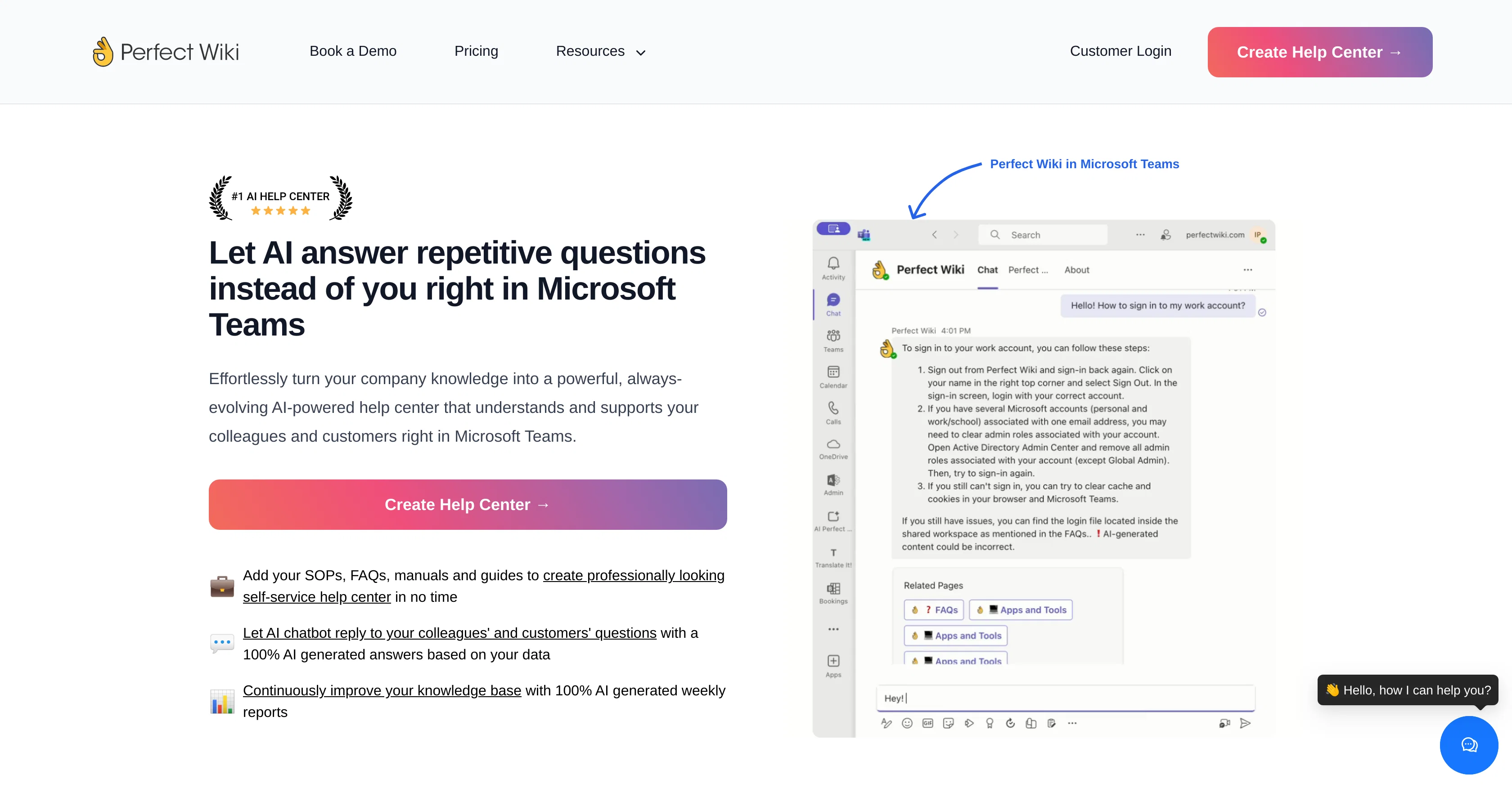
AI answers repetitive questions in Microsoft Teams
Perfect Wiki is an AI-powered platform designed to convert your company's database of knowledge into a continually evolving help center located within Microsoft Teams. By collating content such as SOPs, FAQs, manuals, and guides, it provides a self-service repository for information. The platform features an AI chatbot function which produces automated responses to repetitive questions, providing detailed answers derived directly from your company's specific dataset. Perfect Wiki is designed to seamlessly integrate into the workflow of your employees by operating directly within the Microsoft Teams environment, thereby reducing the time wastage often associated with context switching between different platforms. Additionally, Perfect Wiki offers automated AI-generated weekly reports designed to enhance the knowledge base by identifying data gaps and opportunities for updating information. These reports also enable the tracking of document alterations, the identification of popular content, and the exposure of unsuccessful search queries or bot responses.The tool takes appropriate security measures by storing user content in compliance with the GDPR and encryption in transit. Furthermore, it ensures redundancies with automatic data backups held for up to 60 days. Help other people by letting them know if this AI was useful. Add your own prompts and outputs to help others understand how to use this AI.
When considering Perfect Wiki for integration into your organizational workflow, we recommend deploying a structured score card across three critical operational pillars: Security & Compliance, Integration Friction, and long-term Price Scalability. Rather than looking only at basic feature lists, modern procurement teams must assess how a software platform behaves under high load and how well it fits into the team's data security guidelines.
Depending on your operating region and field, ensure that Perfect Wiki supports standard security layers such as SOC 2 Type II certifications, GDPR compliance, or HIPAA-compliant database encryption. If the tool connects directly to client database tables or handles user passwords, verify that they implement multi-factor authentication (MFA), single sign-on (SSO) integrations, and end-to-end data encryption in transit and at rest.
Siloed data is the primary cause of operational friction. Evaluate if Perfect Wiki has native connectors for your current project trackers, messaging hubs, and customer communication channels. For custom developer requirements, check if they provide a fully documented REST API with reasonable rate limits, comprehensive Webhooks support, and robust SDK packages in your language. A flexible API layer saves hundreds of hours of manual copy-paste overhead.
SaaS pricing packages are often deceptively simple. When reviewing Perfect Wiki's billing structure, map out your team's projected expansion over the next 12 to 24 months. Determine how costs scale as your customer database increases or as you add team members. Factor in setup costs, mandatory support plan upgrades, API access fees, and storage overage rates to understand the true cost before committing to a contract.
By combining verified user reviews from our directory with internal workflow pilot tests, your procurement team can make an informed decision that drives productivity without creating capital waste.
Overall rating
Based on 17 reviews
website is well laid out and its free
martin nolan
We can use this AI effortlessly
Mohammed Sabiq
Useful to quickly explore the content of and interconnections between research papers. Makes it a more fun process.
Jon Hasworth
For now the best browser based AI scraper i have ever used.
Jason Shirazi
Everything is working normally. Best,
Stefan Mitrovic
I joined Kin's beta program on my iPhone XR. After upgrading to an iPhone 13, I found that I couldn't log into my existing account on the new phone, forcing me to create a new account. Now, I have two separate Kin accounts on different phones. Today, when I accessed the beta version of Kin, I got a notification stating that the test version ended on Monday, September 23rd. It instructed me to back up my data and move to the official Kin app. I did as advised—backed up my data, confirmed, uninstalled the beta app via TestFlight, and installed the official Kin app. However, when I attempted to “log in”, I was still unable to access my existing account. This issue hasn't been resolved yet. I have been trying desperately to get in contact with the support team. I left feedback through the test flight app and sent emails. No response. Now trying to find a forums, Reddit posts, TAAFT comments☻
Desiree Miller
Nice interface, but no good at PDF answers, especially tables data.
hifive szu
easy to pick up and you get a few free file imports. it gives you results pretty fast, unfortunately i can't find a way to get back to these, they're locked behind the paid service.
Ron Jayson
Undetectable.wtf is better bypasses everything maintaining thee integrity of the text.
LiteEagle
It's not free, it forces you to input an email before shoving a price tag in your face.
Arvoly XSL
Suppppeeeeerrr! Wowwww! @Mindsmith is absolutely fantastic! It is incredibly useful, easy to use, and very professional.
Claudia Scilletta
This is a nice concept. Anyway app needs to be more polished. Can’t delete notes. I was expecting auto assign of topics, or at least suggestions to be more creative instead of just showing some random words from the text I’ve entered.
Andre
You can now ask AI about your typed note. This issue has been fixed.
MyMemo
Impressive, looks like what I needed all these years... Finally I found something useful!
Felix F.
🚀 Supercharge Your AI Workflow with Keymate! AI enthusiasts, researchers, and productivity power-users — meet Keymate, your new favorite AI-powered assistant to collect, manage, search, and chat with your digital knowledge. ✨ Why Keymate? 🔹 Collect any source – PDFs, Google Docs, YouTube videos, emails, web links — all in one private memory space. 🔹 Chat with your content – Ask complex questions and get grounded answers directly from your own documents. 🔹 Add notes and organize collections – Structure your memory the way you think. 🔹 Boost with AI context – Keymate uses a 128K context window and multi-LLM setup to deliver better, focused results. 🔹 Secure
Ali Atasever
I may be wrong, but it seemed like any RAG Agent
kanawati
Love this!! 100x better than Notion, this should get more attention
Troy
Starting Price
From $17.00/user/month
Pricing may vary based on team size and features selected.


