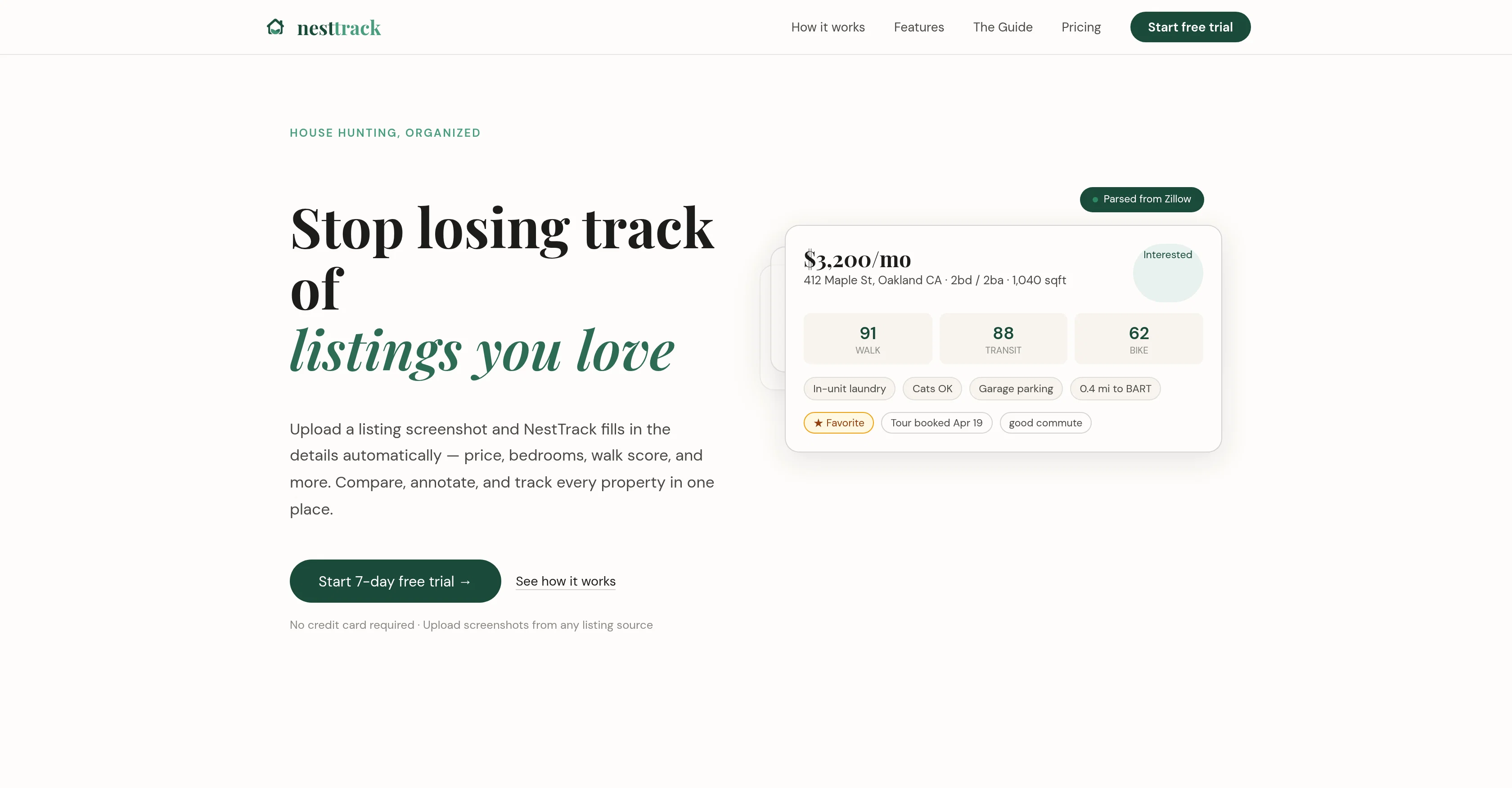
NestTrack is an AI-based tool designed to assist users in their house hunting process by organizing their listing search in one unified location. Its primary function is to track all properties a user is considering, resulting in the simplification and streamlining of the house hunting process.
The AI capabilities of NestTrack enable it to automatically fill in relevant details about each property. Users simply need to upload a screenshot of the listing and the AI performs the task of extracting, analyzing, and storing crucial information from it.
Some of the attributes it identifies include the listing price, number of bedrooms, and the walk score, among others. However, the full range of details that NestTrack can derive from screenshots extends beyond these fundamental details, maximizing the utility of the system.
By gathering and organizing this data, NestTrack supports users in rapidly comparing different properties based on their specific needs and criteria, enhancing their ability to make informed choices.
It should be noted that the efficacy of NestTrack largely depends on the quality and detail present in the screenshot uploaded by the user.
Help other people by letting them know if this AI was useful.
Add your own prompts and outputs to help others understand how to use this AI.
Screenshot gallery
Pros & Cons
Pros
+Simplifies house hunting
+Organizes property listings
+Assists decision making
+Manages property information
+Automated details filling
+Screenshots analysis
+User-friendly interface
+Enables comparative analysis
+Extracts residential property details
+Analyzes property pricing
+Estimates property location score
+Eliminates manual data entry
+Saves users' time
+Tracks user's property considerations
+Supports rapid property comparison
+Supports customized needs
+Depends on user-uploaded content
+Maximizes system utility
+Detects listing price
+Identifies number of bedrooms
+Determines walk score
+Unified location for search
+Information readily accessible
+Streamlined house hunting process
+Enhances informed choices
Cons
−Relies on screenshot quality
−Potential data inaccuracies
−Limited to screenshot analysis
−Requires manual screenshot upload
−Depends on listing's details
−No direct data import
−Lack of additional sources
−No live data updates
−Doesn't provide location insights
−Cannot verify property availability
A Professional Framework to Evaluate NestTrack
When considering NestTrack for integration into your organizational workflow, we recommend deploying a structured score card across three critical operational pillars: Security & Compliance, Integration Friction, and long-term Price Scalability. Rather than looking only at basic feature lists, modern procurement teams must assess how a software platform behaves under high load and how well it fits into the team's data security guidelines.
1. Security and Database Compliance
Depending on your operating region and field, ensure that NestTrack supports standard security layers such as SOC 2 Type II certifications, GDPR compliance, or HIPAA-compliant database encryption. If the tool connects directly to client database tables or handles user passwords, verify that they implement multi-factor authentication (MFA), single sign-on (SSO) integrations, and end-to-end data encryption in transit and at rest.
2. API Coverage and Custom Integrations
Siloed data is the primary cause of operational friction. Evaluate if NestTrack has native connectors for your current project trackers, messaging hubs, and customer communication channels. For custom developer requirements, check if they provide a fully documented REST API with reasonable rate limits, comprehensive Webhooks support, and robust SDK packages in your language. A flexible API layer saves hundreds of hours of manual copy-paste overhead.
3. Total Cost of Ownership (TCO)
SaaS pricing packages are often deceptively simple. When reviewing NestTrack's billing structure, map out your team's projected expansion over the next 12 to 24 months. Determine how costs scale as your customer database increases or as you add team members. Factor in setup costs, mandatory support plan upgrades, API access fees, and storage overage rates to understand the true cost before committing to a contract.
By combining verified user reviews from our directory with internal workflow pilot tests, your procurement team can make an informed decision that drives productivity without creating capital waste.
Features of NestTrack
House Hunting
Listings
Property Details
Property Listings
Real Estate
Property Tracking
Free + From $9/Mo
SaaS1to10 verified reviews for NestTrack
Overall rating
★★★★★5.0
Based on 9 reviews
★★★★★5.02 months ago
“Review”
I’ve been using Image Combiner for quick image blending tests, and it does exactly what I need without making the workflow complicated. The interface is clean, uploads are simple, and the generated combinations are useful enough to iterate on quickly.
ShanAIDev
★★★★★5.02 months ago
“Review”
UI looks impressive, but accuracy is not as advertised
Sickle
★★★★★5.02 months ago
“Review”
Intersting. need to research
Citelity.com
★★★★★5.02 months ago
“Review”
It can generate any image I want freely, it's amazing!
Phan Tung
★★★★★5.02 months ago
“Review”
I like it but sometimes it changes some features in somone
Cherry
★★★★★5.02 months ago
“Review”
A very simple-to-use, yet very powerful app. It made my work so much easier, my scanned and downloaded files are no longer a mess.
Filip Pendovski
★★★★★5.02 months ago
“Review”
very useful AI tool for those who need to work with pdf docs. Thnak you very to the team for offering it free
S RAMA NARAYANA REDDY
★★★★★5.02 months ago
“Review”
i love it i use it to teach me Italian and ukranian and programing ! and it awesome , because it allows you in the free version send many prints of your screen , not having to explain all the errors by typing diferent from gpt that you can only send 3 photos in the free version. i also use @Grok to study i frist make the exercise in my book then i take a photo of my exercise then i ask it to see if there is any mistake and dissipate my terryble handwriting it understands
fernand Lopes
★★★★★5.02 months ago
“Review”
The most humanly AI i have used so far but the problem is as soon as you start piling up messages in single chat session , it starts getting slow and at some point it starts freezing and also uses a lot of resources. For time being its okay to do 3 4 messages but as soon as we continue it has messages limitation and also starts getting very very slow . For the price of £18 per month this is unacceptable and with the newly introduced feature called project, if we start new chat within the project we cannot continue with the context we provided in other chats within same project. There are lot of improvements for them to work on. And to start with the its speed and its price