5.02 months ago
“Review”
I was surprised by MotionGen's image2 model. I've uploaded a photo and it accurately suggested hairstyle variations I actually loved. Didn't expect that at all.
Allen Shi

Turn any product URL into viral video ads.
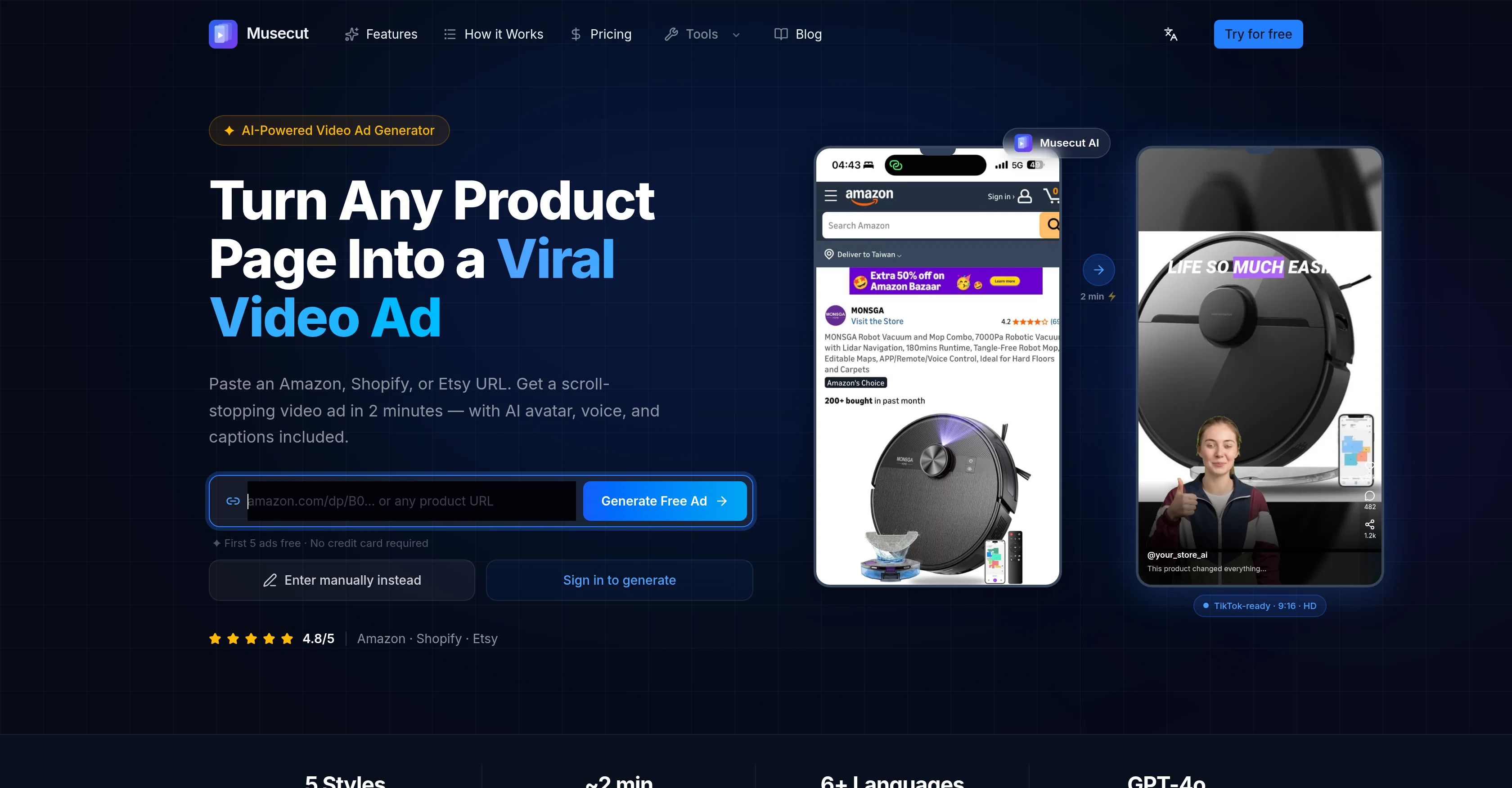
Musecut is an AI-powered tool designed to simplify the creation of video ads. It can convert product pages on ecommerce platforms such as Amazon, Shopify, or Etsy into ready-to-share video ads using the power of artificial intelligence. Users just need to paste a product URL and the AI will generate a video ad within minutes. The resulted video ad comes complete with an AI avatar, voice, captions and various styles and languages to choose from. Musecut offers the additional convenience of not needing any video editing skills as it handles the entire production process. It features five proven ad formats like Viral Hook, Problem to Solution, Unboxing, Flash Sale, and Tutorial Demo, each built to fulfill different conversion goals and platforms. The tool automatically constructs a shot-by-shot script, which can later be edited for better control over voiceover and visual output. Not only the videos are generated in minutes, but the process can also be iterated until you achieve the desired result. Musecut has gained trust from numerous sellers on Amazon, Shopify, Etsy, TikTok Shop, and Instagram. It has proven its utility in promoting products efficiently on various platforms including TikTok, Reels, and Shorts. Help other people by letting them know if this AI was useful. Add your own prompts and outputs to help others understand how to use this AI.
When considering Musecut for integration into your organizational workflow, we recommend deploying a structured score card across three critical operational pillars: Security & Compliance, Integration Friction, and long-term Price Scalability. Rather than looking only at basic feature lists, modern procurement teams must assess how a software platform behaves under high load and how well it fits into the team's data security guidelines.
Depending on your operating region and field, ensure that Musecut supports standard security layers such as SOC 2 Type II certifications, GDPR compliance, or HIPAA-compliant database encryption. If the tool connects directly to client database tables or handles user passwords, verify that they implement multi-factor authentication (MFA), single sign-on (SSO) integrations, and end-to-end data encryption in transit and at rest.
Siloed data is the primary cause of operational friction. Evaluate if Musecut has native connectors for your current project trackers, messaging hubs, and customer communication channels. For custom developer requirements, check if they provide a fully documented REST API with reasonable rate limits, comprehensive Webhooks support, and robust SDK packages in your language. A flexible API layer saves hundreds of hours of manual copy-paste overhead.
SaaS pricing packages are often deceptively simple. When reviewing Musecut's billing structure, map out your team's projected expansion over the next 12 to 24 months. Determine how costs scale as your customer database increases or as you add team members. Factor in setup costs, mandatory support plan upgrades, API access fees, and storage overage rates to understand the true cost before committing to a contract.
By combining verified user reviews from our directory with internal workflow pilot tests, your procurement team can make an informed decision that drives productivity without creating capital waste.
Overall rating
Based on 17 reviews
I was surprised by MotionGen's image2 model. I've uploaded a photo and it accurately suggested hairstyle variations I actually loved. Didn't expect that at all.
Allen Shi
Instantly goes live without hassle
E
I made my website with Pagesmith. Seems the best for fast content based sites.
Teemu Valkonkari
Many ai models help me create videos I love
long ff
Love how it offers stuff for both free and premium users. huge thanks to the devs and keep it up!
Burner Cruz
I tested. Loved it. Tried with 3 different websites. Full Marks to the output! Worth paying for!
SANTOSH SAHU
@VideoIdeas.ai Creates YouTube Video Ideas & Scripts
Aleric Heck
This is a great overview! It clearly explains how the AI simplifies the entire process, from design to content creation. Perfect for anyone looking to launch a business quickly.
Smart Solution
Noodle Tomato is an amazing video creation tool. You can create shorts or full length videos on ANY subject. Choose your voice, bullet points about what you want the video to be about. It then creates the script, all of the videos into parts that are editable. After it compiles the video you can download it directly, post it to YouTube and it's that simple. You need 0 knowledge of AI prompting or video editing.
Joe Bento
You get 300 credits upon signing up, which is enough to test out the app and see its potential. I had a bit of fun with it. It takes a few minutes to generate content, but the results are impressive. There are many styles, modifiers, and customization options available. I would definitely use this for content creation or storytelling.
Daniel Garaiacu
Great designs
Brian Gacheru
This tool i found is super cool, I created 5 books from this tool to sell them online, which gives me great profit. I am creating more valuable books to spread knowledge, and earn some bucks as well 🤑.
Bilal Ashraf
Very good tool to create hyper realistic UGC ads and on-brand static ads
Yasser Seleem
Great video ad platform, easy to use and effective!
Leo Drew
@Reloop let's you create and edit ads in different kind of styles, whether you want to promote a product, a service or a tool, you can do it in 3 minutes, by having a convo with an agent. The output and ease of use is great!
Aurélien D'Hondt
I’ve found Jogg.ai to be super convenient, especially for creating short ad videos for products! If you haven’t tried it yet, you should check out this tutorial: https://www.jogg.ai/blog/4-steps-to-create-your-product-video-ads-in-minutes/
chen chris
I was skeptical about the "one-click video" claim, but I gave TemVideo a shot for a new product I'm testing. The biggest headache with AI video tools is usually the prompt engineering—you spend 30 minutes typing descriptions just to get a weird-looking hand. TemVideo completely bypasses that. My honest take after using it: The "From Raw Footage" feature is the real MVP. You know those random 10-second clips you take on your phone just to check lighting? The AI somehow turns those messy scraps into coherent ads. It’s almost spooky how well it edits around the product. It’s built for speed. If you are a dropshipper who needs to test 5 different products today, this workflow is unbeatable. Upload, click, done. I had an export ready faster than I could find a coffee. Multi-language is a bonus. It’s smart they included localization. If you sell globally, having the AI handle the lip sync and narration in different languages from one workflow is a massive time-saver. Best part? The built-in "Viral Hooks" library. It takes the guesswork out of what text to put on screen to stop the scroll.
abbey
Starting Price
Free plan available
Free tier available with optional paid upgrades.


