5.02 months ago
“Review”
Used this tool to fix my compliance issues in a day.
Zack Fediay

Turn customer feedback into shippable product features.
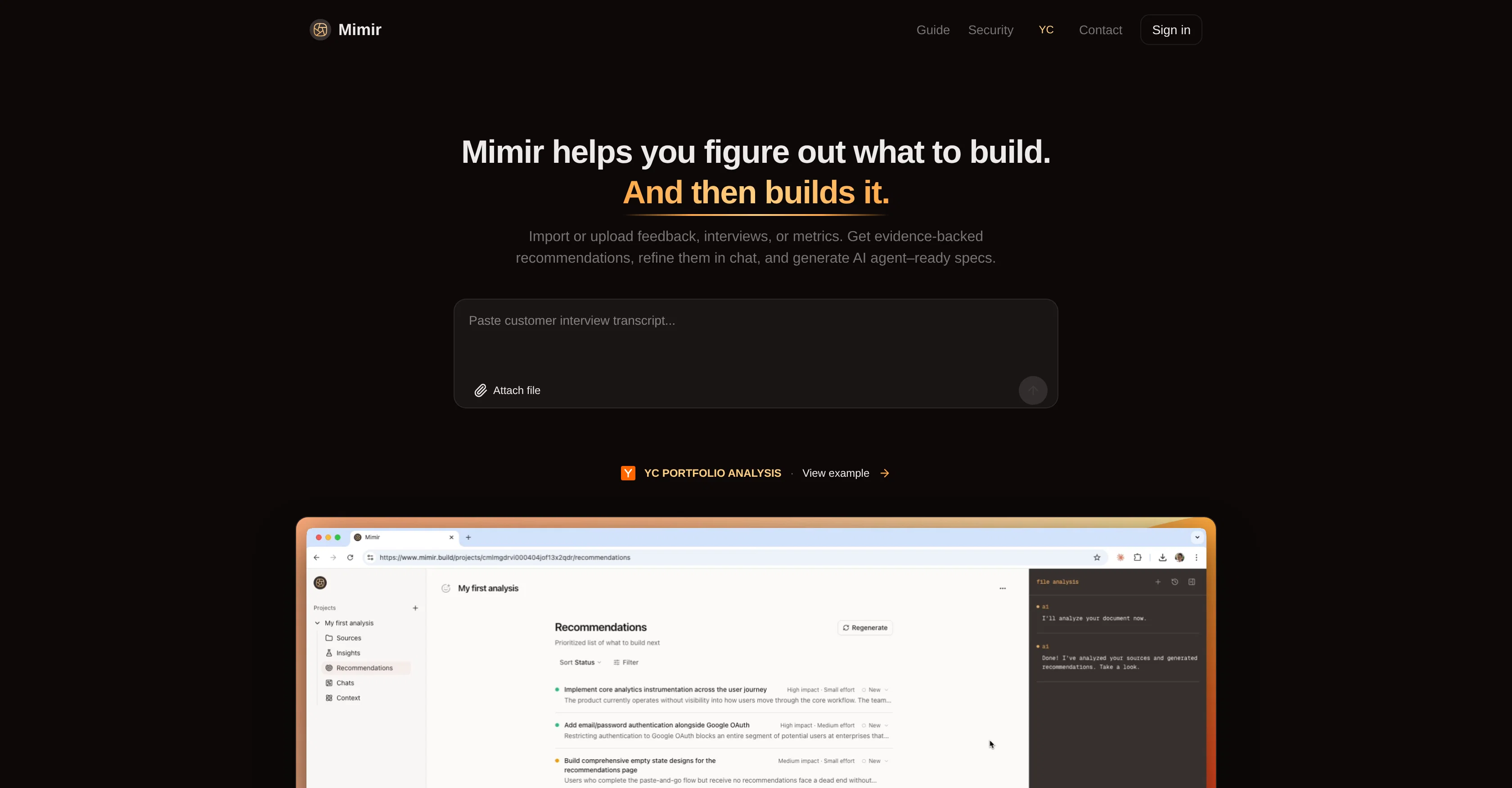
Mimir is an AI-native product management tool designed to help users make more informed, evidence-based product decisions. It does this by transforming user feedback, customer interviews, and usage data into actionable product insights. Users can import or upload their metrics or feedback, and Mimir will analyze this data to provide evidence-backed recommendations. Users can also refine these recommendations through the built-in chat feature. Mimir stands out from other AI tools in that it doesn't merely relay user feedback to a language model. Instead, it uses a specially designed pipeline to extract structured data and insights, group them into themes, and produce prioritized product recommendations. This process is grounded in best practice, incorporating key aspects of effective product management. Each piece of data analyzed by Mimir, whether it be customer pain points, feature requests, metrics or other insights, gets categorized and weighted based on relevance and importance. Mimir also links each piece back to its original source. The tool also employs hierarchical analysis to cluster these pieces into themes, working at a large scale to identify patterns, the most severe or recurring problems, and how they interrelate.Once the data synthesis is complete, Mimir generates ranked product development recommendations. Each recommendation includes impact projections, effort estimates, and a clear rationale that maps back to the original data. As Mimir becomes more familiar with your business context and receives more data, its recommendations become increasingly attuned to your specific business considerations and needs.In addition, Mimir also features full integration with GitHub. It can transform recommendations into complete specs and GitHub issues, thus enabling users to develop new product features rapidly with various AI coding agents. Help other people by letting them know if this AI was useful. Add your own prompts and outputs to help others understand how to use this AI.
When considering Mimir for integration into your organizational workflow, we recommend deploying a structured score card across three critical operational pillars: Security & Compliance, Integration Friction, and long-term Price Scalability. Rather than looking only at basic feature lists, modern procurement teams must assess how a software platform behaves under high load and how well it fits into the team's data security guidelines.
Depending on your operating region and field, ensure that Mimir supports standard security layers such as SOC 2 Type II certifications, GDPR compliance, or HIPAA-compliant database encryption. If the tool connects directly to client database tables or handles user passwords, verify that they implement multi-factor authentication (MFA), single sign-on (SSO) integrations, and end-to-end data encryption in transit and at rest.
Siloed data is the primary cause of operational friction. Evaluate if Mimir has native connectors for your current project trackers, messaging hubs, and customer communication channels. For custom developer requirements, check if they provide a fully documented REST API with reasonable rate limits, comprehensive Webhooks support, and robust SDK packages in your language. A flexible API layer saves hundreds of hours of manual copy-paste overhead.
SaaS pricing packages are often deceptively simple. When reviewing Mimir's billing structure, map out your team's projected expansion over the next 12 to 24 months. Determine how costs scale as your customer database increases or as you add team members. Factor in setup costs, mandatory support plan upgrades, API access fees, and storage overage rates to understand the true cost before committing to a contract.
By combining verified user reviews from our directory with internal workflow pilot tests, your procurement team can make an informed decision that drives productivity without creating capital waste.
Overall rating
Based on 20 reviews
Used this tool to fix my compliance issues in a day.
Zack Fediay
Im a doctor and I think that it is very correct and useful
Black Rose
It's completely free, I created lots of posts with it
Antonia Mitrea
I’ve been using it for a month now and I have decided to keep it for a year. There definitely are some kinks they can still work out like file management, but it’s very good at it’s core function: it generally does a good job answering questions and most times identifies PDFs automatically and correctly. The browser plugin works great, and it’s very nice that @Papers allows you to add your university’s library API so you can automatically download PDFs that are accessible through your institution (sometimes it refuses to download some @Papers, so you just have to downlow it yourself and manually add it). The iPad and Android apps are serviceable. Every once in a while it will mess up the PDF identification, especially with @Papers from either very old sources or online-only journals. Things they must work on: * A much better system to annotate PDFs (the post-it type notes are cumbersome). * Introduce a notepad attached to each PDF or some way to easily link and save the AI’s output to the PDF. Currently, you have to add a little post it note and then paste the text there. * Keep the AI answers available after closing the documents. If you close the document by mistake or have several open and wish to close some, the ai conversation will be reset. * I REALLY wish that you could get citations and links to where the info was from extracted from PDFs. Currently, I have found Coral.ai does a much better job of showing you where the info came from and it even highlights it for you. Give it a try, their 30-day no credit card needed trial allowed me to truly test it, and now I’m a yearly subscriber looking forward for new additions and releases.
JB
typed in my prompts and boooooom. clean descriptions in secs lol. handy if you suck at writing (like me). lowkey a cheat code (no san andreas)
Liam Therrien
10 MB Limit does limit usability best if .pdf contains NO images.
Steve Bastiman
I wasn't able to use this one (I have my API key)
Pauline LeBlanc
When I want to sign up on the @Ideogram website with "Continue with Google" and press it, the sentence "Please choose an option to continue" appears below the banner and no action happens. Anybody can help me?
Michael Ryan
@Clever AI Humanizer is a smart solution for making AI text more 'human' at no cost. I've tried it myself, and the results are truly natural, not robotic. Highly recommended for those who frequently use AI for content! 👍🏼
JEFRIE DYLAN
that's such a great AI
piw
Think its a fab tool but why wont it allow you to save your workflows?
Azmat Yusaf
Such a great place to start out!
Helli Lang
Suppppeeeeerrr! Wowwww! @Mindsmith is absolutely fantastic! It is incredibly useful, easy to use, and very professional.
Claudia Scilletta
Not at all accurate…. The only thing similar between original and generated images were the clothes and accessories… face was absolutely new and unconnected.
Shvetank Sharma
Best PDF to Explainer Videos AI Tool
Alex Cao
So fast, so good.
Tucker Schreiber
It doesn't work at all.
Élise SOULIER
Glad to hear that! That's why i wanted more info , in order to help you out to obtain the product! Enjoy! Have fun!
Daniel Garaiacu
From one of our customers: We are running our 15 person VC-backed company right now without a PM. @Devplan helps fills that gap for us by generating high-quality user stories that sync in Linear in minutes. What used to take me days of back and forth and refinement I’m now doing in less then a hour.
Chris Bee
Great product to offload the data analytics workflow.
Pedro A Porras Luraschi
Starting Price
Free plan available
Free tier available with optional paid upgrades.