5.01 months ago
“Review”
Long waiting time to generate itinerary
Luka Ušalj

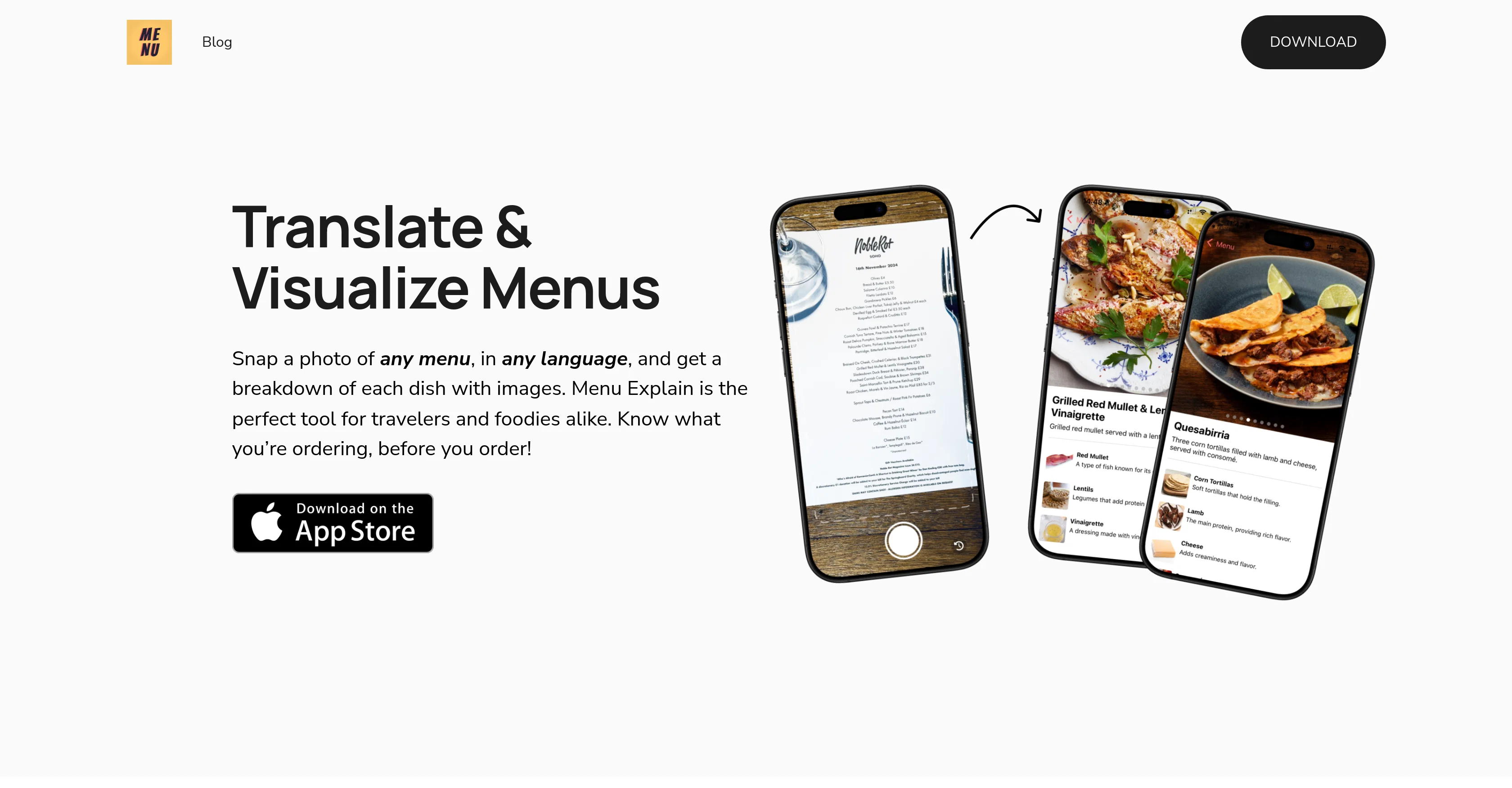
Snap, translate, and visualize any menu instantly.
Menu Explain is an AI-based tool designed to translate and visualize menus from any language to help users understand their contents. The app operates by having users take a photo of the menu. The artificial intelligence technology then processes the photo to provide a comprehensive breakdown of each listed item, complete with descriptions and accompanying images. By doing so, Menu Explain removes language barriers and enhances users' dining experiences, ensuring they better understand what they are ordering. Though it is especially beneficial for travellers and food enthusiasts navigating menus in other languages, the tool can be used by anyone as it supports any language. In addition, Menu Explain offers a 'Scan History' feature which allows users to return and reference menus they've scanned previously. Its aim is to facilitate hassle-free culinary explorations. Overall, Menu Explain combines image recognition and translations to simplify and enrich users' dining experiences, catering to those eager to understand and explore diverse food cultures. Help other people by letting them know if this AI was useful. Add your own prompts and outputs to help others understand how to use this AI.
When considering Menu Explain for integration into your organizational workflow, we recommend deploying a structured score card across three critical operational pillars: Security & Compliance, Integration Friction, and long-term Price Scalability. Rather than looking only at basic feature lists, modern procurement teams must assess how a software platform behaves under high load and how well it fits into the team's data security guidelines.
Depending on your operating region and field, ensure that Menu Explain supports standard security layers such as SOC 2 Type II certifications, GDPR compliance, or HIPAA-compliant database encryption. If the tool connects directly to client database tables or handles user passwords, verify that they implement multi-factor authentication (MFA), single sign-on (SSO) integrations, and end-to-end data encryption in transit and at rest.
Siloed data is the primary cause of operational friction. Evaluate if Menu Explain has native connectors for your current project trackers, messaging hubs, and customer communication channels. For custom developer requirements, check if they provide a fully documented REST API with reasonable rate limits, comprehensive Webhooks support, and robust SDK packages in your language. A flexible API layer saves hundreds of hours of manual copy-paste overhead.
SaaS pricing packages are often deceptively simple. When reviewing Menu Explain's billing structure, map out your team's projected expansion over the next 12 to 24 months. Determine how costs scale as your customer database increases or as you add team members. Factor in setup costs, mandatory support plan upgrades, API access fees, and storage overage rates to understand the true cost before committing to a contract.
By combining verified user reviews from our directory with internal workflow pilot tests, your procurement team can make an informed decision that drives productivity without creating capital waste.
Overall rating
Based on 16 reviews
Long waiting time to generate itinerary
Luka Ušalj
usefull for intial landing page design
WEB5LAB
Just joined your channel in Discord.
M. Cristian
@Fabric is kind of like a combo of bookmarking/webclipper/summarizer/knowledgebase. Basically you can add information and it will auto organize it as well as let you chat with this information and search through it. It is not a “search engine tool” I wouldn’t say. Maybe you will be able to create a knowledge, base and information repository of everything relevant to you and be able to search through that information… But that is still different than a “search engine, tool” in my opinion. So far I think they are shooting for individuals and not enterprise users. Which is great because I have been wanting to find a product that will allow me to add information from PDFs, websites and videos and then be able to search/query/chat with that. But so many of the companies I have found that offer anything close to along these lines are developing knowledge bases with only company customers in mind. I get that that is where the money is, but @Fabric appears to be for actual people to use. The product is definitely underdevelopment, and I have the TestFlight of their iOS app. I wouldn’t say the app is perfect yet or anything, but they are actively developing it, and some of their ideas are changing and evolving not just minor changes to their user interface. I am using @Fabric and Mem at the same time and I will be interested to see which turns put to be more for me. Definitely check it out if you have not already done so they have the opportunity to make an extremely useful tool and kind of even changing the way individuals think about storing/accessing information important to them.
Extra Google Account
Its a promising project and works well so far. Wishing them all the best and godspeed.
Dipak Rautela
I love this extension, mobile app and desktop software! I use it everyday and everywhere. Generated text are amazing. Well done to the team and continue your incredible work! For me, Voilà is the best AI assistant, copilot and AI writer on the market. I stopped my ChatGPT plus subscription since I discoverer it.
Lane Wood
Really nice app with free audio guides
Max Sveshnikov
Accuracy nice. Free
Álvaro Sánchez Román
I've been playing around with this for a few hours. It's made me say "WOW" too many times than i wish to admit. I'm going to follow this and see how it evolves. For now, i managed to create quite a nice Expenses app for personal use. | It did have some problems when it came to moving some components on other pages, but for how short the prompts it uses can be, it is really impressive. With some proper prompts it can generate some strong stuff.
Bernard
I rarely leave reviews, but Elsa amazed me. After a few weeks of using it, I'm still excited. Props, guys.
Anton
i would say it gives the mind a sense of clarity
Emmanuella Marshall
I think the software is really good.
Jiahui Zhou
Really like how it finds connection in the content that I save. I don't think any other tool can do that.
amix ffx
This tool i found is super cool, I created 5 books from this tool to sell them online, which gives me great profit. I am creating more valuable books to spread knowledge, and earn some bucks as well 🤑.
Bilal Ashraf
I think it's the best @Image Generator I ever found on the net. It gives more accurate image according to the prompt. And thank you for keeping it for free.
My Sawsiri
Ultimate foodie travel tool!
Emre Kanatli
Starting Price
Free plan available
Free tier available with optional paid upgrades.


