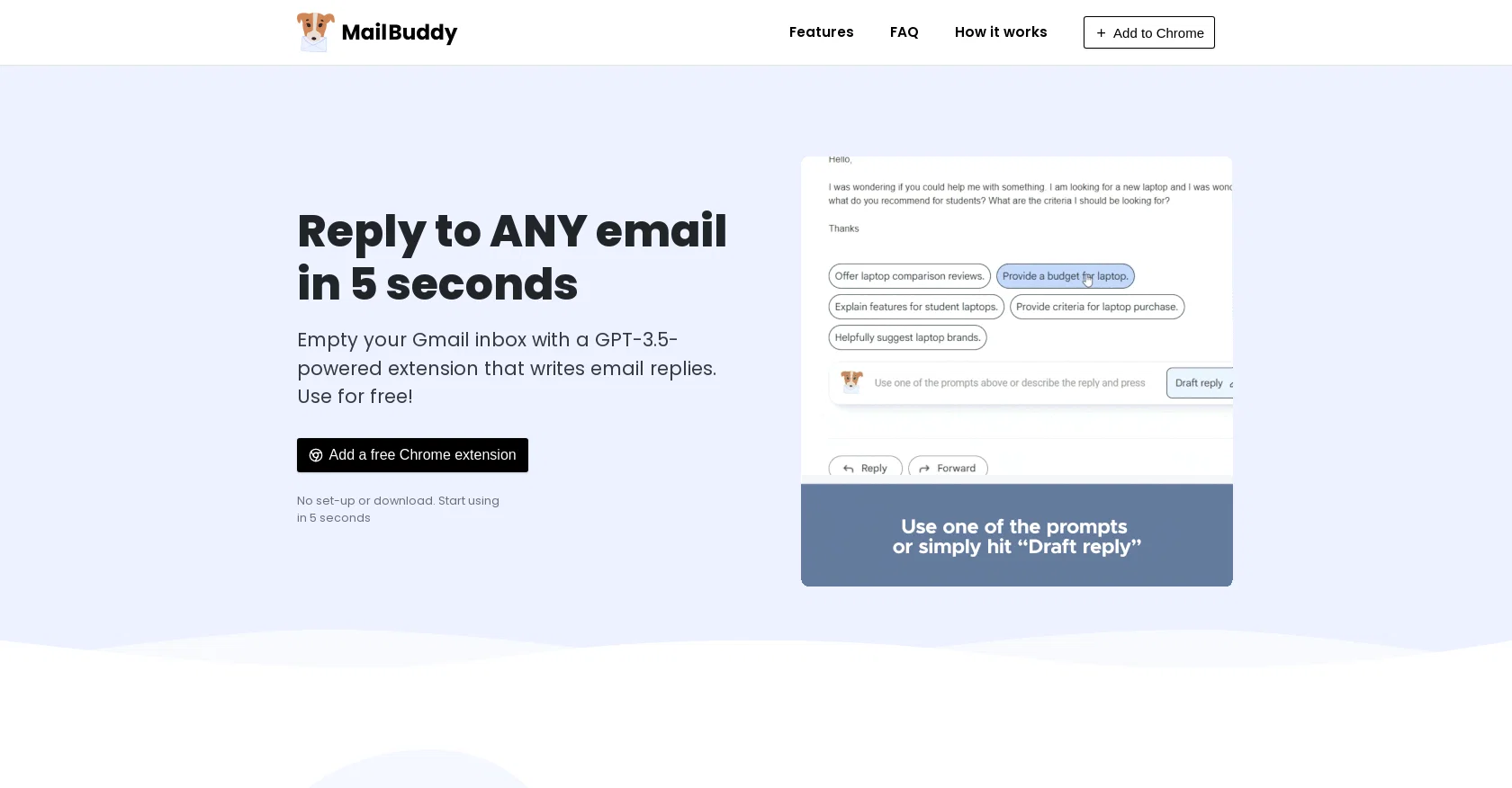
MailBuddy is a free Chrome extension that uses GPT-3.5 technology to assist with email replies. With MailBuddy, users can quickly and efficiently handle their Gmail inbox by automating the process of writing email responses.
The extension requires no setup or download and can be used instantly after installation. The key feature of MailBuddy is its ability to analyze the content of incoming emails and generate contextually appropriate responses within seconds.
Users can simply hit the "reply" button in their Gmail mailbox, and MailBuddy will be ready to assist in crafting a response. The AI-powered assistant can handle a wide range of emails, including inquiries, follow-ups, and corporate communications.
To ensure the desired tone and style, users can give specific instructions to MailBuddy, such as requesting a polite, formal, funny, or brief response.
The tool understands specific details, sentiments, and formatting preferences, enabling users to tailor their responses accordingly. MailBuddy provides a seamless user experience by allowing users to work directly within their Gmail mailbox, eliminating the need for additional windows or login procedures.
The generated responses sound human-like, but users have full control and can edit or regenerate them as needed before sending. Importantly, MailBuddy does not require any additional training or setup for AI integration.
It operates as a fully functional extension without collecting personal data or account permissions. Currently, the extension is available exclusively for Google Chrome, with plans to expand compatibility to other browsers in the future.
Help other people by letting them know if this AI was useful.
Add your own prompts and outputs to help others understand how to use this AI.
Screenshot gallery
A Professional Framework to Evaluate MailBuddy
When considering MailBuddy for integration into your organizational workflow, we recommend deploying a structured score card across three critical operational pillars: Security & Compliance, Integration Friction, and long-term Price Scalability. Rather than looking only at basic feature lists, modern procurement teams must assess how a software platform behaves under high load and how well it fits into the team's data security guidelines.
1. Security and Database Compliance
Depending on your operating region and field, ensure that MailBuddy supports standard security layers such as SOC 2 Type II certifications, GDPR compliance, or HIPAA-compliant database encryption. If the tool connects directly to client database tables or handles user passwords, verify that they implement multi-factor authentication (MFA), single sign-on (SSO) integrations, and end-to-end data encryption in transit and at rest.
2. API Coverage and Custom Integrations
Siloed data is the primary cause of operational friction. Evaluate if MailBuddy has native connectors for your current project trackers, messaging hubs, and customer communication channels. For custom developer requirements, check if they provide a fully documented REST API with reasonable rate limits, comprehensive Webhooks support, and robust SDK packages in your language. A flexible API layer saves hundreds of hours of manual copy-paste overhead.
3. Total Cost of Ownership (TCO)
SaaS pricing packages are often deceptively simple. When reviewing MailBuddy's billing structure, map out your team's projected expansion over the next 12 to 24 months. Determine how costs scale as your customer database increases or as you add team members. Factor in setup costs, mandatory support plan upgrades, API access fees, and storage overage rates to understand the true cost before committing to a contract.
By combining verified user reviews from our directory with internal workflow pilot tests, your procurement team can make an informed decision that drives productivity without creating capital waste.
Features of MailBuddy
Email Automation
Gmail Integration
Automated Responses
Email Management
AI Responses
Customer Service
Free
SaaS1to10 verified reviews for MailBuddy
Overall rating
★★★★★5.0
Based on 15 reviews
★★★★★5.01 months ago
“Review”
Thanks for the feedback, and also for the tip for the community. One more tip: if you upload an image directly, you can add context that might be missing in the image. For example, the duration is 3 hours or prefix every event title with Name:
Caren Cioffi
★★★★★5.01 months ago
“Review”
As a longtime namecheap customer, I got to say, this tool is... just ok. One I can use in a pinch for a slide deck / pitch / MVP, but nothing worth sharing. I doubt anyone will be vowed with the logos made here.
Vineet Sinha
★★★★★5.01 months ago
“Review”
Great accuracy and easy to crosscheck with the provided hyperlinks to the sources.
Marius Schmitt
★★★★★5.01 months ago
“Review”
I'm new in using AI tools, but i found @COACH quite helpful! It follows you step by step both analyzing your situation and finding resources... thanks!
Gabriele Orsini
★★★★★5.01 months ago
“Review”
This team took the time to understand the industry, problem and its users and designed a perfectly engineered solution. Kudos.
Junaid Ali
★★★★★5.01 months ago
“Review”
I joined Kin's beta program on my iPhone XR. After upgrading to an iPhone 13, I found that I couldn't log into my existing account on the new phone, forcing me to create a new account. Now, I have two separate Kin accounts on different phones. Today, when I accessed the beta version of Kin, I got a notification stating that the test version ended on Monday, September 23rd. It instructed me to back up my data and move to the official Kin app. I did as advised—backed up my data, confirmed, uninstalled the beta app via TestFlight, and installed the official Kin app. However, when I attempted to “log in”, I was still unable to access my existing account. This issue hasn't been resolved yet. I have been trying desperately to get in contact with the support team. I left feedback through the test flight app and sent emails. No response. Now trying to find a forums, Reddit posts, TAAFT comments☻
Desiree Miller
★★★★★5.01 months ago
“Review”
We will give you guys a go! thanks!
Silent Co
★★★★★5.01 months ago
“Review”
Suppppeeeeerrr! Wowwww! @Mindsmith is absolutely fantastic! It is incredibly useful, easy to use, and very professional.
Claudia Scilletta
★★★★★5.01 months ago
“Review”
Works but I cannot understand what's the use. I was expecting it to give me some videos
Samartha Venkatramana
★★★★★5.01 months ago
“Review”
I tried NovelGPT a template in @Agentgpt and it did an excellent job writing the first two episodes of my novel complete with character descriptions, setting,plot points and well I think you get the point. Great tool can't wait to see it out of beta.
Kelli Crose
★★★★★5.01 months ago
“Review”
Not at all accurate…. The only thing similar between original and generated images were the clothes and accessories… face was absolutely new and unconnected.
Shvetank Sharma
★★★★★5.01 months ago
“Review”
It's completely free, I created lots of posts with it
Antonia Mitrea
★★★★★5.01 months ago
“Review”
Great idea, but does not find what you are looking for-about the same as Google Scholar
Andy
★★★★★5.01 months ago
“Review”
Fantastic tool for anyone who is looking to promote their personal brand and gain followers on Linkedin with no experience. The tool has a lot of potential to grow and as someone who has recently purchased the tool I'm hoping for more topics in settings.
Ed Soltani
★★★★★5.01 months ago
“Review”
Really amazing! Makes learning content and engaging with things so much easier!