5.02 months ago
“Review”
It has everything that I need in one place: ChatGPT, Copywriting templates, AI Images, Audio Transcription.
Dmytro
Convert photos into clean line drawings online.
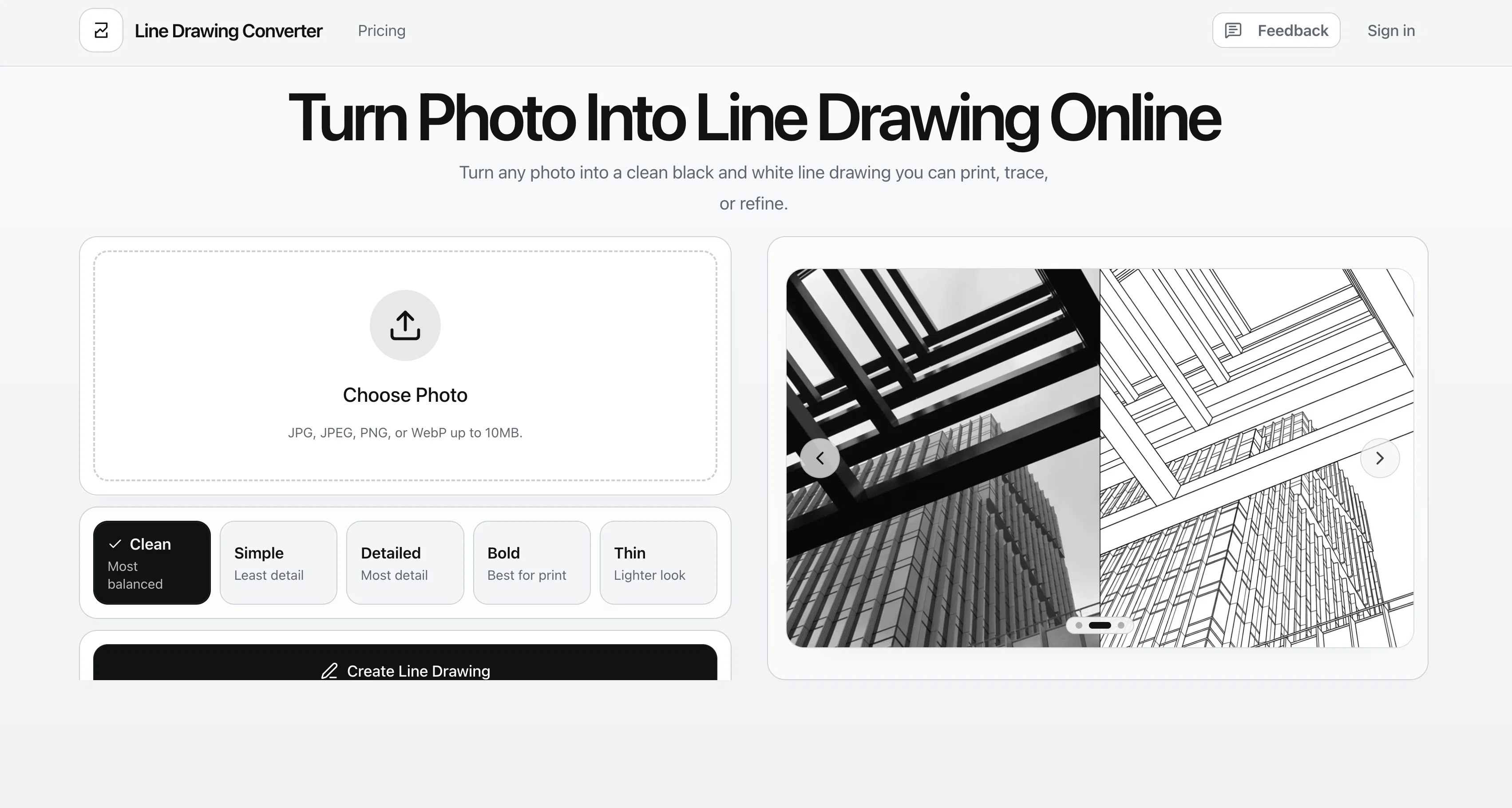
The Photo to Line Drawing Converter is a digital tool that morphs photos into black and white line drawings. It can process images in several formats including JPG, JPEG, PNG, and WebP. The converter offers five different styles for users to choose from: clean, simple, detailed, bold, and thin. Each style is suited to different applications, such as creating print-ready files, design drafts or worksheets. The clean mode generates balanced subject lines with tidy internal details, perfect for default portraits or reference art. The simple mode has fewer lines, creating a clearer silhouette suitable for tracing or simple coloring pages. With the detailed mode, the converter maintains more facial, clothing, and other structural details, useful for reference sheets and architectural drawings. The bold mode produces thicker strokes to stand out in prints or stickers. Lastly, the thin mode provides a more refined, modern linework that can be used in elegant portraits or design drafts. Tokens can be used to generate different outcomes, which users can compare side by side to better visualise their decision. This tool goes beyond just being a simple filterit aims to simplify your image to its core elements, keeping it readable after transformation, particularly in terms of building structures, facial details, and pet features. The intention is to provide clean, usable results, rather than a 'noisy' or overly stylised effect that users may need to fine-tune later. Help other people by letting them know if this AI was useful. Add your own prompts and outputs to help others understand how to use this AI.
When considering Line Drawing Converter for integration into your organizational workflow, we recommend deploying a structured score card across three critical operational pillars: Security & Compliance, Integration Friction, and long-term Price Scalability. Rather than looking only at basic feature lists, modern procurement teams must assess how a software platform behaves under high load and how well it fits into the team's data security guidelines.
Depending on your operating region and field, ensure that Line Drawing Converter supports standard security layers such as SOC 2 Type II certifications, GDPR compliance, or HIPAA-compliant database encryption. If the tool connects directly to client database tables or handles user passwords, verify that they implement multi-factor authentication (MFA), single sign-on (SSO) integrations, and end-to-end data encryption in transit and at rest.
Siloed data is the primary cause of operational friction. Evaluate if Line Drawing Converter has native connectors for your current project trackers, messaging hubs, and customer communication channels. For custom developer requirements, check if they provide a fully documented REST API with reasonable rate limits, comprehensive Webhooks support, and robust SDK packages in your language. A flexible API layer saves hundreds of hours of manual copy-paste overhead.
SaaS pricing packages are often deceptively simple. When reviewing Line Drawing Converter's billing structure, map out your team's projected expansion over the next 12 to 24 months. Determine how costs scale as your customer database increases or as you add team members. Factor in setup costs, mandatory support plan upgrades, API access fees, and storage overage rates to understand the true cost before committing to a contract.
By combining verified user reviews from our directory with internal workflow pilot tests, your procurement team can make an informed decision that drives productivity without creating capital waste.
Overall rating
Based on 16 reviews
It has everything that I need in one place: ChatGPT, Copywriting templates, AI Images, Audio Transcription.
Dmytro
too expensive for me, I just want to make memes, not pay that much
Grzegorz Rolnik
Very interesting
Béatrice Duval
I think the software is really good.
Jiahui Zhou
I joined Kin's beta program on my iPhone XR. After upgrading to an iPhone 13, I found that I couldn't log into my existing account on the new phone, forcing me to create a new account. Now, I have two separate Kin accounts on different phones. Today, when I accessed the beta version of Kin, I got a notification stating that the test version ended on Monday, September 23rd. It instructed me to back up my data and move to the official Kin app. I did as advised—backed up my data, confirmed, uninstalled the beta app via TestFlight, and installed the official Kin app. However, when I attempted to “log in”, I was still unable to access my existing account. This issue hasn't been resolved yet. I have been trying desperately to get in contact with the support team. I left feedback through the test flight app and sent emails. No response. Now trying to find a forums, Reddit posts, TAAFT comments☻
Desiree Miller
This tool i found is super cool, I created 5 books from this tool to sell them online, which gives me great profit. I am creating more valuable books to spread knowledge, and earn some bucks as well 🤑.
Bilal Ashraf
Too 🐌 slow
Yogy Leo
There were no aristocratic Asians and Africans in ancient Rome.
Sándor Gajdos
your answer is much too general, so useless. You could have just tell me to ask Perplexity.
Ta
The most humanly AI i have used so far but the problem is as soon as you start piling up messages in single chat session , it starts getting slow and at some point it starts freezing and also uses a lot of resources. For time being its okay to do 3 4 messages but as soon as we continue it has messages limitation and also starts getting very very slow . For the price of £18 per month this is unacceptable and with the newly introduced feature called project, if we start new chat within the project we cannot continue with the context we provided in other chats within same project. There are lot of improvements for them to work on. And to start with the its speed and its price
Bibash Katel
Reducing manual efforts in first-pass during code-review process helps speed up the "final check" before merging PRs
Sahil Mohan Bansal
State of the Art
Dmitry G.
I think it's the best @Image Generator I ever found on the net. It gives more accurate image according to the prompt. And thank you for keeping it for free.
My Sawsiri
Not at all accurate…. The only thing similar between original and generated images were the clothes and accessories… face was absolutely new and unconnected.
Shvetank Sharma
It refuses to follow the prompt and does whatever it wants like a rebellious teenager on a food fight spree ;-) Fix that and maybe we can use it.
Timeship
used this to turn a couple of our engagement pics into line drawings for the welcome sign + menu ideas and they came out sooo cute!! the minimal ones looked really clean, especially for wedding stationery. some of the tiny details got a little lost but still gave me a really good starting point!!
Orit Paredes
Starting Price
Free plan available
Free tier available with optional paid upgrades.


