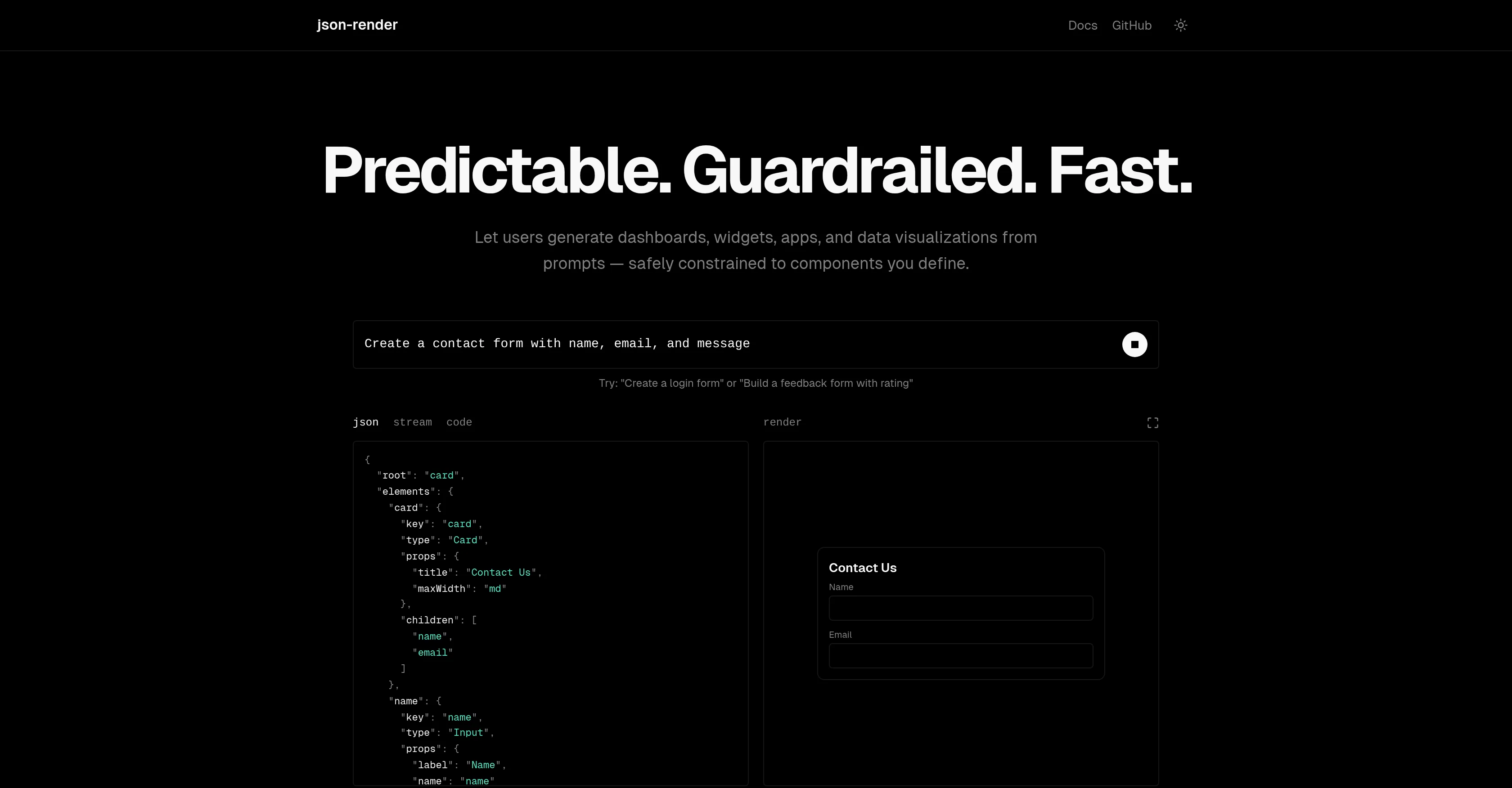
Json-render is an AI-enabled user interface (UI) tool that allows users to generate UI components such as dashboards, widgets, apps, and data visualizations.
It works by receiving user prompts and employing AI to produce JSON code aligned to the constraints set by the developer. This offers developers an ability to define a catalog of components, actions, and data bindings which the AI tool could utilize in generating the UI.
The catalog could include components, such as a card with title and description properties or a metric with label, value path, and format properties. It also supports the definition of specific actions and respective parameters.
The tool provides a 'Guardrails' feature where the AI tool is only permitted to utilize components defined in the catalog, ensuring a predictable and controlled output.
The generated JSON output is rendered natively by your components. It provides features like progressive rendering where components render incrementally as JSON data is received from the stream and two-way data binding with JSON Pointer paths.
Additionally, it offers to handle named actions by your application, to show or hide UI components based on data or authentication status and built-in and custom validation functions to ensure the integrity of the data.
Help other people by letting them know if this AI was useful.
Add your own prompts and outputs to help others understand how to use this AI.
Screenshot gallery
Pros & Cons
Pros
+Generates UI components
+Customizable component catalog
+Includes 'Guardrails' feature
+Predictable output
+Components render progressively
+Two-way data binding
+Handles named actions
+Conditional show/hide features
+Validation functions
+JSON Pointer paths supported
+Streams JSON data
+Creates dashboards
+Generates widgets and apps
+Enables data visualizations
+Uses user prompts
+JSON code generation
+Supports action definition
+Rendered by user components
+Shows and hides UI components
+App can handle named actions
+Data integrity assurance
+End-user friendly
+Fast rendering
+Supports format properties
+Check authentication status
+Data or auth based visibility
+Custom validation
Cons
−No multi-language support
−Lack restricted output control
−Limited pre-defined components
−Over-reliance on developer's definitions
−Non-dynamic UI generation
−Lack of tutorial resources
−Potential JSON code redundancy
−Limited custom validation functions
−Lacks Graphical interface
−No built-in error handling
A Professional Framework to Evaluate Json-Render
When considering Json-Render for integration into your organizational workflow, we recommend deploying a structured score card across three critical operational pillars: Security & Compliance, Integration Friction, and long-term Price Scalability. Rather than looking only at basic feature lists, modern procurement teams must assess how a software platform behaves under high load and how well it fits into the team's data security guidelines.
1. Security and Database Compliance
Depending on your operating region and field, ensure that Json-Render supports standard security layers such as SOC 2 Type II certifications, GDPR compliance, or HIPAA-compliant database encryption. If the tool connects directly to client database tables or handles user passwords, verify that they implement multi-factor authentication (MFA), single sign-on (SSO) integrations, and end-to-end data encryption in transit and at rest.
2. API Coverage and Custom Integrations
Siloed data is the primary cause of operational friction. Evaluate if Json-Render has native connectors for your current project trackers, messaging hubs, and customer communication channels. For custom developer requirements, check if they provide a fully documented REST API with reasonable rate limits, comprehensive Webhooks support, and robust SDK packages in your language. A flexible API layer saves hundreds of hours of manual copy-paste overhead.
3. Total Cost of Ownership (TCO)
SaaS pricing packages are often deceptively simple. When reviewing Json-Render's billing structure, map out your team's projected expansion over the next 12 to 24 months. Determine how costs scale as your customer database increases or as you add team members. Factor in setup costs, mandatory support plan upgrades, API access fees, and storage overage rates to understand the true cost before committing to a contract.
By combining verified user reviews from our directory with internal workflow pilot tests, your procurement team can make an informed decision that drives productivity without creating capital waste.
Features of Json-Render
Open Source
UI Generation
JSON Coding
User Interface
AI Driven Development
Customization
SaaS1to10 verified reviews for Json-Render
Overall rating
★★★★★5.0
Based on 15 reviews
★★★★★5.02 months ago
“Review”
I already have another transcription tool, but this one is much better. I love the different features such as the summary, quiz, and chapters. It does a great job of them. I've only done one transcript so far to try it out, but I'm truly impressed and am going to grab another code. A couple things that would make it even better are: - the ability to rename the files and organize them through folders. - the ability to download a copy of the other features as well as the transcript. Copying and pasting it works, but doesn't keep the format.
dunn
★★★★★5.02 months ago
“Review”
Suppppeeeeerrr! Wowwww! @Mindsmith is absolutely fantastic! It is incredibly useful, easy to use, and very professional.
Claudia Scilletta
★★★★★5.02 months ago
“Review”
State of the Art
Dmitry G.
★★★★★5.02 months ago
“Review”
Went from a C to an A in Cognitive Psychology using @Thea!!
Sarah White
★★★★★5.02 months ago
“Review”
Undetectable.wtf is better bypasses everything maintaining thee integrity of the text.
LiteEagle
★★★★★5.02 months ago
“Review”
B12 exceeded my expectations especially after I tried a few similar tools. Signing up took under a minute and because I offer a very specific set of services as a consultant, I didn't expect the AI to be able to capture my work, but it did a great job with creating content for me. I only had to make a few edits, add my bio, and was able to publish that same day. Now I get lots of compliments on my site and I've even tried their other tools like email marketing, which is great because the emails match my site's appearance. Overall I would recommend B12 as an effective, affordable, and easy to use website solution.
Katie G
★★★★★5.02 months ago
“Review”
Very good. I like it
Michael Adair
★★★★★5.02 months ago
“Review”
This ai is insane, i recommended it to everyone. It's pretty fast, have alot of options and the cost of it is low for what it gave. Really good.
klupy klupy
★★★★★5.02 months ago
“Review”
Honestly @SurfSense is amazing, I use it almost every morning to get an mp3/podcast of my Gmail, Gcal and urgent Linear tickets so I know exactly what's going on that day. It's also insane for board games because I just throw the rulebooks in and share it with my friends so we can chat with the AI together to figure out how to play. And it is scarily good at untangling and explaining really complex rules when we encounter some weird situation!
Eric Lammertsma
★★★★★5.02 months ago
“Review”
This tool not only transcribes videos and audio, but also automatically generates summaries, which greatly helps me organize my study notes.
Sarah
★★★★★5.02 months ago
“Review”
Personal top 5 most convenient tools for creating content for website or social media. Writing text and generating images immediately
Juju
★★★★★5.02 months ago
“Review”
I tested a one-month planner, and it was amazing. Kudos to the team!
EasyDine
★★★★★5.02 months ago
“Review”
When I want to sign up on the @Ideogram website with "Continue with Google" and press it, the sentence "Please choose an option to continue" appears below the banner and no action happens. Anybody can help me?
Michael Ryan
★★★★★5.02 months ago
“Review”
Very interesting
Béatrice Duval
★★★★★5.02 months ago
“Review”
superb, e gratis, merge blana, in EN se aude ideal
jon doe
Pricing
Starting Price
Contact vendor for pricing
Pricing may vary based on team size and features selected.