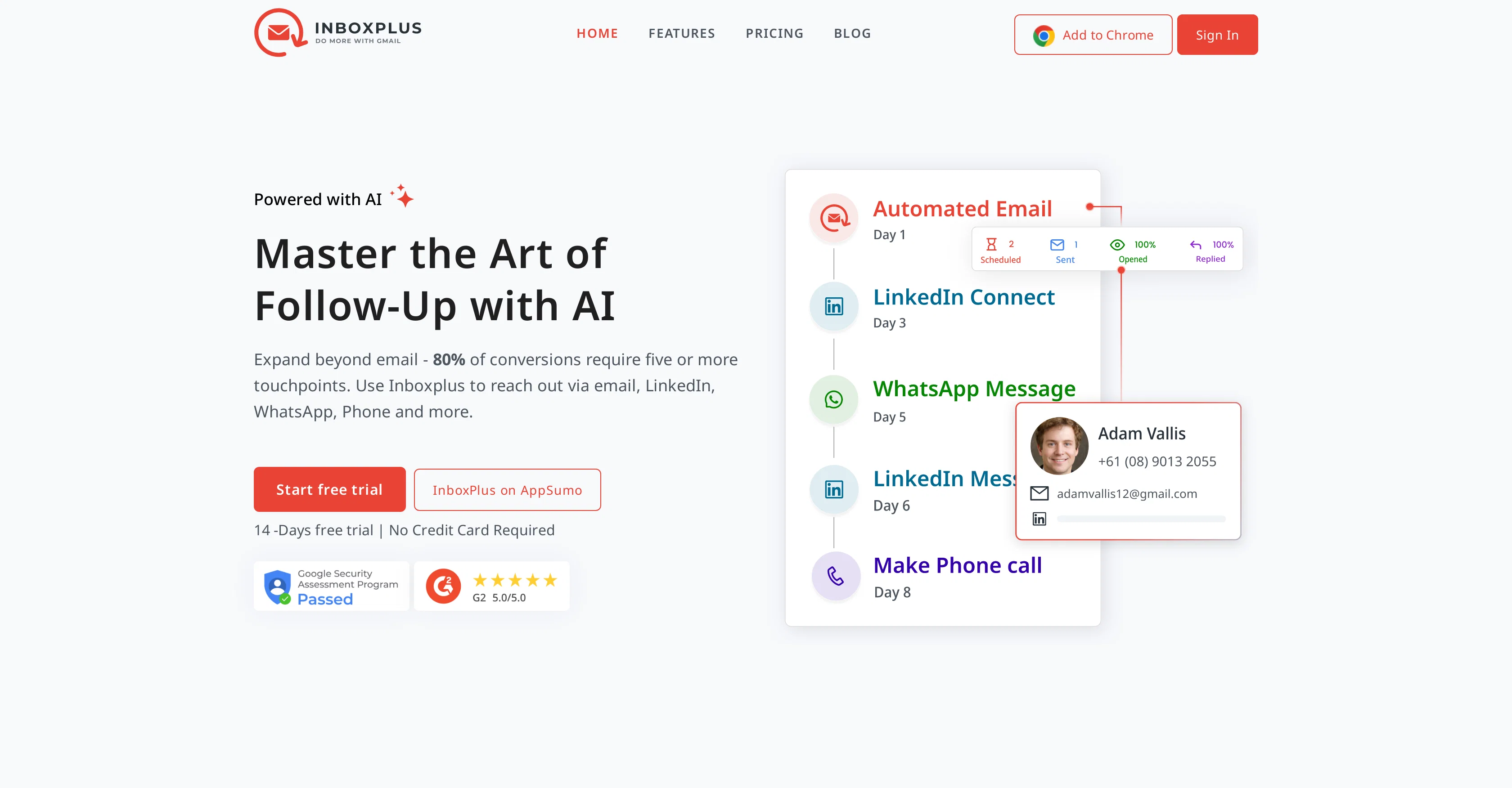
InboxPlus is an AI-powered tool designed to automate multi-touch follow-ups, enhancing communication and sales conversion strategies for businesses. This tool provides a mechanism for personalized automated communication that helps streamline the sales cycle.
With targeted communication sequences, users can tailor their follow-ups based on customer interactions and behavior insights. InboxPlus comes with multi-touch sequences that ensure messages reach your audience via their preferred channels, thus enhancing the response rates.In an effort to boost productivity, InboxPlus automates routine tasks, thereby freeing up time for other high-impact activities.
An additional feature is providing consistency in brand voice across all communication platforms through the use of AI-crafted templates and sequences.
InboxPlus also provides insight into campaign performance through detailed analytics. The tool integrates seamlessly with Gmail through a Chrome extension, reducing the need to juggle multiple applications.
It also supports the creation of email templates using AI, allowing for efficient crafting of personalized emails that captivate and convert audiences.
Workflow is further simplified with the provisioning of team collaboration options and single-click application of AI-crafted templates in Gmail. InboxPlus also allows for the setting up of multi-touch sequences and management of all communication activities in a single sequence.
Daily reminders, task tracking, and an overview of tasks ensure users stay on track with their communication efforts. Other notable features include email tracking, AI Email Templates, task reminders, template management, team management, and contact management.
Though primarily a tool for sales organizations, InboxPlus has found utility across various domains including teams focused on customer service and interaction.
Help other people by letting them know if this AI was useful.
Add your own prompts and outputs to help others understand how to use this AI.
Screenshot gallery
Pros & Cons
Pros
+Automates multi-touch follow-ups
+Streamlines the sales cycle
+Targeted communication sequences
+Behavioral interactions based follow-ups
+Multi-channel communication
+Enhances response rates
+Boosts productivity
+Brand voice consistency
+Detailed performance analytics
+Seamless Gmail integration
+Team collaboration options
+Single-click template application
+Simplified communication management
+Task tracking capability
+Task reminders
+Manages all activities in one sequence
+Email tracking
+Template management
+Team management
+Contact management
+Utility across various domains
+Chrome extension feature
+Efficient crafting of personalized emails
+Features daily task overviews
+Customer service and interaction focused
+Scalability across business entities
+Streamlined workflows
+Insightful campaign performance insights
+Automatic email and template creation
+Direct Gmail integration
+Management of all communication steps
+Easy initial setup
+Facilitates LinkedIn & WhatsApp interactions
+Automatic follow-up setup
+Actionable touchpoints management
+Detailed email analytics
+Automatic skip steps in sequences
+Free trial availability
+Helps in role-based team management
+Task goal tracking
+Extension for maximum CRM accessibility
+Designed for multiple communication platforms
+Streamlines and automates customer touchpoints
Cons
−Only integrates with Gmail
−Limited to Chrome extension
−No multilingual support
−Absence of mobile app
−Limited multi-channel options
−No feedback and survey analytics
−Missing third-party CRM integration
−Limited customization options
−No on-premise deployment option
A Professional Framework to Evaluate InboxPlus
When considering InboxPlus for integration into your organizational workflow, we recommend deploying a structured score card across three critical operational pillars: Security & Compliance, Integration Friction, and long-term Price Scalability. Rather than looking only at basic feature lists, modern procurement teams must assess how a software platform behaves under high load and how well it fits into the team's data security guidelines.
1. Security and Database Compliance
Depending on your operating region and field, ensure that InboxPlus supports standard security layers such as SOC 2 Type II certifications, GDPR compliance, or HIPAA-compliant database encryption. If the tool connects directly to client database tables or handles user passwords, verify that they implement multi-factor authentication (MFA), single sign-on (SSO) integrations, and end-to-end data encryption in transit and at rest.
2. API Coverage and Custom Integrations
Siloed data is the primary cause of operational friction. Evaluate if InboxPlus has native connectors for your current project trackers, messaging hubs, and customer communication channels. For custom developer requirements, check if they provide a fully documented REST API with reasonable rate limits, comprehensive Webhooks support, and robust SDK packages in your language. A flexible API layer saves hundreds of hours of manual copy-paste overhead.
3. Total Cost of Ownership (TCO)
SaaS pricing packages are often deceptively simple. When reviewing InboxPlus's billing structure, map out your team's projected expansion over the next 12 to 24 months. Determine how costs scale as your customer database increases or as you add team members. Factor in setup costs, mandatory support plan upgrades, API access fees, and storage overage rates to understand the true cost before committing to a contract.
By combining verified user reviews from our directory with internal workflow pilot tests, your procurement team can make an informed decision that drives productivity without creating capital waste.
Features of InboxPlus
AI Automation
Multi Touch Follow Ups
Sales Conversion
Communication Tool
Email Templates
AI Emails
Free + From $7/Mo
SaaS1to10 verified reviews for InboxPlus
Overall rating
★★★★★5.0
Based on 15 reviews
★★★★★5.01 months ago
“Review”
I've been using the free trial to use different chatbot models in the same conversation and it's way more efficient than having 3 or 4 different browser tabs open at the same time. It was really cool to see that when changing a model in the middle of a chat, it keeps the context! Can't wait to start using the image and speech features!
Vítor Soares
★★★★★5.01 months ago
“Review”
I swear this actually saved me a lot. 100% recommend to anyone.
307LLL
★★★★★5.01 months ago
“Review”
Its amazing.. I can find almost everything
alexandra matos
★★★★★5.01 months ago
“Review”
Big time saver but the download file is not very friendly
Paul Mercer
★★★★★5.01 months ago
“Review”
I tested a one-month planner, and it was amazing. Kudos to the team!
EasyDine
★★★★★5.01 months ago
“Review”
It is not free. So i couldnt test anything
Isa Venancio
★★★★★5.01 months ago
“Review”
Fantastic tool for anyone who is looking to promote their personal brand and gain followers on Linkedin with no experience. The tool has a lot of potential to grow and as someone who has recently purchased the tool I'm hoping for more topics in settings.
Ed Soltani
★★★★★5.01 months ago
“Review”
I already have another transcription tool, but this one is much better. I love the different features such as the summary, quiz, and chapters. It does a great job of them. I've only done one transcript so far to try it out, but I'm truly impressed and am going to grab another code. A couple things that would make it even better are: - the ability to rename the files and organize them through folders. - the ability to download a copy of the other features as well as the transcript. Copying and pasting it works, but doesn't keep the format.
dunn
★★★★★5.01 months ago
“Review”
Its a promising project and works well so far. Wishing them all the best and godspeed.
Dipak Rautela
★★★★★5.01 months ago
“Review”
Really like how it finds connection in the content that I save. I don't think any other tool can do that.
amix ffx
★★★★★5.02 months ago
“Review”
has been an absolute game changer. Easy to use and offers the flexibility of enterprise level integrations at a fraction of the cost of some other tools. Training models are easy.
navin jeno
★★★★★5.02 months ago
“Review”
Thanks for the feedback! Would love to hear what you’d like to see next
MagicBlocks
★★★★★5.02 months ago
“Review”
I was searching for such a tool literally two days ago, and today I found it on theresanaiforthat. That's funny and awesome. It seems to work well.
Sergey Kolesnikov
★★★★★5.02 months ago
“Review”
It’s an very interesting project, it helps me a lot to speed up my process.