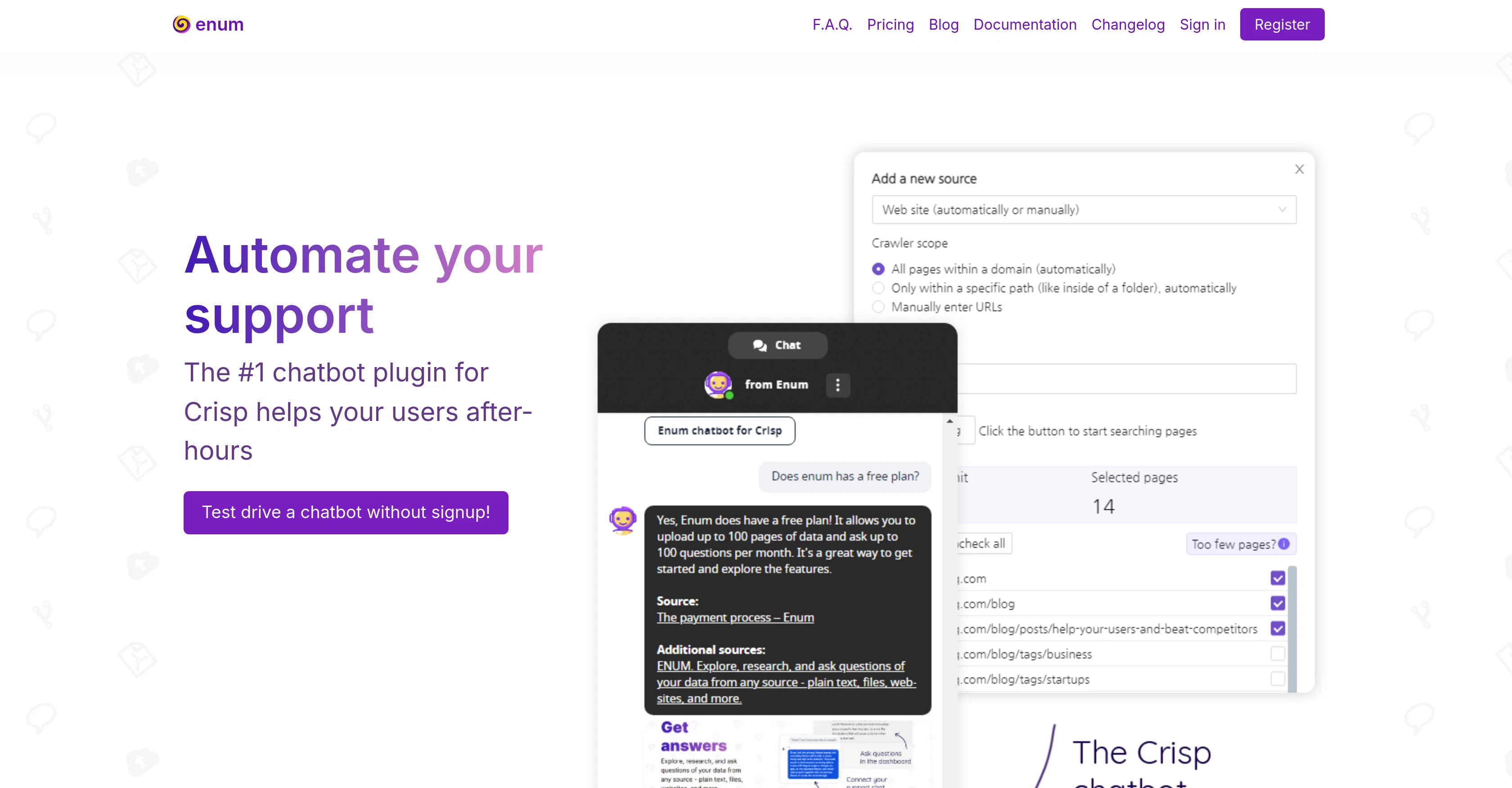
The Enum Support AI Chatbot Plugin for Crisp Chat is designed to automate user support and is available around the clock for your convenience. As a chatbot service, you can train this tool with your website and documents, which allows it to easily support users with their queries.
The plugin offers voice messages and image recognition abilities - supporting multiple image and audio formats. To deploy this chatbot, you can load your data either manually, by uploading documents or let the integrated app scrape your website.
The chatbot is compatible with plain text, PDF files, and fully or partially crawled websites. The chatbot plugin integrates with Crisp, a free chatbot tool, that can be customized with an individual name, icon or set predefined messages.
The chatbot manages to pause itself when a human support agent joins a conversation and can be tested directly via the user interface. This tool provides support in 107 languages and even remembers the context of previous conversations to structure responses better.
Additionally, you can connect it with various integrations like email, WhatsApp, Telegram and others with a simple click, further enhancing its functionality and reach.
It also includes custom buttons for feedback, resolving conversations, and requesting human operators for smoother interaction. Furthermore, the chatbot can be scheduled based on your preference for added convenience, and is white-labelled for each plan, hence making it entirely brandable.
Help other people by letting them know if this AI was useful.
Add your own prompts and outputs to help others understand how to use this AI.
Screenshot gallery
Pros & Cons
Pros
+24/7 availability
+Trains with website/documents
+Voice messages support
+Image recognition software
+Multiple image/audio formats
+Manual or scraped data upload
+Compatible with plain text, PDF
+Full/partial website scraping
+Integrates with Crisp
+Chatbot customization
+Pauses for human intervention
+UI testing
+Supports 107 languages
+Context aware responses
+Various app integrations
+Easy app connectivity
+Custom feedback buttons
+Conversation resolving functionality
+Human operator request
+Schedulable chatbot
+Entirely brandable (White-label)
+Audio files recognition
+Site relinks in response
+Third-party API calls
+Conditional project queries
+Integration with email services
+WhatsApp integration
+Telegram integration
+Automated response system
+Custom prompt language variables
+Conversation re-run on resolve
+Complex scheduling system
+Over 100 audio formats
+4 Image formats support
+Various Crisp integrations
+No Coding needed
+Different data source support
+Crisp Chatbox integration
+Smart, customizable chatbot
+Flexible pricing schemes
+Free plan availability
+Chat responsiveness
+User interface ease
Cons
−Limited image formats supported
−No video message handling
−Reliant on Crisp integration
−No iOS or Android apps
−Limited crawl options for websites
−Doesn't handle animated GIFs
−Limited to 107 languages
−Potential language translation inaccuracies
−Manual data upload requirement
−Limited audio formats supported
A Professional Framework to Evaluate Enum Support
When considering Enum Support for integration into your organizational workflow, we recommend deploying a structured score card across three critical operational pillars: Security & Compliance, Integration Friction, and long-term Price Scalability. Rather than looking only at basic feature lists, modern procurement teams must assess how a software platform behaves under high load and how well it fits into the team's data security guidelines.
1. Security and Database Compliance
Depending on your operating region and field, ensure that Enum Support supports standard security layers such as SOC 2 Type II certifications, GDPR compliance, or HIPAA-compliant database encryption. If the tool connects directly to client database tables or handles user passwords, verify that they implement multi-factor authentication (MFA), single sign-on (SSO) integrations, and end-to-end data encryption in transit and at rest.
2. API Coverage and Custom Integrations
Siloed data is the primary cause of operational friction. Evaluate if Enum Support has native connectors for your current project trackers, messaging hubs, and customer communication channels. For custom developer requirements, check if they provide a fully documented REST API with reasonable rate limits, comprehensive Webhooks support, and robust SDK packages in your language. A flexible API layer saves hundreds of hours of manual copy-paste overhead.
3. Total Cost of Ownership (TCO)
SaaS pricing packages are often deceptively simple. When reviewing Enum Support's billing structure, map out your team's projected expansion over the next 12 to 24 months. Determine how costs scale as your customer database increases or as you add team members. Factor in setup costs, mandatory support plan upgrades, API access fees, and storage overage rates to understand the true cost before committing to a contract.
By combining verified user reviews from our directory with internal workflow pilot tests, your procurement team can make an informed decision that drives productivity without creating capital waste.
Features of Enum Support
Crisp Integration
Customer Support
AI Chatbot
Automated Response
Contextual Conversations
Image Recognition
Free + From $19/Mo
SaaS1to10 verified reviews for Enum Support
Overall rating
★★★★★5.0
Based on 8 reviews
★★★★★5.02 months ago
“Review”
Hey everyone, I’m Evaldas, co-founder of @Guideless, the fastest way to turn any browser workflow into a polished, AI-narrated video guide in minutes. No screen recording. No tedious editing. Just turn on the extension, click through your process as you normally would, and instantly get a share-ready guide. We recently shipped a major update: a sleeker UX and new high-quality AI voiceover characters — making guides sound and feel more vibrant than ever. Give @Guideless a try and see how effortless creating high-quality tutorials can be 🪄
Evaldas Bieliūnas
★★★★★5.02 months ago
“Review”
Hi there, I’m Alix, co-founder of Invent. We’re building the future of Customer Support UX, where humans and AI truly collaborate. Would love to read&hear your thoughts. DM for any questions. We ship fast!
Alix Gallardo
★★★★★5.02 months ago
“Review”
The @Crisp team has done a very good job with this. I'm a very happy customer!
Duda Bardavid
★★★★★5.02 months ago
“Review”
If ai agents collect data but don’t qualify or convert leads, you’re storing inputs instead of generating revenue -> ~25% loss. How many submissions actually turn into deals?
Paul
★★★★★5.02 months ago
“Review”
We've been using InboxPilot for a couple of weeks now, and it’s been a game-changer for my art studio's business! Our admins were drowning in repetitive customer emails while juggling phone calls and front-desk responsibilities, but we had a debate in our team about whether we could afford to hire support specialists. Now, with AI handling emails 24/7, our admins only review the emails that are escalated. I used to notice that emails went unanswered for hours due to the workload, and I'm sure our customer satisfaction has increased significantly since they receive responses right away. Thank you for the tool!
Alex P
★★★★★5.02 months ago
“Review”
Nice to meet you
Shouakat Baloch
★★★★★5.02 months ago
“Review”
WhatsApp and Messenger integrations don't work very well. Support team is very sporadic. Still couldn't get it to work consistently despite best effort to fix.
Orion Chin
★★★★★5.02 months ago
“Review”
@GPT Trainer is run by a highly responsive management team and support staff. Questions are answered quickly, feature requests are incorporated quickly. We have multiple chatbots that are live with GPT Traner, including for Healthcare, hospitality and solar energy providers. We highly recommend for both value and quality.