5.02 months ago
“Review”
Good and amazing
Akash Yadav

Create AI-generated images on your device in minutes
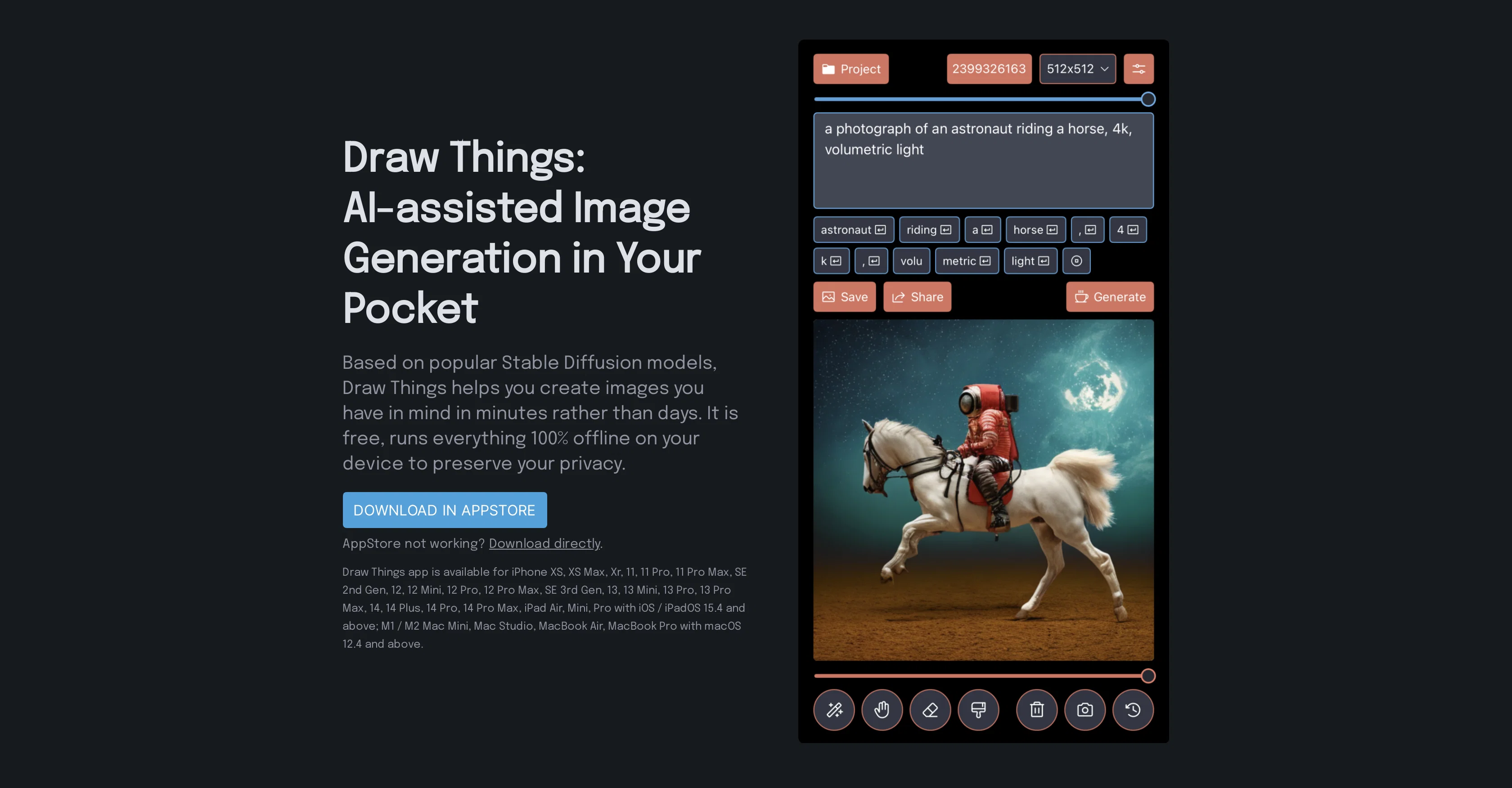
Draw Things is an AI-assisted image generation tool that utilizes Stable Diffusion models to create images. It is designed as a mobile application, allowing users to generate images directly from their device. The application enables users to translate their ideas into images within a matter of minutes. In terms of functionality, Draw Things provides a complete emerging image generation editing workflow, featuring capabilities such as Inpainting Mask, Outpainting, Text to Image Generation, Text-Guided Image to Image Generation, and Image and Prompt Edit History. Users can also select images from their camera roll for the application to work on. To cater to diverse user needs, Draw Things supports the use of different models and styles. Users have the option to use the Generic Stable Diffusion v1.4 model or opt for other popular ones. Included among the options are models such as Waifu Diffusion v1.3, developed specifically for creating Anime images, and Stable Diffusion v1.5 for Inpainting tasks. A notable attribute of Draw Things is its commitment to user privacy. The application functions entirely offline, ensuring user information is not shared online. Draw Things is compatible with various iOS / iPadOS and macOS devices, including selected iPhones, iPads and Mac versions. Help other people by letting them know if this AI was useful. Add your own prompts and outputs to help others understand how to use this AI.
When considering Draw Things: AI-assisted Image Generation for integration into your organizational workflow, we recommend deploying a structured score card across three critical operational pillars: Security & Compliance, Integration Friction, and long-term Price Scalability. Rather than looking only at basic feature lists, modern procurement teams must assess how a software platform behaves under high load and how well it fits into the team's data security guidelines.
Depending on your operating region and field, ensure that Draw Things: AI-assisted Image Generation supports standard security layers such as SOC 2 Type II certifications, GDPR compliance, or HIPAA-compliant database encryption. If the tool connects directly to client database tables or handles user passwords, verify that they implement multi-factor authentication (MFA), single sign-on (SSO) integrations, and end-to-end data encryption in transit and at rest.
Siloed data is the primary cause of operational friction. Evaluate if Draw Things: AI-assisted Image Generation has native connectors for your current project trackers, messaging hubs, and customer communication channels. For custom developer requirements, check if they provide a fully documented REST API with reasonable rate limits, comprehensive Webhooks support, and robust SDK packages in your language. A flexible API layer saves hundreds of hours of manual copy-paste overhead.
SaaS pricing packages are often deceptively simple. When reviewing Draw Things: AI-assisted Image Generation's billing structure, map out your team's projected expansion over the next 12 to 24 months. Determine how costs scale as your customer database increases or as you add team members. Factor in setup costs, mandatory support plan upgrades, API access fees, and storage overage rates to understand the true cost before committing to a contract.
By combining verified user reviews from our directory with internal workflow pilot tests, your procurement team can make an informed decision that drives productivity without creating capital waste.
Overall rating
Based on 19 reviews
Good and amazing
Akash Yadav
its dont availabe in android, web and windows
sakha
draw a thinker sitting on a log
deepak
It created animals with more than 4 legs and multiple animals when I asked for one. Sometimes you have to run it a few times with the same prompt to get something usable, but even then it probably won't be what you are thinking in your head. That being said, I think it is a good start, and for kids that just want to color something for free, it's cool to play with. It is definitely not the same quality as even the lower-end HuggingFace Stable Diffusion projects.
B C
Great idea, but does not find what you are looking for-about the same as Google Scholar
Andy
the kids really liked it, they started drawing a lot of pictures, trying to bring them to life - it turns out fantastic! it's important that there is one character in the picture
Yulia Boiko
Best AI free tool for text to image genaration.
Script Writer
it won't let me generate the images. DO NOT USE THIS APP!!!
Day Gri (Sigmund)
Insanely useful
S Rohan Karthik
Diffusion pulls out extremely good images from simple prompts. Renders were a little slow on higher quality, but totally worth it for the results. The controls feel clear enough and the outputs look legit. Good one here!
Harsh Nether
Litterally the worst AI art i've seen yet, takes forever and the quality is worse than ever
GMLegende
It works nicely. The autodraw function works really well, it easily detects what I’m trying to go for. W tool!
Orit Paredes
This one gives some pretty decent logo directions quickly. The first concepts are useful, but I’d still want finer control over typography and spacing before calling anything final.
Josh KUMAR
Such a great place to start out!
Helli Lang
Love how it offers stuff for both free and premium users. huge thanks to the devs and keep it up!
Burner Cruz
Free Start with a Free Experience $0 /mo
Vitus Bering
It's not free, it forces you to input an email before shoving a price tag in your face.
Arvoly XSL
I think it's the best @Image Generator I ever found on the net. It gives more accurate image according to the prompt. And thank you for keeping it for free.
My Sawsiri
This app is awesome. So much appreciation for the developer and community and all the hard work they put in.
Bus Bus
Starting Price
Free plan available
Free tier available with optional paid upgrades.


