
Canva AIv2.0
AI tools for design, writing, and creativity.
Canva AIv2.0 Overview
What is Canva AIv2.0?
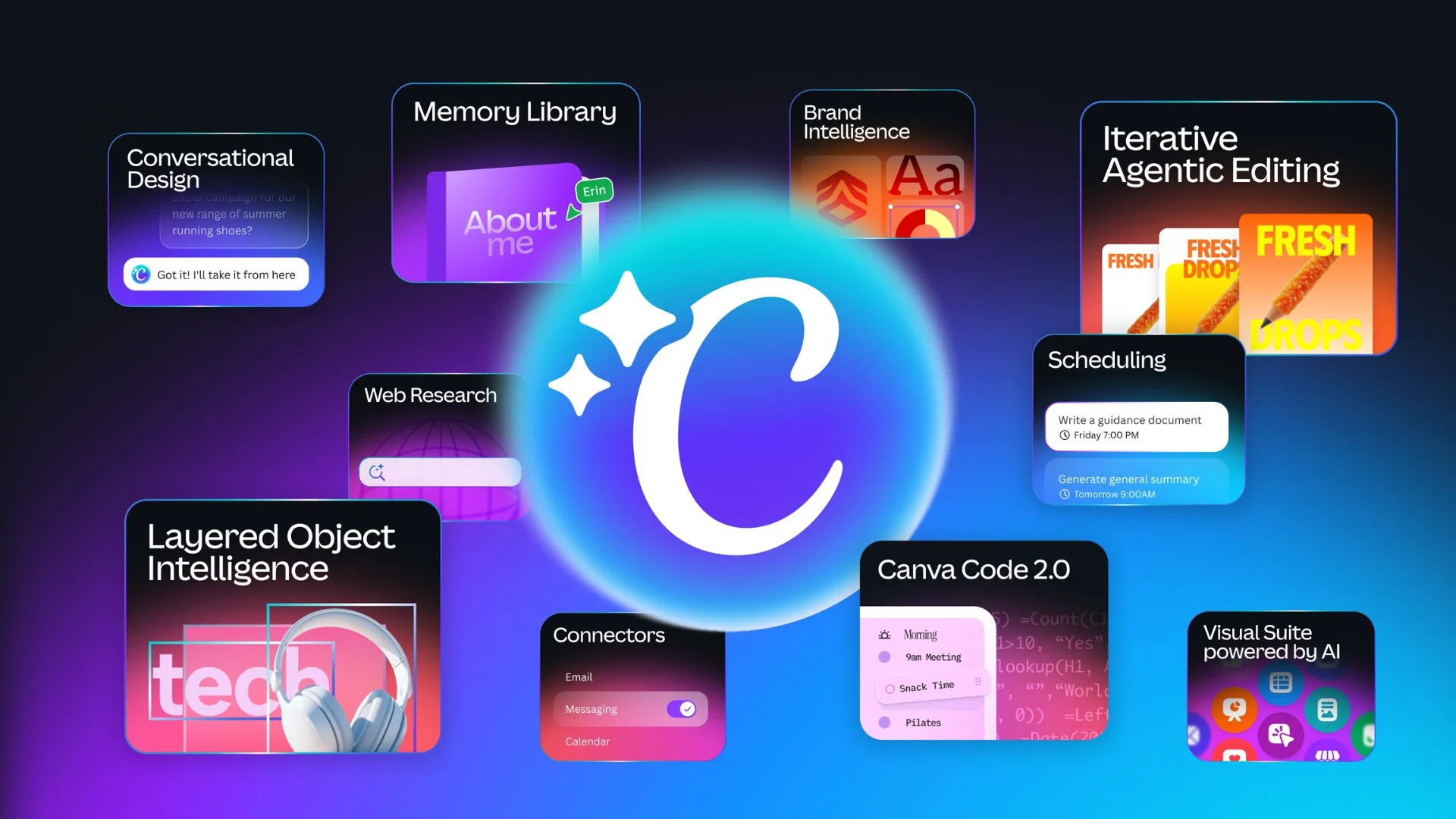
Canva AI serves as a versatile creative tool that utilizes AI to help generate designs. This tool is built to create through conversation, turning creative ideas into visual assets. Users can describe their vision through text or voice, and Canva AI brings these instructions to life. It pulls context from connected tools to generate designs and enables edits or refinements through conversation or manual alterations, ensuring the user remains in control. Canva AI also generates visual elements such as images, charts, or headlines upon request and incorporates them into the design. It learns the users brand assets like fonts, colors, and design rules and ensures every generated design aligns with the brand identity. The tool allows the inclusion of web research straight into designs and learns the users creative process over time to personalize output. It also offers task scheduling features for future or recurring design requirements. New capabilities of Canva AI include creating with prompts, style matching, generating 3D content, video generation, photo editing, on-brand design generation and more. It offers a blend of design, branding and coding tools to create comprehensive visual content. Conversational design — start from a prompt or brief instead of a template; AI generates fully editable, layered designs with brand and layout applied from the first output Agentic orchestration — describe a goal and the AI picks and sequences the right tools across the Visual Suite automatically Layered object intelligence — edit specific elements (text, images, fonts) via prompt without affecting the rest of the design Memory Library — persistent memory learns your style and applies consistent branding across projects Connectors — integrates with Slack, Notion, Zoom, Gmail, Google Drive, and Google Calendar to pull in context and generate assets from existing content Background scheduling — set repeatable tasks to run automatically, with drafts ready for review Web research — pulls live information into designs on demand Brand Intelligence — auto-applies brand guidelines to generated outputs Canva Code 2.0 — now supports HTML import; bring AI-generated code into the visual editor without rebuilding External AI import — import artifacts from Claude, ChatGPT, etc. directly into Canva as editable designs Help other people by letting them know if this AI was useful. Add your own prompts and outputs to help others understand how to use this AI.
Screenshot gallery
Pros & Cons
Pros
- Conversation-based design generation
- Generates visual elements on request
- Brand asset learning for designs
- Incorporates web research into designs
- Learning user creative process
- Task scheduling for design requirements
- Creating with prompts feature
- Style matching capability
- 3D content generation
- Video generation feature
- Photo editing feature
- On-brand design generation
- Blends design, branding, coding tools
- Versatile tool for content creation
- Allows voice interaction
- Ensures interactive design process
- Provides personalized design output
- Ensures on-brand design consistency
- User always remains in control
- Incorporates unique design rules
- Generates images, charts, headlines
- Contextual design through connected tools
- Brand asset consistency in design
- Edits and refinements through conversation
- Future or recurring task scheduling
- Blend of writing and creativity tools
- Option for manual design alterations
- Pulls context from connected tools
- Understands and uses brand colors
- Transforms text to visual assets
- Interactive activities integration
- Enhances designs with style match
- Automatic resize function
- Custom shape generator
- Background remover with magic background
- Converts videos to MP4
- Magic Write for voiceover
- Integrates data with Canva Code
- Generates editable layouts with Magic Layers
- Ensures safe and private design
- Granular privacy settings
- Advanced security tools with Canva Shield
- Supports Design, coding, branding features
- Language conversion for designs
- Converts text to speech voiceover
- Online video recorder for use
Cons
- 3D content generation limitations
- Lack of advanced coding tools
- Limited voice interaction capabilities
- Requires frequent manual alterations
- Overreliance on branding rules
- Not fully compatible with all browsers
- Web research accuracy concerns
- Limited to on-brand design
- Inefficient task scheduling features
- Potential loss of design originality
A Professional Framework to Evaluate Canva AIv2.0
When considering Canva AIv2.0 for integration into your organizational workflow, we recommend deploying a structured score card across three critical operational pillars: Security & Compliance, Integration Friction, and long-term Price Scalability. Rather than looking only at basic feature lists, modern procurement teams must assess how a software platform behaves under high load and how well it fits into the team's data security guidelines.
1. Security and Database Compliance
Depending on your operating region and field, ensure that Canva AIv2.0 supports standard security layers such as SOC 2 Type II certifications, GDPR compliance, or HIPAA-compliant database encryption. If the tool connects directly to client database tables or handles user passwords, verify that they implement multi-factor authentication (MFA), single sign-on (SSO) integrations, and end-to-end data encryption in transit and at rest.
2. API Coverage and Custom Integrations
Siloed data is the primary cause of operational friction. Evaluate if Canva AIv2.0 has native connectors for your current project trackers, messaging hubs, and customer communication channels. For custom developer requirements, check if they provide a fully documented REST API with reasonable rate limits, comprehensive Webhooks support, and robust SDK packages in your language. A flexible API layer saves hundreds of hours of manual copy-paste overhead.
3. Total Cost of Ownership (TCO)
SaaS pricing packages are often deceptively simple. When reviewing Canva AIv2.0's billing structure, map out your team's projected expansion over the next 12 to 24 months. Determine how costs scale as your customer database increases or as you add team members. Factor in setup costs, mandatory support plan upgrades, API access fees, and storage overage rates to understand the true cost before committing to a contract.
By combining verified user reviews from our directory with internal workflow pilot tests, your procurement team can make an informed decision that drives productivity without creating capital waste.
Features of Canva AIv2.0
- Graphic Design
- On Brand Design Generation
- Content Creation
- Interactive Tool
- Branding
- Personalization
- Free + From $12/Mo
SaaS1to10 verified reviews for Canva AIv2.0
Overall rating
Based on 15 reviews
No reviews yet. Be the first to write one.
Pricing
Starting Price
Free plan available
Free tier available with optional paid upgrades.
Where can Canva AIv2.0 be deployed?
- Cloud, SaaS, Web-Based


