5.01 months ago
“Review”
I think it's the best @Image Generator I ever found on the net. It gives more accurate image according to the prompt. And thank you for keeping it for free.
My Sawsiri

Create scroll-stopping social media posts in minutes.
Buffer is an all-in-one social media content creation and management tool. Essentially, it enables users to plan, write, refine, and publish social media content across various platforms from a simple, easy-to-use dashboard. It provides users the comfort of creating a reservoir of content ideas and categorizing these ideas for easy accessibility. Buffer supports collaboration, allowing teams to seamlessly work together throughout the content creation process - from planning to publishing.Buffer integrates with tools like Google, Dropbox, Canva and more to import pictures and video content directly. It also facilitates connection to RSS feeds to automatically refresh content from favorite sites. Buffer offers templates that save time and provide ready-made ideas for the next social media post. The tool also incorporates visual aids like a kanban-style board that helps to track content from the idea stage to publishing, and a grid view for a broader perspective on the content.One outstanding feature of Buffer is its AI Assistant. Buffer's AI assistant provides assistance directly in the writing process. This could be crafting something entirely new, fine-tuning a draft or adapting a post for another platform. The AI assistant eases this process by generating fresh ideas instantly, adjusting tone and wordings, or even repurposing content to suit different channels.Furthermore, Buffer makes managing content simple with features like content tagging. This allows users to tag posts by theme, categorizing ideas, and maintaining an organized content backlog. Buffer touts its ability to support a variety of user types from creators, small businesses, agencies, Nonprofits to Higher learning institutions, through its tools and resources. Help other people by letting them know if this AI was useful. Add your own prompts and outputs to help others understand how to use this AI.
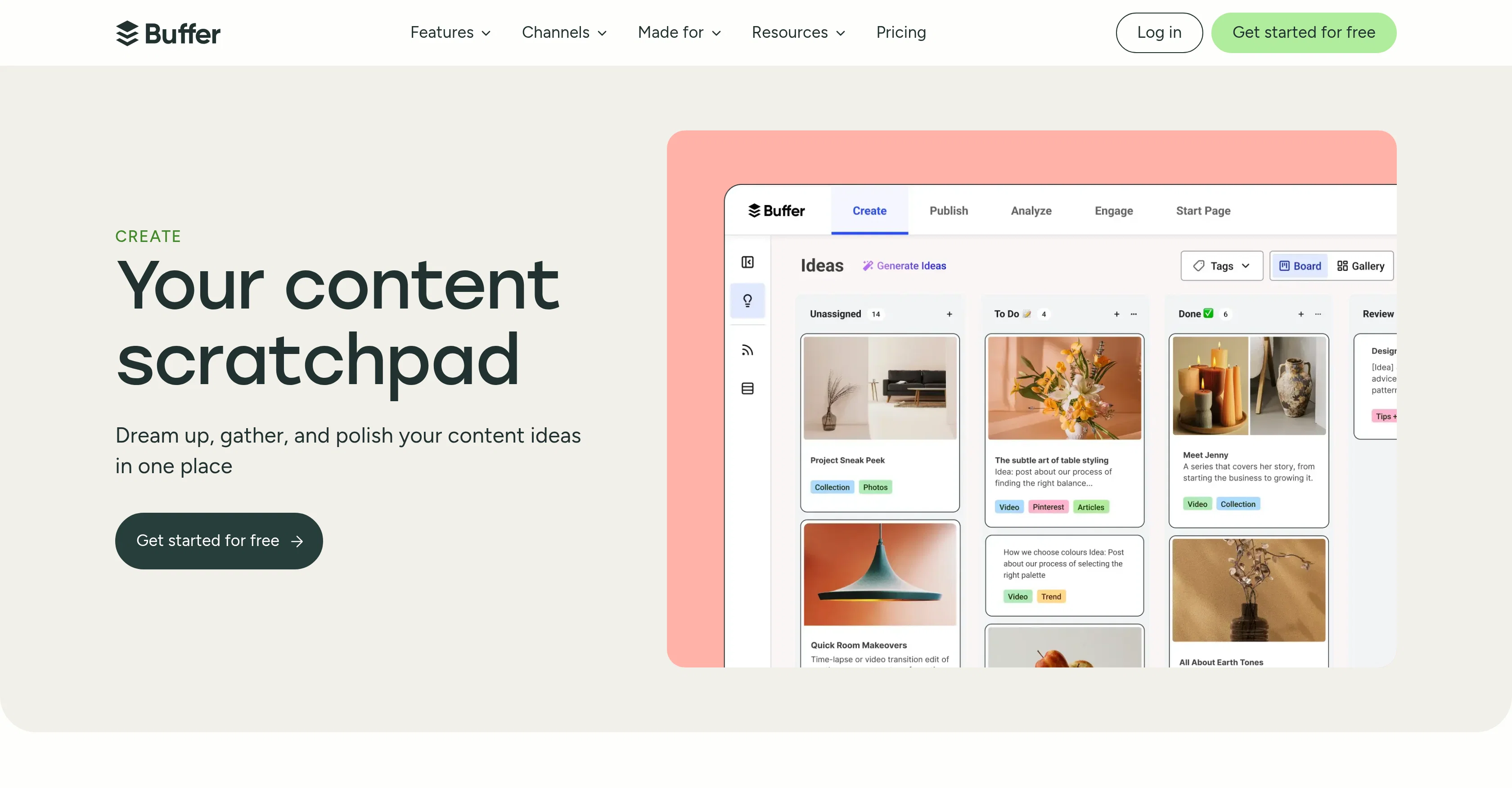
When considering Buffer AI for integration into your organizational workflow, we recommend deploying a structured score card across three critical operational pillars: Security & Compliance, Integration Friction, and long-term Price Scalability. Rather than looking only at basic feature lists, modern procurement teams must assess how a software platform behaves under high load and how well it fits into the team's data security guidelines.
Depending on your operating region and field, ensure that Buffer AI supports standard security layers such as SOC 2 Type II certifications, GDPR compliance, or HIPAA-compliant database encryption. If the tool connects directly to client database tables or handles user passwords, verify that they implement multi-factor authentication (MFA), single sign-on (SSO) integrations, and end-to-end data encryption in transit and at rest.
Siloed data is the primary cause of operational friction. Evaluate if Buffer AI has native connectors for your current project trackers, messaging hubs, and customer communication channels. For custom developer requirements, check if they provide a fully documented REST API with reasonable rate limits, comprehensive Webhooks support, and robust SDK packages in your language. A flexible API layer saves hundreds of hours of manual copy-paste overhead.
SaaS pricing packages are often deceptively simple. When reviewing Buffer AI's billing structure, map out your team's projected expansion over the next 12 to 24 months. Determine how costs scale as your customer database increases or as you add team members. Factor in setup costs, mandatory support plan upgrades, API access fees, and storage overage rates to understand the true cost before committing to a contract.
By combining verified user reviews from our directory with internal workflow pilot tests, your procurement team can make an informed decision that drives productivity without creating capital waste.
Overall rating
Based on 15 reviews
I think it's the best @Image Generator I ever found on the net. It gives more accurate image according to the prompt. And thank you for keeping it for free.
My Sawsiri
Super! Honest 5 stars!
Sergej Kelsch
Super easy to use. The paid plan is also not very exorbitant. Just the price of 2-3 starbucks visits per month. ;)
Aditya Phute
Currently, generating course videos is basically free, and everyone is welcome to use it! If you have any problems during use, you can complain and we will quickly iterate! Thank you~!
Bian Heshan
Love how it offers stuff for both free and premium users. huge thanks to the devs and keep it up!
Burner Cruz
I've tried and tested this, it's legit and to be honest, really great! ☺️🌼
Mintona
it is good to be a social media content creator
Nati Man
Very interesting
Béatrice Duval
This tool i found is super cool, I created 5 books from this tool to sell them online, which gives me great profit. I am creating more valuable books to spread knowledge, and earn some bucks as well 🤑.
Bilal Ashraf
It's truly amazing! The help was so great!
Kunlong H
It's completely free, I created lots of posts with it
Antonia Mitrea
Thank you for your feedback, Wasim. We’ve removed the requirement for 2FA during sign-in. However, it is still required for accessing the credential vault since it is encrypted. Please try the app again and let me know how it feels at this stage.
Joshua Gutierrez
Sadly is not working as described but they have pretty many things planned so maybe in the future it will.
aihelp
Solid hub for socials. Schedules to a lot of platforms in one place with ai post ideas and short-form tools, plus a free tier to try things out. I like the planner and analytics, ui feels busy at first but once you learn the flow it moves fast.
Benjamin A
Works but I cannot understand what's the use. I was expecting it to give me some videos
Samartha Venkatramana
Starting Price
Free plan available
Free tier available with optional paid upgrades.