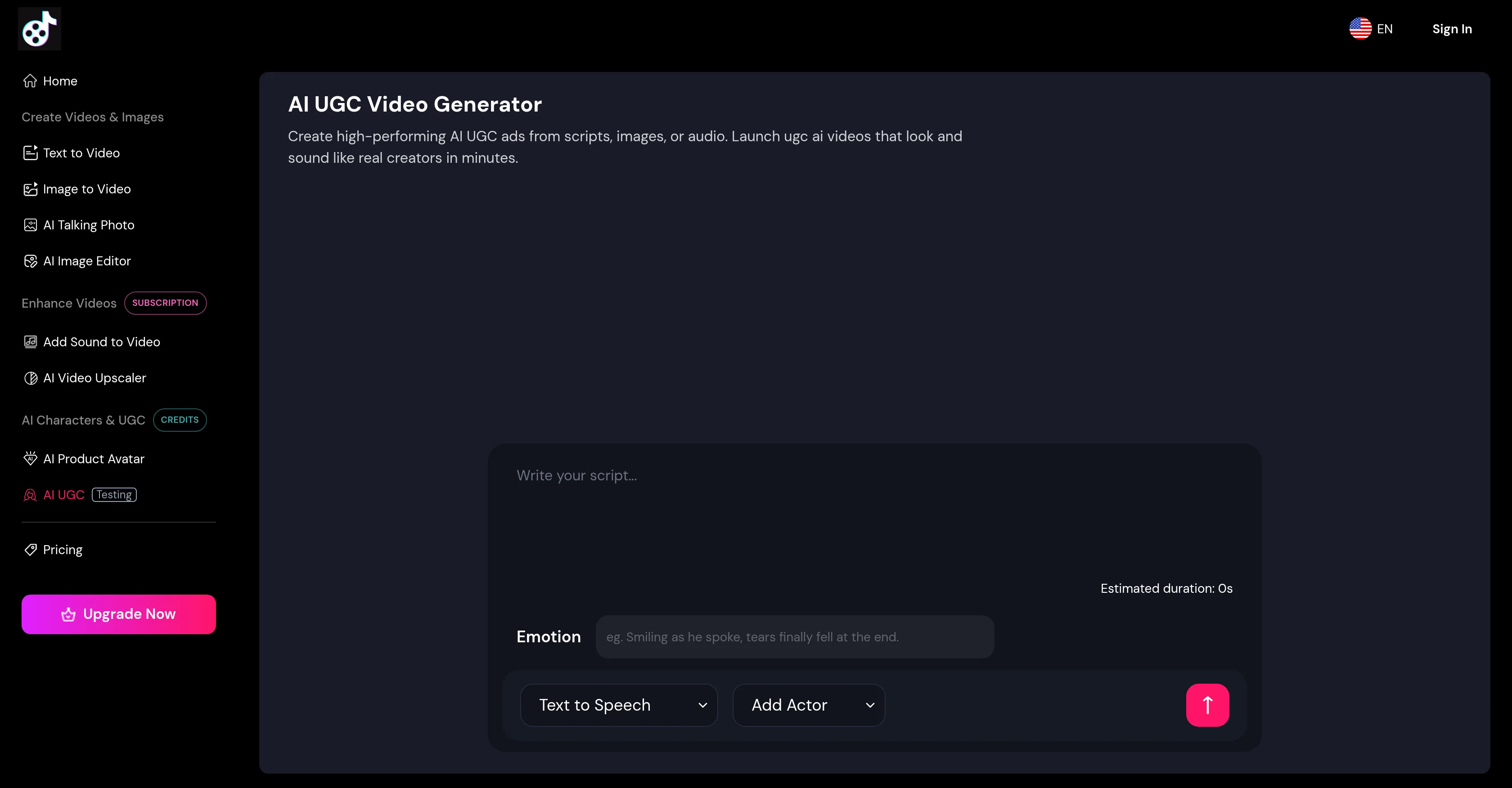
The AI UGC Video Generator is an innovative tool used to create user-generated content (UGC) style videos using artificial intelligence. Primarily designed for marketing purposes, this tool can transform scripts, product images, or voice notes into videos that simulate the feel and aesthetics of a creator-generated content.
Users can easily draft or edit scripts, specifying the mood to enable the AI to deliver persuasive testimonials or explainers in a believable tone. The tool's features allow the selection of AI presenters that span across different industries and language groups, contributing to the creation of a video that reflects the demographic of the intended audience.
It also supports multilingual delivery with lip-syncing capabilities for over 40 languages, ensuring a native feel irrespective of the location. In terms of usability, the AI UGC Video Generator is designed to be straightforward.
With three easy steps selecting an AI presenter and deciding whether to use text-to-video or speech-to-video, inputting your script or audio file, and choosing Generate Video users can create videos for a variety of purposes, such as social media, ads, ecommerce, or onboarding.
Furthermore, the AI UGC Video Generator sets itself apart with usage-based pricing which means users only pay for the seconds of video rendered. This eliminates the need for expensive monthly subscriptions, making the tool cost-effective especially for testing multiple ads.Finally, videos generated from this platform can be personalized with brand logos and custom backgrounds, ensuring the finished product aligns with brand guidelines and can be published across multiple platforms, from social media to email flows and landing pages.
Help other people by letting them know if this AI was useful.
Add your own prompts and outputs to help others understand how to use this AI.
Screenshot gallery
Pros & Cons
Pros
+Turns scripts into videos
+Transforms voice notes into videos
+Generates up to 3-minute videos
+Multilingual delivery
+Lifelike lip-sync
+User-friendly interface
+Transforms product images into videos
+Usage-based pricing
+Effective for various content purposes
+Customizable presenter choice
+Suitable for diverse industries
+Easily embeddable on various platforms
+Supports 40+ languages
+Generates captions and gestures
+Option to add brand logos
+Option to add custom backgrounds
+Generation of explainer videos
+Generation of testimonial videos
+Enables tone personalization
+Quick video creation
+Affordable video creation
+Professional-quality video output
+No professional studio needed
+Timing of video is flexible
+Edits and updates scripts easily
+Allows attachment of reference images
+Enables mixing of input methods
+Supports global localization
+Enables internal training video creation
+Edits inline scripts
+Choose text-to-video or speech-to-video
+Upload voice memo for video creation
+Videos for social media campaigns
+Videos for product ads
+Videos for ecommerce use
+Easy onboarding video creation
+Ideal for testing multiple ads
+Supports extensive branding
+Flexible ad publishing
+Runs up to 3 minutes per clip
+Easily republishable across languages
+Easier content testing
+Optimal for enterprise training
+Ideal for product demos
+Suitable for multi-platform publishing
+Add CTAs to videos
+Easier localization of content
Cons
−3 minutes max video length
−Only 40 languages supported
−No offline version
−Dependent on script quality
−No full HD support
−Limited presenter customization
−Pricing per second rendered
−Requires constant internet access
−No audio editing features
−Adds watermark on free version
A Professional Framework to Evaluate AI UGC Video Generator from AIVideoMaker
When considering AI UGC Video Generator from AIVideoMaker for integration into your organizational workflow, we recommend deploying a structured score card across three critical operational pillars: Security & Compliance, Integration Friction, and long-term Price Scalability. Rather than looking only at basic feature lists, modern procurement teams must assess how a software platform behaves under high load and how well it fits into the team's data security guidelines.
1. Security and Database Compliance
Depending on your operating region and field, ensure that AI UGC Video Generator from AIVideoMaker supports standard security layers such as SOC 2 Type II certifications, GDPR compliance, or HIPAA-compliant database encryption. If the tool connects directly to client database tables or handles user passwords, verify that they implement multi-factor authentication (MFA), single sign-on (SSO) integrations, and end-to-end data encryption in transit and at rest.
2. API Coverage and Custom Integrations
Siloed data is the primary cause of operational friction. Evaluate if AI UGC Video Generator from AIVideoMaker has native connectors for your current project trackers, messaging hubs, and customer communication channels. For custom developer requirements, check if they provide a fully documented REST API with reasonable rate limits, comprehensive Webhooks support, and robust SDK packages in your language. A flexible API layer saves hundreds of hours of manual copy-paste overhead.
3. Total Cost of Ownership (TCO)
SaaS pricing packages are often deceptively simple. When reviewing AI UGC Video Generator from AIVideoMaker's billing structure, map out your team's projected expansion over the next 12 to 24 months. Determine how costs scale as your customer database increases or as you add team members. Factor in setup costs, mandatory support plan upgrades, API access fees, and storage overage rates to understand the true cost before committing to a contract.
By combining verified user reviews from our directory with internal workflow pilot tests, your procurement team can make an informed decision that drives productivity without creating capital waste.
Features of AI UGC Video Generator from AIVideoMaker
Video Creation
Video Generation
User Generated Content
Script To Video
Content Creation
Multimedia Marketing
From $29
SaaS1to10 verified reviews for AI UGC Video Generator from AIVideoMaker
Overall rating
★★★★★5.0
Based on 20 reviews
★★★★★5.02 months ago
“Review”
I joined Kin's beta program on my iPhone XR. After upgrading to an iPhone 13, I found that I couldn't log into my existing account on the new phone, forcing me to create a new account. Now, I have two separate Kin accounts on different phones. Today, when I accessed the beta version of Kin, I got a notification stating that the test version ended on Monday, September 23rd. It instructed me to back up my data and move to the official Kin app. I did as advised—backed up my data, confirmed, uninstalled the beta app via TestFlight, and installed the official Kin app. However, when I attempted to “log in”, I was still unable to access my existing account. This issue hasn't been resolved yet. I have been trying desperately to get in contact with the support team. I left feedback through the test flight app and sent emails. No response. Now trying to find a forums, Reddit posts, TAAFT comments☻
Desiree Miller
★★★★★5.02 months ago
“Review”
A little biased, but I think it's great.
Dawson Whitfield
★★★★★5.02 months ago
“Review”
I got some top quality results after learning how to prompt songs 🤩
Claes Lanng
★★★★★5.02 months ago
“Review”
I have been using @Saufter, and I'm blown away. It has created a marketing newsletters for all of my sales leads, and is giving me data on which leads are interacting with the newsletters, it has created a new 'recently active' segment. I just got the fully drafted campaign in my inbox last week. Very cool!
Ryan Mason
★★★★★5.02 months ago
“Review”
Wow, wonderful project.
Palash Roy
★★★★★5.02 months ago
“Review”
This tool i found is super cool, I created 5 books from this tool to sell them online, which gives me great profit. I am creating more valuable books to spread knowledge, and earn some bucks as well 🤑.
Bilal Ashraf
★★★★★5.02 months ago
“Review”
Great tool! Was very helpful in content production
Duck Typer
★★★★★5.02 months ago
“Review”
No other tool quite like this, it's pretty straightforward. Needed to extract a long interview from YouTube and it extracted everything, providing it in different meaningful formats in less than two minutes. Awesome
Juan Sierra
★★★★★5.02 months ago
“Review”
I already have another transcription tool, but this one is much better. I love the different features such as the summary, quiz, and chapters. It does a great job of them. I've only done one transcript so far to try it out, but I'm truly impressed and am going to grab another code. A couple things that would make it even better are: - the ability to rename the files and organize them through folders. - the ability to download a copy of the other features as well as the transcript. Copying and pasting it works, but doesn't keep the format.
dunn
★★★★★5.02 months ago
“Review”
Suppppeeeeerrr! Wowwww! @Mindsmith is absolutely fantastic! It is incredibly useful, easy to use, and very professional.
Claudia Scilletta
★★★★★5.02 months ago
“Review”
State of the Art
Dmitry G.
★★★★★5.02 months ago
“Review”
Went from a C to an A in Cognitive Psychology using @Thea!!
Sarah White
★★★★★5.02 months ago
“Review”
superb, e gratis, merge blana, in EN se aude ideal
jon doe
★★★★★5.02 months ago
“Review”
Undetectable.wtf is better bypasses everything maintaining thee integrity of the text.
LiteEagle
★★★★★5.02 months ago
“Review”
B12 exceeded my expectations especially after I tried a few similar tools. Signing up took under a minute and because I offer a very specific set of services as a consultant, I didn't expect the AI to be able to capture my work, but it did a great job with creating content for me. I only had to make a few edits, add my bio, and was able to publish that same day. Now I get lots of compliments on my site and I've even tried their other tools like email marketing, which is great because the emails match my site's appearance. Overall I would recommend B12 as an effective, affordable, and easy to use website solution.
Katie G
★★★★★5.02 months ago
“Review”
Extremely weak and useless.
Mohammad Alidoost
★★★★★5.02 months ago
“Review”
Hi everyone! I'm the creator of AI Video Maker. It's completely free to use and doesn't require any signup. You can instantly generate unlimited 5-second AI videos from text or images. Great for testing ideas before upgrading to HD or commercial plans. Excited to see what you all create!
Peter
★★★★★5.02 months ago
“Review”
I built this because I had a spare RTX 5090 sitting idle and friends in e-commerce kept telling me UGC videos were too expensive. Most AI UGC tools cost 80 to 110 dollars a month, about 10 dollars per video.
My prototype can already create 3-minute videos, but it takes almost an hour on one GPU, so I limited the public version to 30 seconds while I scale to 4 GPUs.
Would love feedback on the best pricing model and go-to-market.
Peter
★★★★★5.02 months ago
“Review”
Very easy to use
Fork Ladle
★★★★★5.02 months ago
“Review”
The system responds quickly, the video generation quality is excellent, and the AI voice is perfectly synchronized with the visuals.
wan hu
Pricing
Starting Price
From $20.00/user/month
Pricing may vary based on team size and features selected.
Where can AI UGC Video Generator from AIVideoMaker be deployed?